ANSI Lumens, Decoded: The Brightness Number That Actually Means Something
Every projector listing throws a lumens figure at you. Almost none of them explain that the measurement method behind that number changes what it’s actually telling you.
Open any projector’s product listing and you’ll see a brightness number staring back at you, usually in big bold text right next to the price: “3,000 Lumens.” It looks precise. It looks comparable. And depending on which manufacturer wrote that listing, it might mean something genuinely useful, or it might mean almost nothing at all. The difference comes down to one detail that gets buried in fine print far too often: whether that number is actually measured in ANSI lumens, and if not, what it’s measuring instead.
This guide exists to close that gap. We’ll walk through exactly what ANSI lumens measures and how the standard works, why it became the industry’s most trusted brightness metric, how it differs from the LED lumens and ISO lumens figures you’ll increasingly encounter, and — most usefully — how to translate any lumens number into a realistic expectation of what you’ll actually see on your wall. By the end, a projector spec sheet should feel a lot less like marketing copy and a lot more like something you can genuinely use to make a good decision.
What ANSI Lumens Actually Means
ANSI lumens is a standardized method for measuring how much usable light a projector produces across an entire projected image, developed under the American National Standards Institute. The “lumen” part is simply the scientific unit for luminous flux, the total quantity of visible light emitted by a source. The “ANSI” part is what makes the number trustworthy: it specifies exactly how, where, and under what conditions that light gets measured, so that a lumens figure from one manufacturer can be meaningfully compared to a lumens figure from a competitor.
Before this standard existed in any consistent form, brightness claims on projectors were genuinely difficult to compare. A manufacturer could measure the single brightest point of light coming out of the lens — typically dead center, which is almost always the brightest spot on any projected image — and advertise that peak number as the projector’s overall brightness. That approach technically isn’t lying, but it paints an unrealistic picture, since the corners and edges of a projected image are reliably dimmer than the center on virtually every projector design.
The core idea in one sentence: ANSI lumens averages brightness across nine points spread evenly over the entire image, rather than reporting the single brightest spot, which gives you a number that reflects what you’ll actually perceive when watching real content rather than a best-case marketing figure.
This matters more than it might initially seem, because the gap between a projector’s brightest single point and its averaged brightness across the whole image can be substantial — sometimes 20 to 40 percent or more, depending on the optical design and lens quality. A projector boasting “5,000 lumens” using a peak measurement might only deliver something closer to 3,000 to 3,500 true ANSI lumens once you average across the full image. That’s not a small rounding error; it’s the difference between a projector that handles a sunlit living room comfortably and one that struggles.
How the ANSI Lumens Measurement Actually Works
The procedure itself is refreshingly mechanical once you understand it, and that consistency is exactly the point. Here’s the process, step by step, as it’s actually performed in a controlled testing environment.
The Nine-Zone Grid
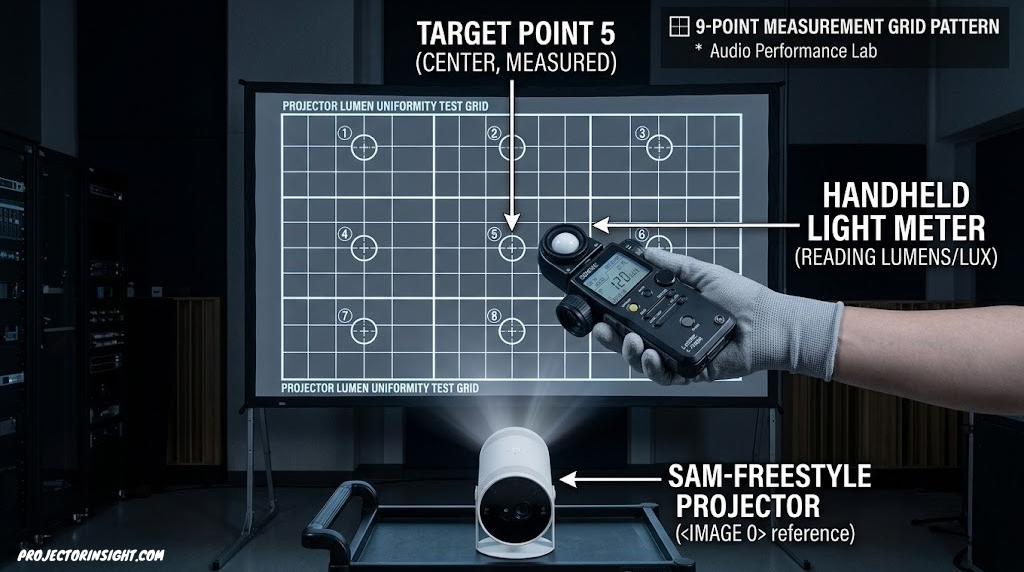
The projector displays an all-white test image onto a flat, neutral-gray or white screen of a specified size, at a specified distance, in a dark room. That projected rectangle is then mentally divided into nine equal zones, arranged in a 3×3 grid — much like a tic-tac-toe board overlaid on the image.
Nine Individual Light Readings
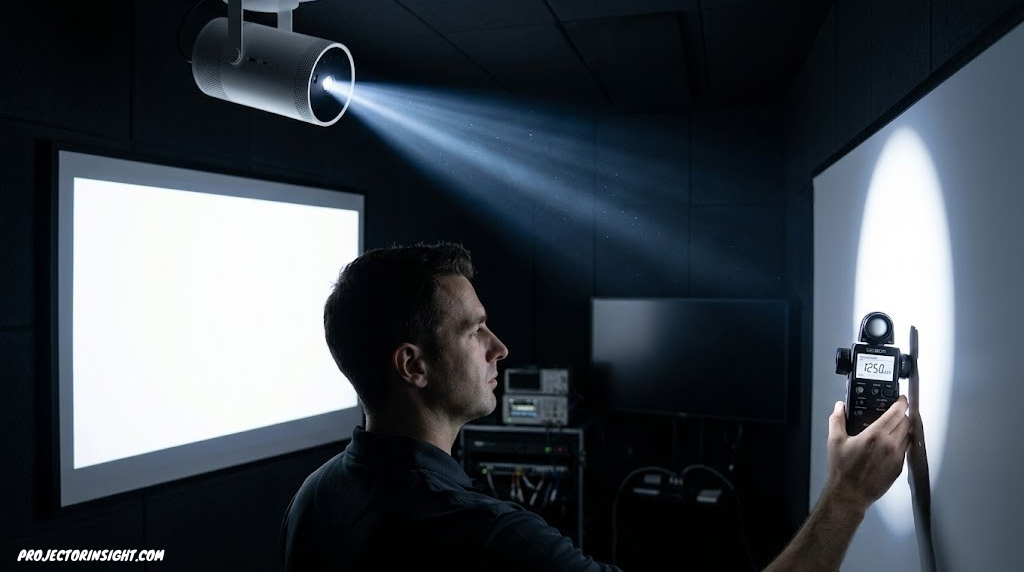
A handheld illuminance meter, typically measuring in lux (lumens per square meter), is placed at the exact center of each of those nine zones, one at a time, and a reading is taken at each location. This step is what makes the standard meaningful — it’s deliberately sampling brightness from the corners and edges of the image, not just the brightest central point.
Averaging the Nine Readings
Those nine lux readings are averaged together to produce a single mean illuminance value. Because the readings include the typically-dimmer corners alongside the typically-brighter center, this average is almost always meaningfully lower than the brightest single point on the image — which is exactly the behavior that makes the final number more representative of real viewing.
Converting to Total Lumens
That averaged lux figure (light per unit area) gets multiplied by the total screen area in square meters, converting the per-area brightness measurement into a single total lumens figure for the entire image. This final number is what appears on a spec sheet as the projector’s ANSI lumens rating.
⚠️ Why this matters in practice: Because the test is standardized — same grid method, same kind of meter, same basic conditions — a 2,000 ANSI lumens rating from one manufacturer should represent roughly the same real-world brightness as a 2,000 ANSI lumens rating from a competitor. That apples-to-apples comparability is the entire value of the standard, and it disappears the moment a brightness figure isn’t actually measured this way.
It’s worth noting that ANSI lumens measures the projector’s white light output specifically — it doesn’t directly capture color saturation, contrast ratio, or sharpness. A projector can have an excellent ANSI lumens rating and still produce a flat, washed-out image if its contrast handling or color accuracy is weak. Brightness and image quality are related but distinct, which is a theme that comes up repeatedly throughout this guide.
Why This Number Actually Matters When You’re Shopping
It’s tempting to treat lumens as just another spec to skim past, but brightness is arguably the single most room-dependent variable in the entire projector buying decision. A projector that’s perfect for a blackout home theater can be borderline unwatchable in a sunlit den, and vice versa — an extremely bright bright-room projector can actually look harsh and contrast-poor in a fully darkened space.
This is also why ANSI lumens shows up as a key filtering criterion across nearly every projector buying guide on this site — it’s genuinely one of the first specs worth checking, right alongside resolution and screen size compatibility. Our broader walkthrough on how to choose a projector treats lumens as one of the foundational decision points for exactly this reason.
ANSI Lumens vs. LED Lumens, ISO Lumens, and Peak Lumens
ANSI lumens isn’t the only brightness terminology you’ll run into, and the differences between these measurement approaches genuinely matter for comparison shopping. Here’s how the major alternatives stack up.
LED Lumens
Some manufacturers, particularly on LED-light-source projectors aimed at budget and portable categories, list brightness as “LED lumens” rather than ANSI lumens. This isn’t a standardized measurement in the same rigorous sense, and LED lumens figures are frequently higher than an equivalent ANSI lumens rating would be for the same projector’s real-world output. A projector advertising “8,000 LED lumens,” for instance, might perform closer to a 600-900 ANSI lumens projector in actual usable brightness — a gap that catches a lot of first-time buyers off guard.
ISO Lumens
ISO 21118 is a newer international standard for projector brightness measurement, and it’s been adopted by some manufacturers, including XGIMI, as an alternative to the ANSI methodology. The ISO approach is more rigorous than informal “LED lumens” marketing claims, but its measurement procedure differs somewhat from the ANSI nine-zone method, which means ISO lumens and ANSI lumens figures aren’t always precisely interchangeable, even though both aim to represent genuine, averaged brightness rather than a peak figure.
Peak Lumens or “Maximum Brightness”
This is the least standardized and most marketing-friendly approach: measuring only the single brightest point on the projected image, almost always located at the center, and presenting that number as the projector’s overall brightness. It’s not necessarily a fabricated figure, but it represents a best-case scenario that overstates what you’ll see across the actual image, particularly toward the corners and edges.
| Measurement Type | Methodology | Reliability for Comparison | Typical Inflation vs. ANSI |
|---|---|---|---|
| ANSI Lumens | 9-zone grid average | ✓ Highly reliable, standardized | Baseline (0%) |
| ISO Lumens | ISO 21118 standardized method | ✓ Reliable, but not 1:1 with ANSI | Varies by method |
| LED Lumens | Often non-standardized | ⚠ Use with caution | Often higher |
| Peak / Max Lumens | Single brightest point only | ✕ Not directly comparable | ~20-40%+ higher |
The practical takeaway: when you see a bare “lumens” figure without the word “ANSI” explicitly attached, treat it as a softer, less verifiable claim and look for independent reviews or third-party testing to confirm real-world brightness before assuming the number is directly comparable to an ANSI-rated competitor. This distinction comes up constantly when comparing light source technologies more broadly — our guide on laser vs. lamp projectors touches on how light source type interacts with these brightness claims.
How Many ANSI Lumens Do You Actually Need?
This is the question that actually drives a purchase decision, and the honest answer is: it depends heavily on your room’s ambient light and how large you want the image to be. Here’s a practical breakdown by room type.
Dark, Dedicated Theater Rooms
If you’re building or already have a genuinely light-controlled room — blackout curtains, no significant ambient light sources, walls and ceiling treated to minimize reflection — somewhere in the 1,500 to 2,500 ANSI lumens range is typically plenty, even for screens up to 120 inches or beyond. This is precisely why many premium home theater projectors deliberately don’t chase the highest lumens numbers; in true darkness, excess brightness can actually reduce perceived contrast, making blacks look gray rather than deep and inky. For more on this category specifically, see our guide to best home theater projectors.
Dim, Mixed-Use Rooms
Most living rooms and media rooms fall here — some light control via curtains or shades, but not a fully blacked-out space, and occasional daytime or evening lamp use. Somewhere around 2,500 to 3,000 ANSI lumens generally handles this comfortably, giving you enough headroom for slightly imperfect light control without washing out the image.
Bright Rooms and Daytime Use
If your space has significant windows, you’re not willing to install blackout treatments, or you frequently want to watch during the day, you’ll want at least 3,000 ANSI lumens, and ideally more for larger screens. Some projectors specifically engineered for this scenario exceed 4,000 ANSI lumens. Our dedicated guide on best projectors for bright rooms goes deeper into this exact use case, including how ambient light rejecting (ALR) screen technology factors in.
Outdoor and Portable Use
This is the one scenario where lower lumens figures are genuinely normal and expected, since outdoor and portable use almost always happens after dusk, when ambient light is minimal. Many portable projectors sit in the 200 to 1,000 ANSI lumens range and perform perfectly well once it’s properly dark outside. Our guide to best portable mini projectors and the companion piece on best outdoor movie projectors both cover this lower-lumens category in detail.
Practical rule of thumb: When in doubt, lean toward more lumens rather than fewer if your room has any ambient light at all, since brightness can typically be dialed back in software (via Eco or dimmer picture modes), but a genuinely underpowered projector can’t be made brighter after purchase.

Shopping by room brightness?
Browse projectors filtered by verified ANSI lumens output for your spaceScreen Size Changes Everything About Perceived Brightness
This is one of the most commonly overlooked factors in the entire brightness conversation: the exact same projector, with the exact same ANSI lumens rating, will look meaningfully dimmer on a larger screen than on a smaller one. The reason is straightforward physics — the projector is emitting a fixed total quantity of light, and that light gets spread across a larger surface area as screen size increases, which lowers the brightness per square foot (technically, the luminance) even though the total lumens output hasn’t changed.
This relationship is why two people can buy the identical projector model and have completely different experiences with how “bright” it feels — one running it on an 80-inch screen, the other stretching it to 150 inches in the same room. The lumens rating on the box didn’t change, but the practical experience did, substantially. If you’re trying to figure out exactly how big a screen your specific room and projector combination can comfortably support, the calculator-style walkthrough on calculating projector throw distance is a useful companion resource, since throw distance and screen size are directly linked.
⚠️ Rule of thumb: As a rough guideline, every increase in screen width by roughly 25-30% effectively requires proportionally more lumens to maintain equivalent perceived brightness. If you’re upgrading from a 100-inch to a 130-inch image with the same projector, expect a noticeably dimmer-feeling picture even though nothing about the projector’s brightness rating has changed.
This is also a major part of why ultra-short-throw projectors, which are often paired with specific ALR (ambient light rejecting) screens at fixed sizes, tend to spec their lumens ratings around the specific screen size they’re designed to be paired with. Our guide to best ultra-short-throw projectors touches on this pairing relationship in more detail.
How Screen Gain Changes What You Actually Perceive
Screen gain is the other major variable that affects perceived brightness independently of the projector’s raw ANSI lumens rating, and it’s frequently left out of the brightness conversation entirely. Gain measures how much light a screen’s surface reflects back toward the viewer compared to a standard reference matte white surface, which is assigned a gain value of 1.0.
Higher-Gain Screens
A screen with a gain above 1.0 — sometimes 1.3, 1.5, or higher — reflects more light back toward the viewer than a standard reference surface, effectively making a moderately bright projector look brighter than its raw lumens figure alone would suggest. The tradeoff is usually a narrower optimal viewing cone; people seated well off to the side of a high-gain screen often see a noticeably dimmer image than someone seated dead-center.
Lower-Gain and Matte Screens
A screen with a gain at or below 1.0 reflects light more evenly across a wider viewing angle, but shows the projector’s brightness more literally without any reflective boost. This is often the better choice in rooms with multiple seating positions spread across a wide arc, even though it means you genuinely need the projector’s ANSI lumens output to be sufficient on its own merits.
Ambient Light Rejecting (ALR) Screens
ALR screens use specialized optical coatings to selectively reflect light coming from the projector’s specific angle while absorbing or redirecting ambient light coming from other angles, like windows or ceiling fixtures. This effectively boosts perceived contrast and color saturation in rooms with some ambient light, without literally changing the projector’s ANSI lumens rating. These screens are particularly common with ultra-short-throw projectors; the guide on ALR screens for UST projectors covers this pairing specifically.
The combined picture: ANSI lumens, screen size, and screen gain work together to determine what you actually perceive. A projector with a modest lumens rating paired with a smaller screen and a higher-gain surface can look just as bright in practice as a higher-lumens projector paired with a larger, lower-gain screen. None of these three factors should be considered in isolation.
Color Brightness vs. White Brightness — A Distinction Worth Knowing
Here’s a nuance that even some experienced buyers miss: ANSI lumens, as traditionally measured and reported, typically refers to white brightness — brightness measured using an all-white test pattern. There’s a separate, related metric called color brightness (sometimes labeled color light output) that measures how much of that brightness is preserved when displaying fully saturated colors rather than plain white.
On some projector technologies, particularly certain single-chip DLP designs using a color wheel, there can be a meaningful gap between white brightness and color brightness — the projector might produce a bright white test pattern while showing noticeably dimmer, less saturated color content during actual movies or games. Three-chip designs (like 3LCD or 3-chip DLP and D-ILA/LCoS projectors) tend to show a smaller gap between the two figures, since each color channel has its own dedicated imaging chip rather than sharing one chip across a rapid color sequence.
This distinction is one of several reasons it’s worth comparing the underlying imaging technology, not just the lumens number, when shopping across different price tiers and brands. The explainer on 3LCD vs. DLP projectors goes deeper into how these different chip architectures affect color performance specifically.
How to Spot Inflated or Misleading Brightness Claims
Armed with everything above, here’s a practical checklist for evaluating any projector’s brightness claim before you buy, especially on unfamiliar or budget brands where marketing language tends to be less conservative.
- Look for the word “ANSI” explicitly — A bare “lumens” number without that qualifier deserves extra scrutiny
- Compare against known, trusted models — If an unfamiliar brand claims similar lumens to an established model at a fraction of the price, treat that gap with healthy skepticism
- Check for independent light-meter testing — Reputable review sites and YouTube channels frequently verify brightness claims with their own equipment
- Consider the light source type — Tiny, inexpensive LED projectors claiming thousands of lumens are a common red flag, since LED light sources of that size and price point rarely produce that much genuine output
- Read user reviews for brightness complaints — Real owners frequently mention if a projector feels noticeably dimmer than advertised
Red Flags Worth Watching For
- Extremely high lumens claims (4,000+) on very inexpensive, compact LED projectors
- Listings that use “lumens” and “ANSI lumens” inconsistently across different parts of the same product page
- Brightness figures that seem disconnected from the stated light source wattage or technology
- No mention of measurement methodology anywhere in the official specifications
⚠️ A useful gut check: If a projector’s price seems unusually low relative to its claimed lumens output compared to known, reputable brands at similar lumens figures, the brightness claim is the first thing worth investigating before anything else on the spec sheet.
This kind of scrutiny matters more in certain categories than others. Budget projectors under a few hundred dollars are where brightness inflation tends to be most common; our guides on best projectors under 100 dollars and best projectors under 500 dollars both factor verified brightness specifically into their picks, rather than taking manufacturer claims at face value.

Look for verified ANSI lumens, not just “lumens”
Compare current listings that clearly disclose ANSI-rated brightnessLumens Requirement Cheat Sheet by Room and Use Case
Use this table as a quick reference the next time you’re sizing up a projector against your specific room conditions.
| Use Case | Ambient Light Level | Recommended ANSI Lumens | Typical Screen Size | Notes |
|---|---|---|---|---|
| Dedicated Theater Room | None (blackout) | 1,500–2,500 | Up to 120″+ | Excess brightness can hurt contrast |
| Mixed-Use Living Room | Low to moderate | 2,500–3,000 | 90–120″ | Most common household scenario |
| Bright Room / Daytime | High | 3,000–4,000+ | 80–110″ | Consider ALR screen for added contrast |
| Business Presentations | Office lighting | 3,000–5,000 | Varies by room | See dedicated business projector guide |
| Outdoor Movie Night | After dusk | 300–1,000 | 100–150″ | Wait for full darkness for best results |
| Portable / Travel Use | Dark room | 200–700 | 60–100″ | Battery life often trades off against lumens |
For business and presentation environments specifically, where overhead lighting is rarely fully controllable, the lumens requirement tends to run higher than home entertainment use — our dedicated guide on best business presentation projectors covers that scenario with more specificity.

Want to verify a projector’s brightness yourself?
Handheld lux/light meters let you spot-check ANSI lumens claims at homeFrequently Asked Questions
What does ANSI lumens mean?
ANSI lumens is a standardized brightness measurement created by the American National Standards Institute. It works by dividing a projected image into nine equal zones, measuring the light output at the center of each zone with a light meter, averaging those nine readings, and multiplying by the screen area. The result is a single number that represents real, usable brightness rather than a marketing figure.
Is a higher ANSI lumens number always better?
Not necessarily. More ANSI lumens helps in rooms with ambient light or for larger screens, but in a fully darkened room with a modest screen size, excessive brightness can actually wash out contrast and make blacks look gray. The right lumens figure depends on your room’s ambient light, screen size, and screen gain, not on simply maximizing the number.
Why do some projectors list lumens without saying ANSI?
Manufacturers sometimes list brightness using less standardized measurements, like LED lumens or peak lumens measured at a single bright spot rather than averaged across the whole image. These numbers are often inflated relative to an equivalent ANSI lumens rating, so a 1,000 LED lumens projector frequently looks noticeably dimmer in person than a 1,000 ANSI lumens model.
How many ANSI lumens do I need for a dark room?
For a fully darkened, dedicated home theater room, 1,500 to 2,500 ANSI lumens is typically sufficient for screens up to about 120 inches, and many premium home theater projectors intentionally stay in this range rather than maximizing brightness, since excess light can reduce perceived contrast in total darkness.
How many ANSI lumens do I need for a bright room?
For rooms with significant ambient light, such as a living room with windows or daytime use, look for at least 3,000 ANSI lumens, and ideally more for larger screens. Some bright-room-focused projectors exceed 4,000 ANSI lumens specifically to remain watchable without blackout curtains or shades.
What’s the difference between ANSI lumens and ISO lumens?
ANSI lumens is the long-established standard from the American National Standards Institute, while ISO lumens refers to a newer international measurement standard, ISO 21118, adopted by some manufacturers, notably XGIMI. The two methodologies differ slightly, which means ISO and ANSI lumens figures for similar physical light output are not always directly interchangeable.
Does screen size affect how bright a projector looks?
Yes, significantly. The same projector spreads the exact same amount of light over a larger area as the screen size increases, which lowers the brightness per square foot. A projector that looks plenty bright at 100 inches can look noticeably dimmer at 150 inches, even though the ANSI lumens rating hasn’t changed.
Does screen gain change the brightness I actually see?
It does. Screen gain measures how much a screen’s surface reflects light back toward the viewer compared to a standard reference white surface. A higher-gain screen can make a moderately bright projector look brighter, while a low-gain or matte screen will show the projector’s true ANSI lumens output more literally, often at the cost of a narrower optimal viewing angle.
Can I trust the lumens number on a budget projector’s listing?
Treat unverified lumens figures, especially on very inexpensive projectors, with some skepticism. Look specifically for the words “ANSI lumens” rather than just “lumens,” check independent reviews or third-party light meter testing when available, and be wary of brightness claims that seem unusually high relative to the projector’s price and light source type.
How is ANSI lumens different from brightness in nits or candela?
Nits and candela per square meter measure luminance, or how bright a surface appears per unit of area, which is the metric typically used for televisions and monitors. ANSI lumens measures total light output across an entire projected image area, which makes direct comparisons between a projector’s lumens rating and a TV’s nits rating misleading without converting for screen size and reflectivity.
Why do two projectors with the same ANSI lumens look different in brightness?
Color brightness, contrast handling, and color accuracy all affect perceived brightness independently of the ANSI lumens figure. A projector with strong color saturation and good contrast can feel brighter and more vivid than one with an identical lumens rating but weaker color reproduction, since human perception of brightness isn’t based on raw light output alone.
Is ANSI lumens the same as color brightness?
No. ANSI lumens (often called white brightness) measures overall light output using a white test pattern, while color brightness, sometimes called color light output, measures how much of that brightness is preserved when displaying saturated colors. Some projector technologies show a meaningful gap between the two figures, producing a bright white image but comparatively dimmer, less vivid colors.
Conclusion: A Number Worth Understanding, Not Just Reading
ANSI lumens isn’t a complicated concept once you see how it’s built — nine measurement points, averaged together, converted into a total figure that represents what you’ll genuinely see rather than a flattering best case. What makes it worth understanding isn’t the formula itself, though; it’s what that understanding lets you do the next time you’re comparing two projectors and trying to figure out which brightness claim to actually trust.
The practical version of everything in this guide boils down to a short checklist: confirm the figure is actually labeled ANSI lumens rather than a softer alternative, match that number to your room’s real ambient light rather than chasing the highest figure available, and remember that screen size and screen gain will shift your perceived brightness even when the projector’s rating stays fixed. Get those three things right, and you’ll walk into your next projector purchase with a genuinely accurate sense of what you’re buying, rather than hoping the box matches reality.
Ready to Shop with Confidence?
Now that you know what to look for, browse current projector listings and check their ANSI lumens ratings for yourself.
Browse Projectors on AmazonIf you’re ready to apply this knowledge to an actual purchase decision, our comprehensive guide to best projectors for every budget and room size factors verified brightness directly into every recommendation, and the focused guide on best projectors for bright rooms is the natural next read if ambient light is your specific challenge.
Pingback: How to Connect a Phone to a Projector: All Methods