Best Business Projectors for Presentations
A practical, boardroom-tested look at the projectors worth trusting with your next pitch, quarterly review, or client walkthrough — picked for brightness, reliability, and how little they get in the way of the meeting.

Why the Right Projector Matters More Than People Think
Most people don’t think about their projector until it fails them. The bulb takes forty seconds to warm up while a client waits. The image looks washed out because nobody thought to check the room’s window situation before buying. The laptop connects fine over HDMI but the wireless mirroring option everyone assumed would be there simply isn’t. None of these are catastrophic on their own, but they chip away at the thing a presentation is supposed to do, which is make an idea land cleanly in front of the people who need to hear it.
A business projector is infrastructure, not decoration. It sits in the room for years, gets used by dozens of different people with dozens of different habits, and needs to work the same way on a rushed Monday morning as it does during a scheduled all-hands. That means the buying decision is less about chasing the flashiest spec sheet and more about matching a machine to the room, the lighting, and the way your team actually presents.
This guide walks through seven projectors that cover a wide spread of budgets and use cases, from a large-venue laser workhorse to a projector that fits in a laptop bag. Each one is broken down by how it performs in real office conditions, not just on paper. If you’re also weighing projectors for other rooms in the building, our guide to projectors for every budget and room size is a useful companion piece, and if brightness is your main concern because your conference room faces a wall of windows, jump ahead to our notes on projectors built for bright rooms.
It also helps to be honest about who actually uses the projector day to day. In most offices, it isn’t a dedicated AV technician; it’s whichever employee happens to be running that hour’s meeting, and they usually have about ninety seconds of patience before they start apologizing to the room and calling IT. That reality should shape the buying decision as much as any spec sheet. A projector that’s slightly less bright but starts instantly and connects wirelessly will often serve a busy office better than a marginally brighter model that needs a specific cable and a two-minute warm-up every single time someone wants to share a screen.
There’s also a cost dimension that doesn’t show up on the price tag at checkout. A cheaper lamp-based projector can end up costing more over five years once replacement lamps, the labor to swap them, and the downtime from a burnt-out bulb during a client call are factored in. A laser model with a higher sticker price can be the more economical choice once you look past the first year. Keeping both the purchase price and the running cost in view is part of what separates a good projector decision from one that gets revisited with regret eighteen months later.
3LCD vs. DLP vs. Laser: What the Technology Actually Changes
Spec sheets throw around a lot of technology names, and it’s easy to assume they’re marketing noise. In practice, the underlying imaging technology shapes how a projector behaves in an office more than most buyers expect. Three terms come up again and again: 3LCD, DLP, and laser, and it helps to understand what each one is actually describing before comparing models.
3LCD, used in several of the Epson models covered in this guide, splits light through three separate liquid crystal panels, one each for red, green, and blue, then recombines them into the final image. The practical upside for a business setting is color consistency: because all three colors are produced simultaneously rather than cycled quickly one after another, 3LCD projectors tend to avoid the faint “rainbow” artifact that some viewers notice on single-chip DLP projectors, and they generally render brand colors, charts, and photography with less color shift across the image.
DLP, common in many compact and portable projectors, uses a single chip covered in microscopic mirrors that flip on and off thousands of times per second to build the image, cycling through color rapidly with the help of a spinning color wheel or LED color sequencing. DLP projectors tend to be smaller, lighter, and mechanically simpler, which is part of why they show up so often in portable models. The trade-off is that a small percentage of viewers are sensitive to the rainbow artifact mentioned above, though it’s far less noticeable on modern multi-chip or LED-driven DLP designs than it was a decade ago.
Laser and LED aren’t really competing with 3LCD or DLP directly — they describe the light source rather than the imaging chip, and either technology can be paired with either light source. What laser and LED light engines change is longevity and consistency: they don’t dim the way a traditional lamp does over its life, they skip the warm-up delay, and they remove scheduled lamp replacement from the maintenance list entirely. That’s why laser business projectors, like the ViewSonic, Panasonic, and BenQ models in this guide, tend to cost more upfront but are increasingly the default recommendation for rooms that get used every day.
None of this means one combination is objectively “better” across the board. A 3LCD, lamp-based projector like the Epson EX7280 is still a completely reasonable choice for a company that presents a few times a week rather than constantly, where the lamp will last for years before it ever needs attention. The more useful question isn’t which technology wins in the abstract, but which combination of imaging chip and light source matches how often the room gets used and how much that daily convenience is actually worth to your team.
Quick Comparison: Seven Business Projectors Side by Side
Before diving into full reviews, here’s how these seven models stack up against each other on the factors that matter most for office and presentation use: light source, brightness class, resolution, and portability.
| Projector | Light Source | Brightness Class | Native Resolution | Best For |
|---|---|---|---|---|
| Epson Pro EX9240 | Lamp (3LCD) | High | Full HD 1080p | Mid-to-large conference rooms |
| Epson EX7280 | Lamp (3LCD) | Mid-High | WXGA | Everyday office presentations |
| ViewSonic LS550WH | Laser | High | WXGA | Daily-use rooms wanting laser reliability |
| Panasonic PT-VMZ51 | Laser | High | WUXGA | Larger rooms and light venue use |
| BenQ LU935 | Laser | Very High | WUXGA | Large venues and bright auditoriums |
| ASUS ZenBeam L2 | LED | Low-Mid | Full HD 1080p | Portable use, small huddle rooms |
| soundcore Nebula X1 Pro | Laser/LED hybrid | Mid | Full HD 1080p | Portable smart presentations |
Brightness class here reflects how each model performs against typical office ambient light rather than a raw lumen number alone, since a high lumen figure on a dim projection surface behaves differently than the same number on a proper matte screen. If you want the full breakdown of how lumens are measured and what actually counts, our explainer on what ANSI lumens really means is worth a read before you commit to a number on a spec sheet.
Notice the spread across this table: three fixed, laser-driven models built for daily conference room duty, two lamp-based Epson models that trade a little long-term convenience for a lower purchase price, one large-venue laser projector built for a completely different scale of room, and two genuinely portable options for presenters who don’t work from the same desk every day. That range is intentional. Rather than ranking these seven as first through seventh place, it’s more useful to think of them as answers to seven slightly different questions about how and where your team actually presents, which is exactly how the reviews below are organized.
Epson Pro EX9240 — Best Overall for Mid-to-Large Conference Rooms
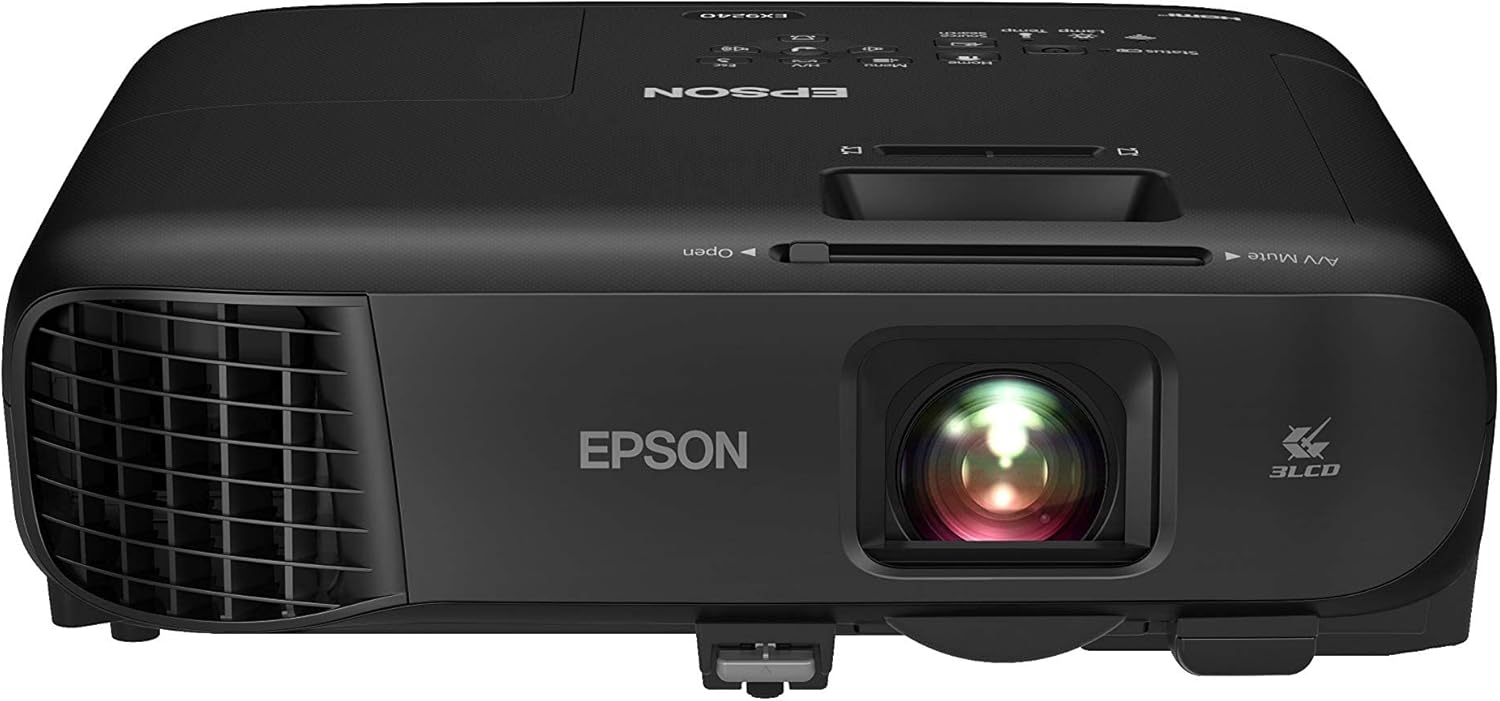
The EX9240 is built around Epson’s 3LCD engine, which tends to render presentation colors more evenly than single-chip alternatives, especially when a slide deck is heavy on charts, brand colors, or photography. It’s the kind of projector that quietly does its job in a room that hosts client calls, budget reviews, and training sessions in the same week.
Setup is straightforward, which matters more than it sounds like it should for a shared conference room. The lens offset and zoom range give enough flexibility to fit a fairly wide range of table and screen positions without needing a precisely measured mount, and the built-in wireless projection option means a presenter can walk in, connect from a laptop, and start talking within a minute or two. Full HD resolution keeps spreadsheets and dense text legible even from the back row of a mid-size room, which is where cheaper WXGA projectors tend to lose people.
In day-to-day use, this is the projector that handles a mixed diet of content without needing to be babied. A morning budget review with a dense spreadsheet, an afternoon client pitch with brand photography, and an evening training session with a recorded video walkthrough are all reasonably comfortable for the EX9240, largely because the combination of Full HD resolution and 3LCD color keeps text sharp and colors natural across very different kinds of content. Built-in speakers are loud enough for a mid-size room without an external sound system, which matters for rooms that don’t already have conferencing audio installed. For teams deciding between this and a dedicated home-style unit for a break room or lounge, it’s worth a quick look at our best native 1080p projectors roundup for context on how it compares outside a strictly business setting.
Where the EX9240 shows its age slightly is in its light source. It’s lamp-based rather than laser, which means there’s a warm-up delay at power-on and a lamp that will eventually need replacing after a few thousand hours of use. For a room that gets heavy daily use across a full workday, that’s a maintenance line item worth budgeting for down the road. If long-term running cost is the deciding factor, it’s worth reading our comparison of laser vs. lamp projectors before deciding which trade-off fits your office better.
Pros
- Strong, even color rendering from the 3LCD engine
- Full HD resolution handles detailed slides and video well
- Generous zoom and lens offset simplify placement
- Built-in wireless projection for laptops and mobile devices
Cons
- Lamp-based light source means eventual replacement cost
- Warm-up and cool-down delay compared to laser models
- Bulkier than portable alternatives on this list
View on Amazon
Epson EX7280 — Best Value for Everyday Office Use
The EX7280 is the projector to consider when the brief is simple: reliable, bright enough for a normal room, and priced so it doesn’t need a purchase order committee to approve. It’s a smaller sibling to the EX9240 in spirit, trading some resolution and light output for a friendlier price point.
WXGA resolution is the main compromise here compared to the EX9240, and for most day-to-day slide decks that’s genuinely fine. Where it starts to matter is with dense spreadsheets or CAD-style content, where the extra pixels of a 1080p model earn their keep. For general meetings, sales pitches, and training sessions, the EX7280’s image is bright and clean enough that nobody in the room will be thinking about the projector at all, which is really the goal.
It shares the 3LCD advantage of accurate, consistent color with its bigger sibling, and wireless connectivity is included, so teams that rotate through a lot of different presenters don’t need to keep a drawer of adapters on hand. Teams outfitting several rooms with different budgets might also want to compare this against options in our best projectors under 500 dollars roundup to see where it lands relative to the field.
This is also a sensible pick for organizations standardizing across several small-to-mid meeting rooms at once, since buying several identical units keeps spare parts, remotes, and staff training simple. IT teams managing five or ten of these across a floor will appreciate that setup is close to identical from room to room, which cuts down on the “why does this one behave differently” support tickets that crop up when every conference room has a different projector brand and menu layout. For companies working with a tighter budget across many rooms, it’s also worth checking our best projectors under 1000 dollars guide to see how far that budget stretches per room.
Pros
- Strong value relative to brightness and color accuracy
- Built-in wireless projection
- Consistent, easy-to-manage color from 3LCD tech
- Simple setup for shared meeting rooms
Cons
- WXGA resolution limits fine detail on dense content
- Lamp-based, with the same warm-up and replacement considerations
- Less headroom in larger or brighter rooms
View on Amazon
ViewSonic LS550WH — Best Laser Option for Daily-Use Rooms

The LS550WH is where this list starts moving into laser territory, and the difference shows up immediately in how the projector behaves rather than just how bright the image looks. Power it on and it’s ready almost instantly, no warm-up ritual required before the first slide goes up.
Laser light sources also tend to hold their brightness far longer over the projector’s life compared to a traditional lamp, which means the image you get in year one is much closer to the image you get in year five. For a shared conference room that might run for six to eight hours a day, that consistency reduces the number of surprises facilities teams have to deal with, and it removes lamp replacement from the maintenance checklist entirely.
The trade-off is a higher upfront price than the lamp-based Epson models above it in this guide, which is the classic laser-versus-lamp calculation. For rooms with heavy daily use, the math tends to favor laser once you account for a few years of lamp replacements and the labor to install them. If you’re still deciding which type suits your office, the earlier link to our laser vs. lamp comparison breaks down the total cost of ownership in more detail.
It’s a particularly good fit for a company’s primary, most-used conference room: the one booked back-to-back most days of the week, where a lamp warm-up delay would compound into real lost time over a year, and where consistent brightness matters because that’s the room clients see. Facilities and IT teams also tend to appreciate the reduced maintenance load, since a laser engine effectively removes “order a replacement lamp” from the recurring task list, replacing it with an occasional filter clean instead. If your priority list has instant power-on and predictable long-term brightness near the top, this is one of the stronger arguments for spending the extra money on laser over lamp.
Pros
- Instant on/off with no lamp warm-up delay
- Laser light source holds brightness over years of use
- No lamp replacements to schedule or budget for
- Solid brightness for a well-lit office room
Cons
- Higher upfront cost than comparable lamp-based models
- WXGA resolution rather than full 1080p
- Not a portable option; best suited to a fixed room
View on Amazon
Panasonic PT-VMZ51 — Best for Larger Rooms and Flexible Placement

Panasonic’s PT-VMZ51 is aimed at rooms that don’t fit neatly into a standard mounting distance. Its laser engine pairs with a wide lens shift and zoom range, giving installers real flexibility when the ceiling mount can’t sit in the ideal spot.
WUXGA resolution puts it a step above the WXGA models on this list, which is noticeable on detailed dashboards or when a laptop is running at its native widescreen resolution rather than being scaled down to fit. Combined with strong laser brightness, the PT-VMZ51 holds up well in rooms with some daylight coming through blinds rather than requiring full blackout conditions.
It’s a heavier, install-oriented projector rather than something you’d move between rooms, so it makes the most sense as a semi-permanent fixture in a larger conference room or training space. If your room’s dimensions are unusual, it’s worth working out the numbers ahead of time using our guide to calculating projector throw distance so the lens shift range actually covers your setup before you buy.
Buildings with awkward architectural constraints tend to be where this projector earns its keep. Think of a training room where the only sensible mount point is off to one side because of a support beam, or a conference room where the screen was installed years before anyone thought about projector placement. The generous lens shift range means an installer can correct for that kind of real-world compromise electronically rather than needing to physically move furniture or reroute the mount, which often ends up being both cheaper and less disruptive than a full room reconfiguration.
Pros
- WUXGA resolution for sharper detail than WXGA rivals
- Wide lens shift and zoom simplify awkward room layouts
- Laser light source with strong sustained brightness
- Handles moderate ambient light well
Cons
- Larger and heavier; best for a fixed installation
- Premium price relative to entry-level models
- Overkill for a small huddle room
View on Amazon
BenQ LU935 — Best for Large Venues and Bright Auditoriums

The LU935 is built for a different scale of room than most of the projectors on this list. Town halls, large training auditoriums, and multi-purpose event spaces are where its very high laser brightness actually gets used rather than wasted.
WUXGA resolution combined with genuinely high brightness means this projector can push a large, legible image across a big room even with house lighting partially on, which matters at company-wide events where you can’t ask three hundred people to sit in the dark. Interchangeable lens support on models like this also gives AV teams the option to fine-tune throw distance for unusual room shapes, something worth reviewing alongside our notes on projectors with the highest contrast ratio if image punch matters as much as raw brightness for your venue.
None of this comes cheap, and the LU935 is squarely aimed at organizations with a dedicated large-venue need rather than a standard conference room. For a smaller space, its brightness is more than necessary and the price premium isn’t worth carrying. But for the right room, it’s one of the more capable options a business will find without stepping into full cinema-grade installation projectors.
Organizations that host recurring all-hands meetings, investor days, product launches, or large training cohorts tend to be the natural buyers here, particularly when the same room doubles as a rentable event space. In those settings, the projector often needs to compete with stage lighting, natural light from lobby windows, or a room that simply can’t be dimmed on short notice, and that’s exactly the scenario where a mid-range business projector starts to look washed out while a high-lumen laser model like the LU935 still reads clearly from the back row.
Pros
- Very high brightness suited to large, semi-lit venues
- WUXGA resolution for crisp detail at scale
- Laser reliability with long-term brightness retention
- Flexible lens options for AV installers
Cons
- Significant investment compared to standard conference room models
- Overkill and inefficient for small or mid-size rooms
- Best handled by a professional AV install
View on Amazon
ASUS ZenBeam L2 — Best Truly Portable Pick for On-the-Go Pitches

Not every presentation happens in a room your company owns. The ZenBeam L2 is aimed squarely at people who pitch at client offices, coworking spaces, or pop-up events, where a full-size projector simply isn’t practical to carry.
Its LED light source keeps the unit small, light, and cool enough to run off a compact power source, and Full HD resolution is a pleasant surprise in something this size. The trade-off, as with most portable projectors, is brightness: this is a projector for a dimmable meeting room or a space where you can control the lighting, not for a bright afternoon boardroom with floor-to-ceiling windows.
Battery-friendly operation and a genuinely pocketable footprint make it a strong pick for consultants, sales teams, and anyone who needs to be presentation-ready without checking a bag. If portability is the deciding factor for your team, it’s worth comparing it against the field in our best portable mini projectors guide.
It’s worth setting expectations correctly before buying: this isn’t a replacement for a mounted conference room projector, and treating it like one in a bright, window-heavy room will disappoint. Where it earns its price is in the moments a business projector doesn’t usually get credit for — the impromptu pitch in a client’s side office, the last-minute product demo at a trade show booth, the training session run out of a rented coworking room with no AV equipment of its own. For that category of use, small size and quick setup consistently matter more than maximum brightness.
Pros
- Genuinely pocket- or bag-friendly size and weight
- Full HD resolution is unusually sharp for its class
- LED light source runs cool and efficiently
- Good fit for client-site and offsite presentations
Cons
- Lower brightness needs a dim or controllable room
- Not suited to large conference rooms
- Smaller built-in speaker than fixed-install models
View on Amazon
soundcore Nebula X1 Pro — Best Smart Portable for Ad-Hoc Presentations
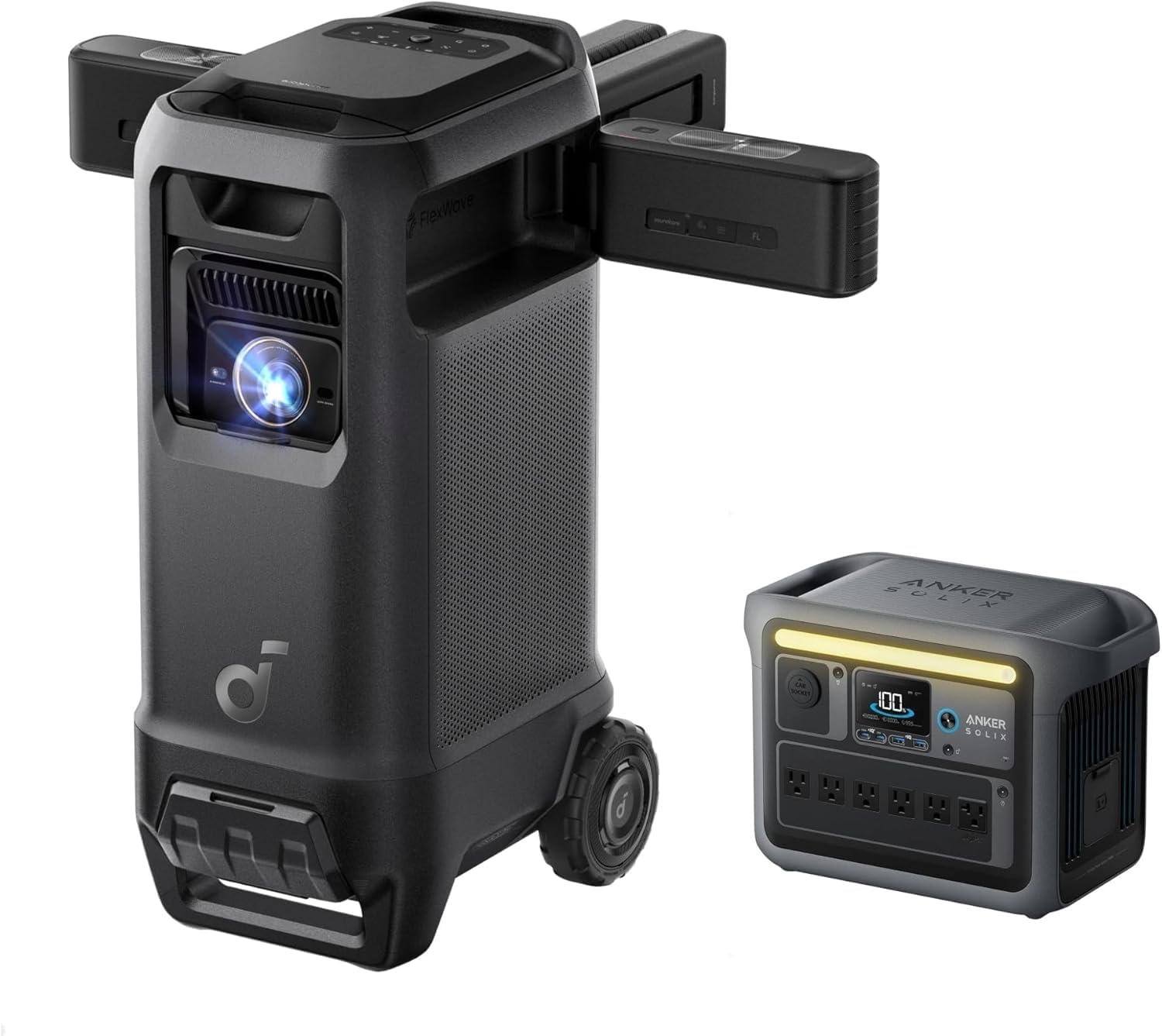
The Nebula X1 Pro leans into the “smart projector” category, pairing a portable form factor with onboard apps, auto keystone correction, and easy wireless casting. It’s a good match for small teams that need to project something quickly without a full AV setup.
Auto focus and auto keystone correction are the standout convenience features here, cutting out the fiddly manual adjustments that portable projectors often require when they’re set down at an angle on a table rather than mounted square to a screen. Full HD resolution and built-in streaming and casting options also make it easy to pull up a video, a cloud-hosted deck, or a screen mirror from a phone without extra hardware.
Because it’s part smart-device and part projector, it’s a slightly different tool than the dedicated business models above it on this list, and it shines most in casual pitch settings, small huddle rooms, or hybrid presentation-and-media use rather than as the primary display for a formal boardroom. Teams weighing this kind of hybrid device against a more traditional smart projector setup may also want to check our best smart projectors guide for additional context.
It’s a natural fit for startups and small teams that don’t have a dedicated conference room budget line, since one device can cover Monday’s investor call recap, Wednesday’s team movie night, and Friday’s client walkthrough without needing three different pieces of equipment. The built-in smart platform also means it can pull a deck straight from a cloud drive without a laptop attached at all, which is a genuinely convenient option when someone forgets their charger but still has their phone.
Pros
- Auto focus and auto keystone speed up setup
- Strong wireless casting and app support
- Compact and easy to move between spaces
- Doubles well as a media and presentation device
Cons
- Mid-range brightness limits use in well-lit rooms
- Not intended as a primary fixed boardroom display
- Smart features add complexity some users won’t need
View on Amazon
How to Choose a Business Projector for Your Room
The seven projectors above cover very different situations, and the right pick depends more on your room and workflow than on any single spec. A useful way to narrow the field is to answer four questions before comparing model numbers.
How big is the room, and how much control do you have over the light in it? A small huddle room with dimmable lights can get away with a lower-brightness portable model. A conference room with a wall of windows and no blinds needs serious lumens just to stay legible at 2pm. If you’re unsure where your space lands, our general guide to choosing a projector walks through the room-assessment process in more depth.
Is this a fixed installation or does it need to travel? A mounted, laser-powered model makes sense for a room that hosts meetings every day. A portable LED or hybrid unit makes more sense for a consultant, a sales rep, or a team that regularly presents at client sites. Trying to make one projector do both jobs usually means it’s mediocre at each.
What resolution does your content actually need? Simple slide decks with large text are fine on WXGA. Detailed spreadsheets, CAD drawings, or dual-monitor setups mirrored onto the screen benefit from Full HD or WUXGA, where more pixels mean less squinting from the back row.
How many people will operate it, and how technical are they? A shared room used by a rotating cast of employees benefits enormously from wireless mirroring, auto keystone, and simple input switching. A single dedicated AV operator running a large venue projector can handle more manual controls in exchange for more precise image tuning.
Once you have honest answers to those four questions, the list of realistic candidates usually narrows fast. A five-person startup pitching from a rented office needs something closer to the ASUS ZenBeam L2 or the Nebula X1 Pro. A mid-size company with one or two dedicated conference rooms used daily is better served by a laser model like the ViewSonic LS550WH or Panasonic PT-VMZ51. A larger organization with an auditorium or an event space that hosts company-wide gatherings has different needs entirely, and that’s where a high-output model like the BenQ LU935 starts to make sense. Very few businesses actually need the single “most powerful” projector on the market; they need the one that matches their specific room.
Brightness and Lumens, Explained Simply
Brightness is the spec that gets the most attention and the least understanding. The number that matters is ANSI lumens, a standardized measurement, rather than generic “lumens” claims that aren’t tested the same way across brands. Two projectors with wildly different real-world brightness can list similar-looking numbers if one uses the standardized measurement and the other doesn’t.
As a rough guide for offices: a small, fully darkened room can work with 2,000 to 3,000 ANSI lumens. A typical conference room with some ambient light needs 3,000 to 4,500. A larger room, a space with unavoidable daylight, or a room where you can’t dim the lights during a client call benefits from 4,500 to 6,000 or more. Large venues and auditoriums often push past that, which is exactly the gap a projector like the BenQ LU935 is designed to fill.
It’s also worth remembering that lumens interact with screen size and screen material. A brighter projector pushed onto a bigger screen spreads that light over more area, effectively lowering perceived brightness, so matching the projector to both the room’s light and the intended image size matters more than chasing the single highest number on a spec sheet. For a deeper dive on how the measurement itself works, see our explainer on what ANSI lumens actually means.
Screen material plays a bigger role in perceived brightness than most buyers expect. A plain white wall absorbs and scatters more light than a purpose-built projection screen, which is why a projector that looks perfectly bright on a proper matte white screen can look noticeably dimmer painted straight onto drywall. For rooms fighting ambient light specifically, an ambient-light-rejecting screen surface can meaningfully improve perceived contrast and color saturation without needing to buy a brighter, more expensive projector at all. It’s a relatively inexpensive upgrade that often gets overlooked in favor of chasing a bigger lumen number.
Throw Distance and Room Size Considerations
Throw distance is simply how far the projector needs to sit from the screen or wall to produce a given image size, and it’s one of the most common reasons a projector purchase goes wrong. Buy a standard-throw projector for a small room and the image ends up too large for the wall, spilling over the edges of the screen. Buy a short-throw model for a long room and you may not be able to fill the screen at all without mounting it awkwardly close.
Before buying, measure the distance from where the projector will realistically sit (a mount point, a shelf, a table) to the screen or wall, and check that distance against the projector’s throw ratio. Most manufacturers publish an online throw distance calculator, and doing this math ahead of time avoids returns and re-installs. Our own throw distance calculation guide walks through the formula step by step if you’d rather work it out manually.
It’s also worth thinking about lens shift and zoom range, which some of the projectors above, like the Panasonic PT-VMZ51, offer generously. That flexibility means the projector doesn’t have to sit in one exact spot to produce a straight, correctly sized image, which is useful in rooms where ceiling joists, HVAC vents, or existing wiring limit where a mount can actually go.
Ultra short throw designs solve this differently by sitting just inches from the screen or wall, which avoids the mounting and cabling problems of a traditional ceiling install entirely, at the cost of usually being paired with a smaller maximum image size and a higher price for a given brightness level. None of the projectors covered in the main list above are ultra short throw models, but it’s a category worth knowing about if your room genuinely can’t accommodate a standard-throw ceiling mount or a table positioned far enough back. Our dedicated guide to ultra short throw projectors and our comparison of UST vs. standard throw projectors both go deeper into when that trade-off makes sense.
Connectivity and Wireless Presentation Features
The best-looking image in the world doesn’t help if half of every meeting is spent hunting for the right cable. HDMI remains the baseline connection for laptops and streaming devices, and USB-A ports are handy for playing content directly from a flash drive without a computer at all. Older equipment in some offices still relies on VGA, so it’s worth checking whether that port is present if your organization hasn’t fully retired legacy hardware.
Wireless screen mirroring has moved from nice-to-have to close to essential in shared meeting rooms. It lets a presenter connect from their own laptop or phone without needing to know which dongle lives in which drawer, and it removes a common point of friction right at the start of a meeting, when everyone in the room is already watching the clock. Several of the projectors covered here, including the Epson models and the Nebula X1 Pro, build this in directly rather than requiring a separate adapter purchase.
Network connectivity matters too, particularly for IT teams managing several rooms. Projectors with Ethernet or Wi-Fi support can often be monitored, updated, or restarted remotely, which saves a trip to the room for something as simple as a firmware update or an input reset.
USB-C deserves a specific mention because of how quickly it’s become the default port on modern laptops. A projector that accepts video, and in some cases power, over a single USB-C cable simplifies the presenter’s setup to one cable instead of a separate video cable and power adapter for their laptop. Not every business projector has embraced this yet, so if your organization has standardized on USB-C laptops, it’s worth checking a model’s port selection carefully rather than assuming compatibility, since an adapter-heavy workaround tends to be exactly the kind of friction point that discourages people from using a shared room’s equipment properly.
Contrast Ratio and Image Quality for Data-Heavy Content
Brightness gets most of the attention in business projector marketing, but contrast ratio quietly does a lot of work for the kind of content offices actually project: text-heavy slides, spreadsheets with fine gridlines, and charts with subtle shading differences between data series. Contrast ratio describes the difference between the darkest black and brightest white a projector can produce, and a higher ratio generally means crisper text edges and more distinguishable detail in dense visuals, even before brightness enters the conversation.
In a business setting, this matters most for two common scenarios. The first is small text: a projector with weak contrast can make an 11-point font in a spreadsheet look slightly blurred or “glowy” at the edges, which is tiring to read for the length of a typical meeting. The second is layered data visuals, like a stacked bar chart or a heat-map style table, where distinguishing between similarly colored data points depends on the projector rendering subtle differences rather than crushing them together. Laser projectors, including the ViewSonic, Panasonic, and BenQ models in this guide, generally have an edge here over older lamp-based designs, though panel quality and internal processing matter too.
It’s worth noting that headline contrast ratio numbers on spec sheets aren’t always directly comparable between brands, since manufacturers sometimes measure under different conditions. As a practical shortcut, reading independent reviews or, where possible, viewing a demo unit with a real spreadsheet or dense chart pulled up tells you more than the number alone. If image quality at the very top end matters most to you, our roundup of projectors with the highest contrast ratio digs deeper into how these numbers are measured and which models lead the pack.
Room lighting also interacts with perceived contrast in ways that are easy to overlook. Even a projector with excellent native contrast will look flatter under bright overhead lighting, because ambient light raises the effective black level the projector is competing against. Dimming overhead lights during a presentation, or angling blinds to keep direct sun off the screen, often improves perceived image quality more noticeably than any single spec upgrade would, and it costs nothing beyond remembering to do it before the meeting starts.
Setting Up a Projector for Hybrid and Video Conference Rooms
Most conference rooms today aren’t just projecting a slide deck to people in the room; they’re also running a video call with remote participants, which changes a few things about how the projector should fit into the room’s overall setup. The projector itself doesn’t need special “hybrid meeting” features, but its placement and integration with the room’s camera and microphone system deserve some thought.
Screen glare is the first practical issue. If the projector or screen sits directly across from a camera used for video calls, bright projected content can wash out the camera’s exposure, making in-room participants look dark by comparison. Positioning the screen out of the primary camera’s direct line of sight, or angling the camera slightly, usually solves this without any equipment changes.
The second consideration is audio. A projector’s built-in speaker is rarely loud or clear enough to double as the room’s conferencing audio once remote participants are in the mix, so most hybrid-ready rooms route audio through a dedicated conferencing speakerphone or ceiling microphone system instead, leaving the projector to handle only the visual side. Finally, network connectivity is worth double-checking: a projector on the same network as the room’s video conferencing hardware, with wireless casting enabled, lets a presenter share a screen to the projector and join the call from the same device without juggling two separate connections mid-meeting.
It’s also worth testing the full hybrid setup end to end before it’s needed for something important, rather than assuming individual pieces that work fine on their own will also work fine together. Running a short test call with someone dialing in remotely, checking that the projected content is legible on their end and that in-room audio comes through clearly, catches integration issues while there’s still time to fix them, instead of discovering a muted microphone or a washed-out camera feed thirty seconds before a real client call begins.
Common Mistakes When Buying a Business Projector
A handful of avoidable mistakes account for most of the buyer’s remorse we hear about with business projectors, and most of them come down to skipping a measurement or a question that felt unnecessary at the time. None of these mistakes are exotic; they’re the same small oversights repeating across different offices, different budgets, and different room sizes, which is exactly why they’re worth spelling out plainly rather than assuming common sense will catch them in the moment of purchase.
Buying on lumens alone. A high lumen number on a projector paired with a low-quality or overly large screen can still look dim and washed out. Brightness, screen size, and screen material need to be considered together, not as a single number to maximize.
Skipping the throw distance calculation. It’s tempting to assume “it’ll probably fit,” but a projector bought without checking throw ratio against the actual room dimensions is one of the most common causes of a return or an awkward, off-center install. A five-minute calculation upfront avoids this entirely.
Ignoring total cost of ownership. A cheaper lamp-based projector can cost more over several years than a pricier laser model once replacement lamps and the labor to install them are factored in, particularly in rooms used every day.
Overlooking wireless and input compatibility. A projector without wireless mirroring can work perfectly well, but only if there’s a clear, reliable process for connecting a laptop by cable. Skipping this consideration is how offices end up with a drawer full of mismatched dongles and a recurring five-minute delay at the start of every meeting.
Buying more projector than the room needs. A large-venue laser model in a small huddle room isn’t just an overspend; it’s often harder to place correctly because its throw ratio and minimum image size aren’t built for tight quarters. Matching the projector class to the room, not just the budget, tends to produce the best outcome.
Maintenance and Lifespan: What to Expect After Purchase
A projector is a long-term piece of office equipment, and a little bit of routine care goes a long way toward keeping the image sharp for years. Dust is the biggest enemy of any projector’s air intake and lens, especially in an office that runs the HVAC system hard. A simple habit of checking and cleaning the lens periodically keeps the picture crisp; our guide on how to clean a projector lens covers the safe way to do it without scratching the coating.
Light source lifespan is the other big factor in long-term cost. Traditional lamps commonly run 3,000 to 5,000 hours before they dim noticeably and need replacing, which for a heavily used conference room can mean a lamp swap every year or two. Laser and LED light engines are typically rated for 20,000 hours or more, which often outlasts the useful life of the projector itself before any light-source maintenance is needed at all.
If a projector ever seems to power on but show nothing, or drops the signal intermittently, it’s usually a connection or source issue rather than a hardware failure. Our troubleshooting guides for HDMI no-signal errors and situations where a projector turns on but shows no picture walk through the most common causes before you assume the unit itself needs repair. And if a projector that used to work fine starts shutting off unexpectedly mid-meeting, that’s often a specific and fixable issue covered in our piece on why a projector keeps turning off.
Finally, if you’re mounting a projector permanently rather than leaving it on a table, take the time to do it properly. A secure, correctly angled ceiling mount avoids keystone distortion and keeps the unit out of the way of foot traffic and meeting room furniture. Our ceiling mounting guide covers the process from measuring to final adjustment.
Many business projectors, particularly the mounted laser models on this list, include a washable or replaceable intake filter, and checking it every few months is a five-minute task that meaningfully extends the projector’s working life by keeping dust away from internal optics and cooling components. It’s also worth keeping firmware reasonably current, since manufacturers periodically release updates that improve wireless projection stability or add compatibility with newer laptops and operating systems. For networked projectors, this can often be scheduled and pushed remotely by IT rather than requiring anyone to physically visit the room, which is one more argument in favor of connecting shared conference room equipment to the network in the first place.
Screens, Mounts, and Accessories Worth Budgeting For
The projector itself is only part of the total setup cost, and it’s easy to underspend on the pieces around it in a way that undercuts the projector’s actual performance. A dedicated projection screen is the single biggest upgrade most offices skip. A plain painted wall introduces color tint and uneven texture that a proper matte white or gray screen avoids, and for rooms fighting ambient light, an ambient-light-rejecting screen surface can noticeably improve perceived contrast without spending another dollar on a brighter projector.
Mounting hardware is the second commonly underbudgeted item. A universal ceiling mount is inexpensive, but getting the drop length, tilt, and lens alignment right takes some care, and a poorly mounted projector can introduce keystone distortion that digital correction only partially fixes without softening the image. For rooms where a ceiling mount isn’t practical, a stable shelf or credenza mount at the correct height and distance is a reasonable alternative, provided it keeps the projector out of the way of foot traffic and doesn’t block the lens with people walking past.
Cabling is worth planning for rather than improvising room by room. Running a permanent HDMI or USB-C cable from the table to the projector or a wall plate avoids loose cables draped across the floor, which is both a tripping hazard and a common source of intermittent signal issues if a cable gets stepped on repeatedly over time. For rooms relying primarily on wireless mirroring, it’s still worth keeping one reliable wired path as a backup, since even the best wireless systems occasionally have an off day right when it matters most.
Finally, consider a simple remote or a small control panel mounted near the door for basic functions like power, input switching, and volume, rather than expecting every presenter to dig through an on-screen menu. Reducing the number of decisions a nervous presenter has to make before their first slide goes up is a small thing that consistently pays off in smoother meetings.
Budgeting for a Business Projector: What You Get at Each Price Point
Business projector pricing spans a wide range, and it helps to know roughly what changes as the budget goes up rather than treating every jump in price as an arbitrary premium. At the entry level, you’re generally paying for basic brightness and resolution, usually a lamp-based light source, and a fairly bare-bones port selection. These projectors can absolutely handle a small, dimmable room with light presentation use, and our projectors under 100 dollars guide covers what’s realistic at the very low end of the market.
Moving into the low-to-mid range, typically covering models like the Epson EX7280 in this guide, buyers start getting more consistent brightness, better build quality, and built-in wireless projection as a standard feature rather than an add-on. This tier tends to be the sweet spot for a huddle room or a small-to-mid conference room in a business that doesn’t need laser-grade reliability but still wants something that behaves predictably every day.
The mid-to-upper range is where laser light sources become common, as seen with the ViewSonic LS550WH and Panasonic PT-VMZ51 covered above. Here you’re paying for instant power-on, brightness that holds steady for years, and often better resolution and lens flexibility. This tier makes the most sense for a company’s primary, heavily used conference rooms, where the extra upfront cost is offset by lower maintenance and less downtime over the projector’s working life.
At the top end sit large-venue and specialty projectors like the BenQ LU935, priced for organizations with a genuine need for auditorium-scale brightness, interchangeable lenses, and professional installation. Very few standard offices need to spend at this level, and doing so for a room that doesn’t require it is one of the more common ways businesses overspend on AV equipment. As a general rule, it’s worth matching your budget tier to the room category first, then picking the strongest available option within that tier, rather than working backward from “buy the most expensive one available.”
Projector vs. Large Display: Which Makes Sense for Your Room?
Large flat-panel displays have gotten cheaper and brighter over the past several years, and it’s a fair question whether a big-screen TV or commercial display might simply be a better choice than a projector for a given conference room. The honest answer is that it depends heavily on room size and image size needs.
For a huddle room or small meeting space where a 65 to 85 inch image is genuinely large enough, a display often wins on convenience: no bulb or laser to think about, no ambient light concerns, instant-on with no warm-up, and generally lower long-term maintenance. It also tends to look better in a fully lit room, since projectors are still competing against ambient light in a way that a self-illuminated panel isn’t.
Projectors pull ahead once the room gets larger or the desired image size grows past what a display can reasonably offer. Producing a 120 or 150 inch image with a flat panel is either extremely expensive or simply not available as a single unit, while a mid-range business projector can hit that size for a fraction of the cost. Projectors also scale better for spaces used for multiple purposes, since a projected image and screen can often be much larger, and in some cases more visible from a wider range of seating angles, than a single flat panel mounted on a wall. If you’re on the fence for a specific room, our detailed comparison of a projector vs. an 85 inch TV walks through the trade-offs in more depth, covering everything from total cost to long-term picture quality in different lighting conditions.
A reasonable rule of thumb: if the room seats fewer than eight or ten people and a screen in the 65 to 85 inch range would comfortably fill the wall, weigh a display seriously. If the room is longer, hosts larger groups, or needs to flex up to a genuinely large image for things like town halls or client showcases, a projector remains the more practical and often more cost-effective route to get there.
Frequently Asked Questions
How many lumens do I need for a business projector?
For a typical conference room with some ambient light, aim for at least 3,000 ANSI lumens. Larger rooms, rooms with windows, or spaces you can’t fully darken benefit from 4,000 to 6,000 ANSI lumens or more.
Is a laser projector worth it for an office?
For daily office use, laser light sources are usually worth the extra upfront cost. They hold brightness longer, skip lamp replacements entirely, and are ready to use almost instantly, which matters when back-to-back meetings don’t leave time to wait for a warm-up.
What resolution is best for presentation projectors?
WXGA (1280×800) is the practical minimum for modern slide decks and spreadsheets. Full HD 1080p is a safer choice if you regularly share detailed charts, video, or dual-monitor content, and it ages better as source devices trend toward higher resolutions.
Do I need wireless screen mirroring on a business projector?
It isn’t mandatory, but it removes a lot of friction. Wireless mirroring lets presenters connect from a laptop or phone without hunting for the right cable, which speeds up meeting starts and avoids the awkward cable-swap moment in front of clients.
What is throw distance and why does it matter for offices?
Throw distance is how far a projector needs to sit from the screen to produce a given image size. Small huddle rooms usually need a short-throw model, while long conference rooms have more flexibility. Getting this wrong means an image that’s too small or too large for the wall.
Can I use a business projector for home movie nights too?
Many can, though business projectors are tuned for bright, data-heavy images rather than deep contrast and cinematic color. If home theater is the primary use, a dedicated model built for that purpose will usually look better in a dark room.
How long do business projector light sources actually last?
Traditional lamps typically run 3,000 to 5,000 hours before dimming noticeably, while laser and LED light engines are commonly rated for 20,000 hours or more, which can mean a decade or longer of typical office use.
Is a portable projector good enough for regular business use?
Portable projectors are a great fit for teams that move between rooms, client sites, or offsite pitches, trading some peak brightness for size and convenience. For a fixed conference room used daily, a mounted mid-size or large-venue model usually holds up better.
What ports should a business projector have?
At minimum, look for HDMI, USB-A, and a VGA input for older equipment. Ethernet and built-in Wi-Fi are worth having if the projector will be controlled or updated over the network, and USB-C is increasingly useful for modern laptops.
How much should a business projector cost?
Solid entry-level office projectors start under a few hundred dollars, mid-range laser models with strong brightness and wireless features generally land in the mid three figures, and large-venue or high-lumen laser projectors can run well into four figures.
Do business projectors need special ceiling mounts?
Most work with standard universal ceiling mounts, but it’s worth checking the projector’s weight, mounting hole pattern, and lens offset before buying hardware, since throw angle affects where the mount needs to sit relative to the screen.
What causes a business projector to show no signal from HDMI?
This is usually a source or cable issue rather than a projector fault, often tied to the wrong input selected, a sleeping laptop output, or a cable or port that’s failed. Working through each connection point in order usually isolates the cause quickly.
Should I choose a portable or a permanently mounted projector for my office?
It comes down to how the projector will actually be used. A permanently mounted model makes the most sense for a fixed conference room that gets daily use, since it can be tuned once for the room and left alone, and it can afford higher brightness and better cooling since it doesn’t need to be battery-friendly or lightweight. A portable model is the better choice for consultants, sales teams, or anyone who regularly presents outside their own office, since convenience and setup speed matter more than absolute peak brightness in those situations.
What’s the difference between a business projector and a home theater projector?
Business projectors are generally tuned to prioritize brightness and legible text and data under everyday room lighting, while home theater projectors prioritize deep black levels, wide color accuracy, and cinematic contrast for a dark, controlled viewing environment. A business projector can play a movie reasonably well, and a home theater projector can technically run a slide deck, but each will show its weaknesses if pushed too far outside its intended use.
Picking the Right Projector Comes Down to the Room
There isn’t a single “best” business projector, only the best one for your specific room, budget, and the way your team actually presents. If you need one fixed answer, the Epson Pro EX9240 covers the widest range of everyday conference rooms well, the ViewSonic LS550WH is the pick for daily-use rooms that want laser reliability without a large-venue price tag, and the ASUS ZenBeam L2 is the one to grab before a client-site pitch.
See Today’s Price on the Epson Pro EX9240Whichever model ends up on your shortlist, the process that gets you there is the same one this guide has walked through: be honest about your room’s size and light, decide whether the projector needs to travel or stay put, match resolution to the content you actually present, and don’t forget to price in the maintenance costs that show up after the first year. A projector chosen this way tends to disappear into the background of every meeting it supports, which, for a piece of equipment, is about the best compliment there is. The alternative — a projector that’s slightly wrong for the room — has a way of making itself known at the worst possible moment, usually thirty seconds before an important call starts.
If you’re outfitting more than one space, it rarely makes sense to buy the same projector for every room. A large-venue laser model earns its price in an auditorium and wastes it in a huddle room, while a portable unit that’s perfect for a consultant on the road would frustrate a busy conference room used all day, every day. Treating each room as its own small buying decision, using the framework in this guide, tends to produce a much better outcome than picking one projector and installing it everywhere out of convenience.
Still narrowing things down? Explore our related guides on home theater projectors, 4K 120Hz gaming projectors, outdoor movie projectors, ultra short throw projectors, 4K laser projectors, and projectors for golf simulators if this isn’t the only room or space you’re outfitting.