Samsung Premiere LSP9T Review: Is Samsung’s Triple-Laser UST Projector Still Worth Buying?
A deep, no-fluff look at design, brightness, color accuracy, sound, smart features, and everyday livability from someone who actually cares about home cinema.
Introduction: Samsung’s Big Swing at Home Cinema
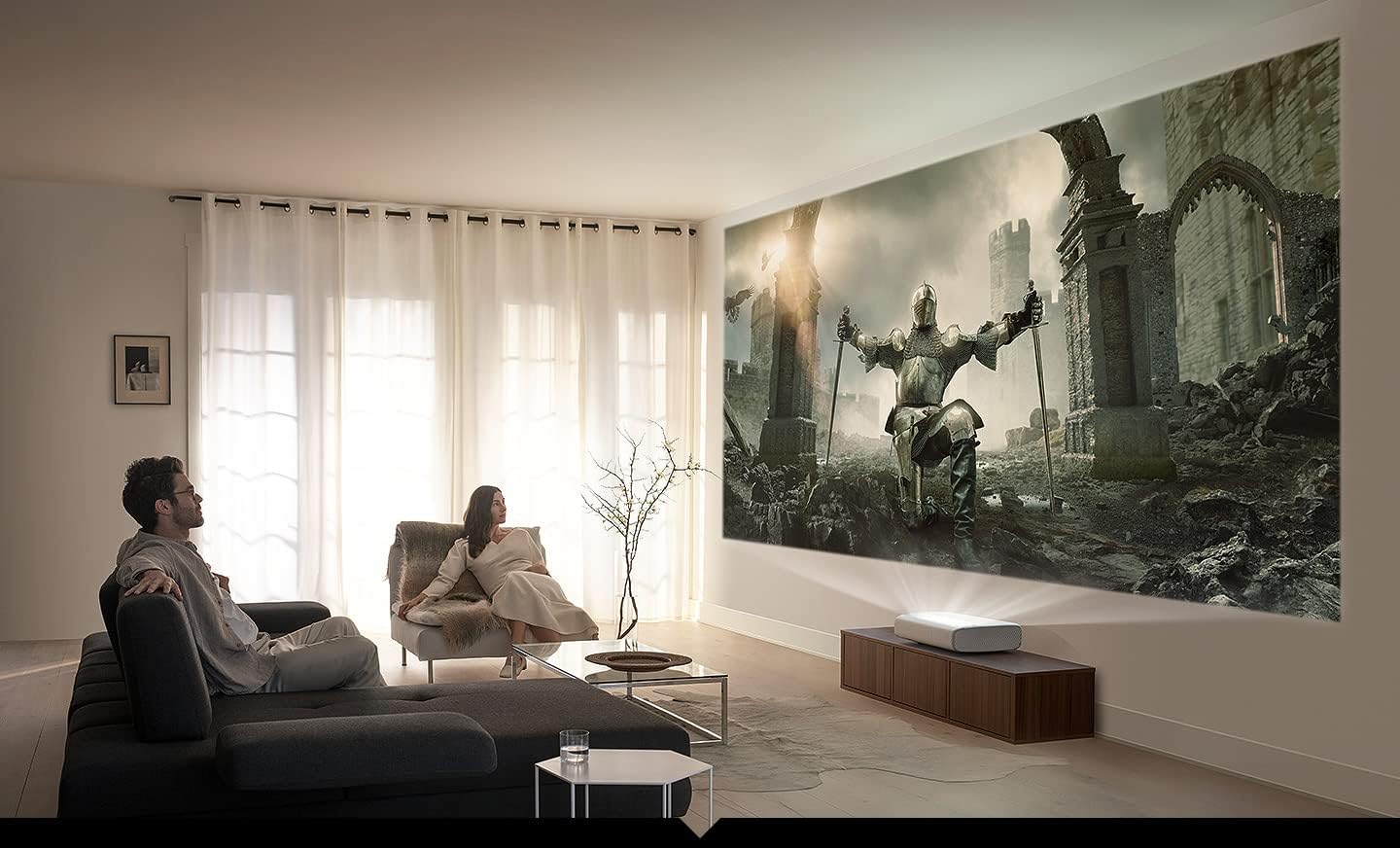
When Samsung decided to re-enter the projector business after a long hiatus, it didn’t tiptoe back in with a budget model. Instead, the company went straight for the top with the Premiere LSP9T, an ultra-short-throw laser TV built to replace a massive flat-panel display rather than compete with a modest home theater projector. The pitch is simple: place this compact white box just inches from your wall, and it throws a genuinely cinematic image anywhere from 100 to 130 inches diagonally, all wrapped in Samsung’s polished Tizen smart platform.
What makes the LSP9T interesting isn’t just the size of the picture. It was one of the first consumer projectors to use a true triple-laser light engine, meaning dedicated red, green, and blue laser diodes instead of a single blue laser bounced through a phosphor wheel. That architecture matters because it directly affects color volume, brightness consistency, and long-term reliability, three things that separate a genuinely premium projector from a merely large one.
In this review, we’ll walk through everything that matters if you’re deciding whether the LSP9T deserves a spot in your living room: picture quality in real rooms with real ambient light, how the built-in sound system holds up against a dedicated soundbar, what daily use actually feels like, and how it stacks up against other ultra-short-throw projectors on the market. If you’re still exploring the category more broadly, our guide on the best ultra-short-throw projectors is a useful companion piece before you commit.

Curious about current pricing and availability? Check the latest deal on the Samsung Premiere LSP9T before it changes.
Check Price on AmazonDesign & Build Quality
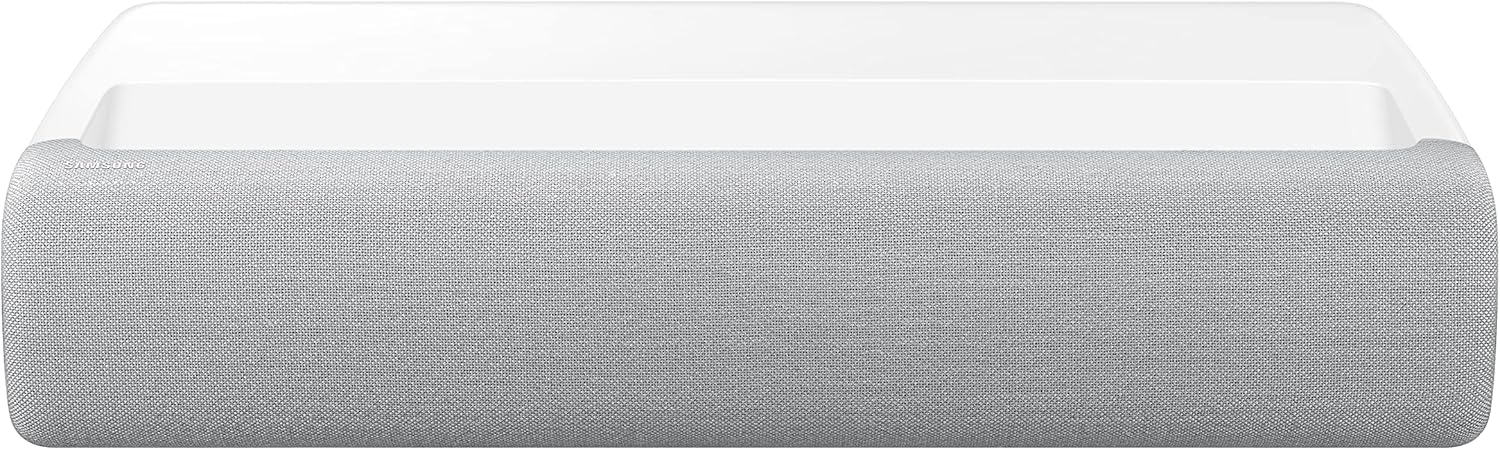
Samsung didn’t design the LSP9T to look like a piece of AV equipment tucked away in a rack. It looks more like a piece of furniture, and that’s clearly intentional. The chassis is wrapped in a fabric-textured finish, available only in white, with soft rounded corners that make the roughly 21 x 13.5 x 5-inch footprint feel smaller than the numbers suggest. At around 25.5 pounds, it’s substantial enough to feel premium without being unwieldy to reposition during setup.
There’s no visible control panel on the front of the unit. A single power button sits on the back, and every other adjustment is handled through the remote or the on-screen menu. This minimalism keeps the front face clean: just the fabric speaker grille stretching the width of the unit, a power indicator, and an IR sensor. The lens assembly and eye-protection sensors sit on top of the chassis, angled upward toward the wall or screen, while intake and exhaust vents are tucked along the rear and sides.
Fit and Finish
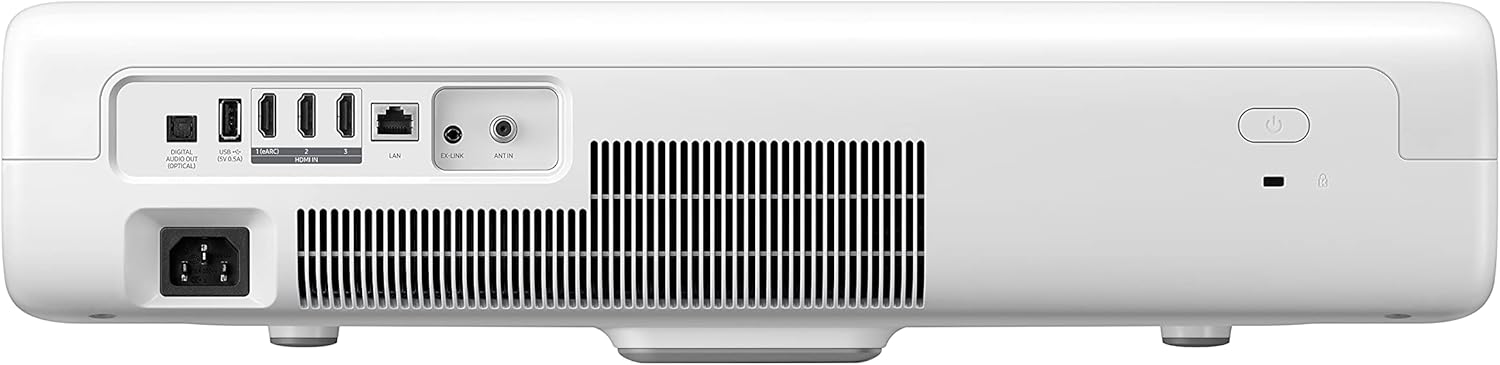
Every port and connection lives on the back panel, facing the screen rather than the room, which keeps cable clutter out of sight when the unit sits on a low media console. Samsung clearly wanted this to double as a piece of living-room furniture people would be comfortable leaving in full view, not something you’d want to hide in a cabinet, and for the most part it succeeds. The eye-protection sensor is a nice practical touch, too. It automatically dims or shuts off the laser if it detects something moving too close to the lens path, which matters a lot in households with kids or pets.

If industrial design and how a projector looks sitting in your living room matters to you as much as image quality, it’s worth comparing this against other lifestyle-oriented options like the XGIMI Horizon, which takes a very different, more compact approach to the same living-room-friendly philosophy.
Triple Laser Display Technology Explained
This is where the LSP9T earns its premium positioning. Most laser projectors, even good ones, use a single blue laser diode that passes through a phosphor wheel to generate the remaining colors. It’s an efficient, cost-effective approach, but it inherently limits how saturated and pure those secondary colors can be. Samsung went a different route with the LSP9T, building it around three genuinely independent laser sources, one red, one green, and one blue, working in concert.
The practical result is a color volume that reaches roughly 147% of the DCI-P3 color space and around 106-107% of BT.2020, figures that are still difficult for many single-laser or lamp-based projectors to match. Colors on screen look less like an approximation and more like the genuine article: reds have real depth rather than looking orange-tinted, and greens avoid that slightly sickly cast you sometimes see on phosphor-based laser engines.
The DLP Imaging Chip
Behind that laser engine sits a single-chip 0.65 to 0.66-inch DLP imager from Texas Instruments, one of the largest DMD chips available in a consumer projector at the time of its release, using pixel-shifting technology to reconstruct a full 4K image. Larger DMD chips generally translate to better detail retention and reduced visible pixel structure, which matters enormously on a screen this large. At 100+ inches, any weakness in the imaging chain becomes obvious fast, and the LSP9T’s chip size helps keep the picture looking sharp rather than soft or artificially processed.
If you’re trying to understand how this compares to competing display technologies more broadly, our breakdown of 3LCD vs DLP projectors is a good primer, and our explainer on laser vs lamp projectors goes deeper into why laser engines like this one tend to age so much better than traditional lamp-based units.
Brightness & HDR Performance
Samsung rates the LSP9T at 2,800 ANSI lumens, a genuinely strong figure for a laser TV in this category, and one that translates into real-world usability that lamp-based projectors from a few years earlier simply couldn’t match. In a dedicated dark home theater room, the image is rich, punchy, and cinematic. But the more impressive trick is how well it performs when a room isn’t perfectly dark.
Because the LSP9T pushes this much brightness combined with a strong laser color engine, it holds up noticeably better against ambient light than most projectors at this price point. Daytime viewing with curtains partially open, or evening use with a lamp on in the corner of the room, doesn’t wash the image out the way it would on a dimmer unit. That said, for the deepest blacks and the most cinematic shadow detail, dimming the room still makes a meaningful difference, especially with HDR content.
HDR10+ Support
The LSP9T made headlines as the world’s first HDR10+ certified projector, and that support still matters today. HDR10+ uses dynamic metadata to adjust brightness and tone mapping scene by scene rather than applying one static curve across an entire film, which helps preserve highlight detail in bright scenes without crushing shadow detail in darker ones. Combined with the projector’s Dynamic Black feature, which claims a contrast ratio around 2,000,000:1, HDR content on the LSP9T has noticeably more punch and depth than standard laser TVs relying purely on static HDR10.
| Spec | Samsung Premiere LSP9T |
|---|---|
| Light Source | Triple RGB Laser |
| Brightness | 2,800 ANSI Lumens |
| Resolution | Native 4K (pixel-shifted from 0.65″/0.66″ DLP chip) |
| HDR Support | HDR10, HDR10+, HLG |
| Color Gamut | ~147% DCI-P3, ~106-107% BT.2020 |
| Contrast Ratio | ~2,000,000:1 (Dynamic Black) |
| Throw Ratio | 0.189:1 (Ultra Short Throw) |
| Screen Size Range | 100″ to 130″ |
| Light Source Lifespan | 20,000+ hours to half brightness |
For a deeper primer on how brightness ratings actually translate into real-world picture quality, take a look at our guide to what ANSI lumens actually mean, since manufacturer marketing numbers can be genuinely misleading across brands.
Screen Size, Throw Distance & Screen Recommendations
The LSP9T’s ultra-short-throw lens carries a throw ratio of just 0.189:1, which means the projector can sit only a few inches from the wall or screen and still fill a massive image. This is the entire appeal of the UST category: no ceiling mount, no long throw distance eating up your room, and none of the shadow-casting issues that come with people walking between a traditional projector and the screen.
Samsung recommends screen sizes between 100 and 130 inches for the LSP9T, and as you push toward the larger end of that range, the required distance from the wall increases proportionally. Unlike some laser TVs, the Premiere doesn’t ship with a screen included, which is actually a feature rather than a drawback for enthusiasts, since it lets you choose glass or ALR (ambient light rejecting) material tuned specifically to your room’s lighting conditions and seating distance.
Do You Need an ALR Screen?
For UST projectors specifically, a standard white wall or generic screen isn’t ideal. ALR screens are engineered with a directional surface that reflects light coming from below (where the UST projector sits) back toward the viewer, while rejecting ambient light coming from windows and ceiling fixtures above. If you’re setting this up in anything other than a fully light-controlled room, pairing the LSP9T with a proper ALR screen makes a genuinely significant difference in perceived contrast and color saturation.
Before buying any panel, it’s worth running the numbers using our throw distance calculator guide, and reading through our dedicated piece on choosing the right ALR screen for a UST projector so you don’t end up with mismatched gain or a screen that’s the wrong size for your room.
See current bundle options and confirm the LSP9T is in stock at your preferred size.
View on AmazonBuilt-In Audio: A Real Soundbar Alternative
Most projectors treat onboard audio as an afterthought, something functional enough to get you through setup before you inevitably connect a soundbar. The LSP9T is a rare exception. It packs a 40-watt, 4.2-channel speaker system using Samsung’s Acoustic Beam technology, which uses multiple drivers angled to simulate a wider soundstage than the compact chassis would suggest is possible.
In practice, dialogue stays clear and centered, bass has genuine weight thanks to the dual low-frequency drivers, and the overall tonal balance is even across the frequency range. It’s genuinely one of the better-sounding built-in audio systems available in any laser TV, to the point where plenty of owners never bother adding an external soundbar for casual viewing.
When You’ll Still Want External Audio
That said, for larger rooms, dedicated home theaters, or anyone chasing true surround immersion for action movies and gaming, the built-in system, however impressive for its size, still can’t fully replace a proper multi-speaker or soundbar setup. Fortunately, the LSP9T includes HDMI ARC (audio return channel) connectivity, making it simple to route audio out to an external system without adding a separate optical cable or losing convenience.
Acoustic Beam Technology Explained
Samsung’s Acoustic Beam approach relies on carefully angled internal drivers that bounce sound off nearby walls and surfaces to create an artificial sense of width and directionality, rather than simply firing audio straight out from a single flat plane. The result is a soundstage that feels noticeably wider than the physical chassis would suggest, particularly for dialogue-heavy content where clear center-channel imaging matters most. It’s not a substitute for a dedicated multi-speaker surround setup, but for a projector that has to fit an entire amplifier and speaker array into a compact housing, the engineering here punches well above its size.
Smart Features & Tizen Operating System
Because Samsung builds this on the same Tizen platform used across its award-winning QLED television lineup, the smart TV experience on the LSP9T feels genuinely mature rather than bolted on as an afterthought, which is a common complaint with many projector-native smart platforms. You get a comprehensive app library covering all the major streaming services, a clean and responsive interface, and Samsung’s Universal Guide, which aggregates content recommendations across your installed apps and viewing habits into a single, browsable hub.
Voice control is handled through Samsung’s Bixby assistant, supporting conversational follow-up questions and hands-free control over playback, volume, and app launching. If you’d rather use a different smart ecosystem, the LSP9T also plays nicely with Alexa and Google Assistant devices for basic voice commands.
Samsung’s SmartThings ecosystem integration is another underappreciated benefit of the Tizen platform. If you already own SmartThings-compatible smart home devices, the LSP9T can act as a hub or control point for lighting, thermostats, and other connected accessories directly from the projector’s interface, which adds a layer of convenience beyond simply being a large display. It’s a small thing, but it reinforces the sense that Samsung designed this as a genuine centerpiece for a connected living room rather than a single-purpose entertainment device.
Built-In Tuners and Live TV
Unlike most projectors, the LSP9T includes built-in tuners, letting it function as a genuine all-in-one television replacement rather than just a display for streaming boxes and consoles. Combined with TV Plus, Samsung’s free ad-supported streaming channel service, you get access to live content without needing any additional hardware plugged in.
If smart platform performance and app selection are a top priority for you, it’s worth comparing this against other smart-first options in our best smart projectors with Netflix built in roundup to see how Tizen stacks up against Android TV and Google TV implementations from other brands.
Gaming Performance: Where the LSP9T Falls Short
This is the category where potential buyers need to temper expectations. The LSP9T was designed first and foremost as a cinema and lifestyle TV replacement, not a gaming projector, and its input lag figures reflect that priority. If fast-paced competitive gaming, particularly shooters or fighting games where every millisecond of response time matters, is a major use case for you, this isn’t the projector built for that job.
Casual gaming, story-driven single-player titles, and family game nights are still perfectly enjoyable on that massive screen, and the picture quality genuinely elevates the experience for slower-paced or narrative games. But if low-latency, high-refresh 4K/120Hz gaming is a non-negotiable requirement, you’ll want to look elsewhere in the category.
Our dedicated roundup of the best 4K 120Hz gaming projectors covers models specifically engineered around low input lag and high refresh rates, which is a more appropriate starting point if competitive gaming is your primary use case rather than a secondary one.
Connectivity & Ports
All connections on the LSP9T live on the rear panel, tucked out of sight and facing the wall behind the unit rather than out into the room, keeping the front-facing presentation clean. You get multiple HDMI inputs (including one with eARC support), USB ports for media playback or accessory power, an optical digital audio output, and both Wi-Fi and Bluetooth for wireless streaming and device pairing.
| Connection Type | Availability |
|---|---|
| HDMI (including eARC) | Multiple inputs |
| USB | Yes, for media and power |
| Optical Audio Out | Yes |
| Wi-Fi | Built-in dual-band |
| Bluetooth | Yes, for audio and remote pairing |
| Built-in Tuner | Yes |
Wireless screen mirroring is also supported for quickly casting content from a phone or laptop without needing to run a physical cable across the room, which is a genuinely convenient touch for casual movie nights or quick presentations.
Setup & Ease of Use
Getting the LSP9T positioned correctly is the single most important step in the entire setup process, and Samsung has clearly put effort into making that process approachable. Automatic keystone correction and auto-focus features help compensate for minor placement imperfections, though for genuinely sharp corner-to-corner focus at large screen sizes, a bit of manual fine-tuning through the menu tends to produce noticeably better results than relying purely on the automated system.
Because the throw ratio is so tight, placement tolerance is fairly forgiving compared to long-throw projectors, but you’ll still want the wall or screen perfectly parallel to the projector’s lens for the sharpest, most rectangular image without excessive digital correction, which can slightly soften picture detail if overused.
If you’re new to the category entirely and unsure whether a UST laser TV or a traditional ceiling-mounted projector fits your room better, our comparison of UST vs standard throw projectors walks through the trade-offs in detail, and our broader how to choose a projector guide is a solid starting point for first-time buyers weighing multiple options at once.
Remote Control and Menu Navigation
Samsung pairs the LSP9T with its slim, minimalist Tizen remote rather than a bulky projector-specific controller, which keeps the day-to-day experience feeling like operating a premium television rather than a piece of specialty AV gear. The remote includes dedicated buttons for major streaming apps, a built-in microphone for Bixby voice commands, and even solar charging strips on some remote revisions to reduce battery dependency.
Menu navigation follows the same logic as Samsung’s flat-panel Tizen interface, meaning anyone who’s used a recent Samsung TV will feel instantly at home. Settings are organized into clearly labeled categories rather than buried in nested submenus, and the picture and sound adjustment panels include live preview thumbnails so you can see the effect of a change before committing to it. This kind of interface polish is genuinely rare in the projector world, where menus often feel like an afterthought ported over from a decade-old firmware base.
Placement Tips From Real Installations
A few practical lessons tend to come up repeatedly from LSP9T owners during setup. First, the surface the unit sits on needs to be completely level and rigid; even a slight wobble in a media console can throw off focus and alignment enough to require frequent readjustment. Second, while the short throw ratio is forgiving of imprecise distance, it is far less forgiving of an uneven or non-parallel wall relative to the projector, so taking the time to measure and square everything up before finalizing screen mounting pays off considerably in image quality. Finally, keeping the lens area free of dust and avoiding placing the unit directly beneath an HVAC vent helps prevent debris from settling on the optical path over time.
Pros & Cons
Pros
- Genuine triple RGB laser engine delivers exceptional color accuracy and volume
- Strong 2,800 ANSI lumen brightness handles moderate ambient light well
- World-first HDR10+ certification adds real dynamic HDR benefit
- Impressively good 40W 4.2-channel built-in sound system
- Mature Tizen smart platform with excellent app support
- Elegant, furniture-grade design that fits naturally into a living room
- 20,000+ hour laser lifespan means minimal long-term maintenance
Cons
- Premium price sits well above value-tier laser TVs
- Not designed for competitive, low-latency gaming
- No included screen, adding to overall setup cost
- Some units show minor chromatic aberration at screen edges
- Only available in a white finish
How the LSP9T Compares to Other Projectors
The ultra-short-throw laser TV category has grown considerably, and the LSP9T now competes against a range of rivals at different price points and feature sets. Here’s a quick side-by-side look at how it stacks up against a few notable alternatives worth considering.
| Projector | Light Source | Best For |
|---|---|---|
| Samsung Premiere LSP9T | Triple RGB Laser | Color accuracy, smart TV experience, sound quality |
| XGIMI Horizon | LED/Laser hybrid | Portability and compact lifestyle use |
| BenQ projectors | Varies by model | Gaming and home theater balance |
| Optoma projectors | Varies by model | Value-focused home theater |
If you want a more rigorous head-to-head between two flagship laser projectors specifically, our detailed Epson LS12000 vs JVC NZ500 comparison is useful context for understanding how traditional long-throw laser projectors differ from UST laser TVs like the LSP9T in terms of black level performance and installation flexibility. And if you’re still deciding between a projector of any kind and simply buying a large flat-panel, our piece on projector vs an 85-inch TV lays out the trade-offs clearly.
For projectors specifically engineered around contrast performance rather than brightness alone, our list of projectors with the highest contrast ratio is worth a look, and if you’re comparing this against other four-figure 4K laser models more broadly, check our best 4K laser projectors guide.
Laser TV vs Traditional Long-Throw Options
It’s also worth stepping back and asking whether a UST laser TV is even the right category for your space, versus a traditional ceiling-mounted long-throw projector. Long-throw models generally offer more flexibility in screen material choice, since they don’t rely on the same directional ALR technology, and they can sometimes achieve deeper black levels in a fully dark, dedicated theater room. But they also demand a ceiling mount, a longer unobstructed throw path, and typically a more involved installation process overall.
The LSP9T’s appeal lies specifically in eliminating those installation headaches while still delivering genuinely competitive picture quality. For anyone renting, working with a smaller room, or simply wanting to avoid running cables through a ceiling and drilling mounting hardware, the UST format the LSP9T represents is a considerably more practical path to a massive home cinema image.
Who Should (and Shouldn’t) Buy the LSP9T
Ideal Buyers
This projector is built for anyone treating it as a primary living-room television replacement rather than a secondary home-theater accessory. If you want the full smart TV experience, built-in tuners, strong sound without an extra soundbar purchase, and a picture that competes with genuinely high-end flat panels, the LSP9T earns its premium price. It’s also a strong pick for design-conscious buyers who don’t want their entertainment setup to look like AV equipment.
Who Should Look Elsewhere
Serious gamers chasing low input lag, buyers on a tighter budget, and anyone without at least a moderately controlled lighting environment might be better served elsewhere. If budget is the primary constraint, our guides to the best projectors under $1000 and best projectors under $500 cover far more accessible alternatives, while buyers chasing even higher-end performance regardless of cost should browse our best high-end home cinema projectors list.
If your room gets a lot of natural daylight, it’s also worth reading our dedicated guide on the best projectors for bright rooms to set realistic expectations before purchasing any UST laser TV, including this one.
Ready to see if the LSP9T fits your space and budget? Check today’s price and shipping options.
Check AvailabilityPricing & Value
The LSP9T launched at a manufacturer’s suggested retail price of $6,499.99, positioning it firmly at the top of the laser TV category, well above value-oriented models that typically sell for under $3,000. That price point puts it in direct competition with premium rivals like the Hisense 100L9G, which uses a similarly advanced triple-laser light source.
Whether that premium is justified comes down to what you’re comparing it against. Against value laser TVs, the LSP9T offers meaningfully better picture fine-tuning, a more polished smart platform, and noticeably better built-in audio. Against a comparably priced 85-inch-plus flat panel, you’re trading some peak brightness and black-level performance for a dramatically larger screen and a design that many buyers find more visually appealing in a living room setting.
Current market pricing fluctuates, particularly around major sales events, so it’s always worth checking real-time availability rather than relying on the original launch MSRP alone.
It also helps to think about total cost of ownership rather than sticker price alone. A traditional lamp-based projector might look cheaper upfront, but replacement bulbs typically run $200 to $400 each and need swapping every 2,000 to 4,000 hours. Over a decade of regular use, that adds up quickly, both in cost and in the hassle of tracking down the right replacement part. Because the LSP9T’s laser engine is rated well past 20,000 hours, that entire category of recurring expense simply disappears, which is worth factoring into any direct price comparison against lamp-based alternatives.
There’s also the matter of what you’re not buying alongside it. A comparably sized flat panel in the 100-inch class typically costs significantly more than the LSP9T’s launch price, assuming you can even find one in stock, since panels at that size remain a niche, low-volume product for most manufacturers. Viewed through that lens, the LSP9T’s price starts to look less like a premium tax and more like a reasonable trade against the alternative of an enormous, hard-to-source flat panel.
Picture Modes & Calibration Options
Out of the box, the LSP9T offers several preset picture modes, and understanding what each one is actually optimized for makes a real difference in day-to-day satisfaction with the image. Standard mode is Samsung’s default for general viewing, striking a balance between the more neutral, accuracy-focused Movie mode and the punchier, more saturated Dynamic mode. For most casual viewing, Standard is a perfectly reasonable starting point, but movie purists will likely gravitate toward Movie or Filmmaker mode instead.
Filmmaker Mode
The LSP9T includes one of the more polished implementations of Filmmaker Mode available on any laser TV. This mode strips away motion smoothing, sharpening, and other post-processing effects that can distort a director’s original intent, presenting content closer to how it was mastered and intended to be viewed in a theater. For anyone who cares about watching films the way their creators intended, Filmmaker Mode is worth switching to as a default for movie nights.
Dynamic and Bright Room Modes
When ambient light is unavoidable, whether from windows, overhead lighting, or a room that simply can’t be fully darkened, Samsung’s Dynamic and dedicated bright-room presets push brightness and saturation higher to compensate. The LSP9T handles this reasonably gracefully compared to competitors, avoiding the heavy green cast that plagues many projectors when they crank brightness to fight ambient light, while still retaining a respectable amount of color range.
Expert-Level Adjustments
For enthusiasts who want to fine-tune the image beyond the presets, the LSP9T’s Expert settings menu unlocks up to fifteen adjustable parameters, including gamma curves, RGB white balance controls, and a full color management system (CMS) for individually tweaking hue, saturation, and luminance across each primary and secondary color. This level of control is unusual at this price point and category, and it means the LSP9T can be professionally calibrated to reference-level accuracy by anyone willing to invest the time, or hire a certified calibrator, rather than being locked into whatever the factory presets deliver.
Maintenance & Long-Term Ownership
One of the quieter advantages of laser light sources over traditional lamps is how little ongoing maintenance they require. There’s no bulb to monitor for dimming or sudden failure, no need to keep a spare on hand, and no scheduled replacement to budget for. The LSP9T’s laser engine is designed to run for well over 20,000 hours before dropping to half its original brightness, which at a few hours of daily use translates into well over a decade of service before any meaningful degradation becomes noticeable.
Dust and airflow management still matter, though. Like any projector, the LSP9T relies on intake and exhaust vents to keep internal components cool, and those vents can accumulate dust over time, particularly in homes with pets or in rooms without great air filtration. Periodically checking and gently cleaning the vent openings helps maintain consistent performance and extends the life of internal components. The lens itself rarely needs attention beyond an occasional soft microfiber wipe, since it sits recessed and angled away from direct contact during normal use.
Firmware updates are another consideration worth planning for. Because the LSP9T runs on Samsung’s Tizen platform and connects to Wi-Fi, it receives periodic software updates that can improve app compatibility, fix bugs, and occasionally introduce new features. Keeping the unit connected to your network and allowing these updates to install ensures you get the most refined experience over the life of the projector, rather than being stuck with whatever software shipped in the box.
Real-World Use Cases: How the LSP9T Actually Gets Used
Specs and lab measurements only tell part of the story. What matters more for most buyers is how a projector like this fits into actual daily life, and the LSP9T tends to shine in a few specific scenarios more than others.
Movie Nights and Prestige TV
This is unquestionably where the LSP9T is at its best. Combined with a properly chosen screen, dimmed lighting, and Filmmaker Mode engaged, the picture quality genuinely rivals dedicated home theater setups costing considerably more. Streaming prestige dramas, blockbuster films, and documentary content all benefit enormously from the color accuracy and HDR handling this projector offers.
Sports and Live Events
Fast motion handling is respectable, and the sheer scale of a 120-inch-plus image makes watching live sports feel genuinely immersive in a way a standard television simply can’t replicate. The built-in tuner and TV Plus access also mean you don’t necessarily need a separate cable box or streaming device just to catch a game.
Family and Casual Gaming
While competitive gamers should look elsewhere, the LSP9T handles party games, story-driven titles, and casual multiplayer sessions perfectly well. The massive screen size adds genuine spectacle to games that aren’t twitch-reflex dependent, and younger family members in particular tend to love the scale of it for games like open-world adventures or cooperative titles.
Everyday Television Replacement
Perhaps the most underrated use case is simply using the LSP9T as your everyday television. With built-in tuners, a full smart app suite, and voice control through Bixby, it functions as a complete television replacement rather than something you only power on for special movie nights. Owners who commit to this use case tend to report the highest overall satisfaction, since it justifies the investment across daily use rather than occasional special occasions.
Presentations and Multi-Purpose Rooms
Some buyers also use the LSP9T for hybrid living spaces that double as a home office or presentation room during the day and a home theater in the evening. Wireless screen mirroring makes it simple to cast a laptop for work presentations or video calls onto a genuinely massive display, and the projector’s strong brightness handling means it doesn’t need the lights dimmed to remain legible for daytime work use. Switching back to movie mode for evening viewing takes just a few button presses, making the LSP9T a surprisingly flexible centerpiece for rooms that need to serve more than one function.
Outdoor and Semi-Outdoor Viewing
While the LSP9T isn’t marketed as a portable or weatherproof outdoor projector, its brightness output is strong enough to handle covered patios or screened-in porches during dusk and evening hours reasonably well, provided the unit itself stays protected from moisture and temperature extremes. For anyone specifically shopping for a projector built from the ground up for backyard movie nights, though, it’s worth browsing our dedicated guide to the best outdoor movie projectors, since portable and weather-resistant models are generally a better fit for that specific use case than a furniture-style laser TV designed to live indoors.
Frequently Asked Questions
What screen size does the Samsung Premiere LSP9T support?
The LSP9T is designed to project images between 100 and 130 inches diagonally, making it best suited for rooms with enough wall space to comfortably accommodate a screen at the larger end of that range.
Does the Samsung LSP9T come with a screen included?
No, the LSP9T does not ship with a screen. Buyers need to purchase a compatible screen separately, which gives you the flexibility to choose material and gain suited to your specific room and lighting conditions.
Is the Samsung Premiere LSP9T good for gaming?
It handles casual and story-driven gaming reasonably well, but it was not designed with competitive, low-latency gaming as a priority. Fast-paced titles requiring minimal input lag are better served by projectors built specifically for gaming performance.
How bright is the Samsung LSP9T compared to other laser TVs?
At 2,800 ANSI lumens, the LSP9T sits toward the brighter end of the ultra-short-throw laser TV category, allowing it to handle moderate ambient light noticeably better than dimmer, lower-cost alternatives.
What makes the triple laser light source different from other projectors?
Most laser projectors use a single blue laser diode combined with a phosphor wheel to generate other colors. The LSP9T instead uses independent red, green, and blue laser diodes, resulting in significantly wider color volume and more accurate, saturated colors on screen.
Does the LSP9T need a dark room to look good?
Not entirely. Its high brightness and laser color engine allow it to remain watchable in moderately lit rooms, though a dimmed or fully dark room still produces noticeably deeper blacks and more impactful HDR performance.
How long does the laser light source last?
Samsung rates the laser engine for over 20,000 hours of use before reaching half its original brightness, which typically translates to well over a decade of regular daily viewing before any noticeable dimming occurs.
Can the LSP9T replace a soundbar?
For many casual viewers, yes. Its 40-watt 4.2-channel Acoustic Beam sound system is genuinely impressive for a built-in projector speaker, though dedicated home theater enthusiasts chasing full surround immersion may still prefer an external audio system.
Does the Samsung LSP9T support 4K HDR content natively?
Yes, it supports native 4K resolution through pixel-shifting technology along with HDR10, HDR10+, and HLG formats, making it compatible with the vast majority of modern streaming and disc-based HDR content.
What smart TV platform does the LSP9T use?
It runs Samsung’s Tizen operating system, the same platform used across the company’s QLED television lineup, giving it a mature, responsive interface with a comprehensive selection of streaming apps.
Is the Samsung Premiere LSP9T worth the price?
For buyers who want a genuine flat-panel TV replacement with an enormous screen, strong color accuracy, and impressive built-in sound, most reviewers, including this one, consider it a worthwhile investment. Budget-conscious buyers or dedicated gamers may find better value elsewhere in the category.
How does the LSP9T compare to standard flat-panel TVs of similar price?
Compared to a similarly priced large flat panel, the LSP9T trades some peak brightness and black-level precision for a dramatically larger, more immersive screen size and a design many buyers find more visually appealing in a living room setting.
Final Verdict: A Premium Laser TV That Mostly Earns Its Price Tag
The Samsung Premiere LSP9T set out to prove that a projector could genuinely replace a premium flat-panel television, and for the most part, it succeeds. The triple-laser engine delivers color performance that’s still difficult to match at this size, HDR10+ support adds real, noticeable value to compatible content, and the built-in 4.2-channel sound system is good enough that plenty of owners never feel the need to add a separate soundbar. Layer on Samsung’s mature Tizen smart platform and a genuinely elegant, furniture-grade design, and it’s easy to understand why the LSP9T made such a strong first impression when Samsung re-entered the projector market.
It isn’t for everyone. Competitive gamers should look elsewhere, the price sits well above value-tier alternatives, and you’ll need to budget separately for a screen. But for buyers who want a genuinely cinematic, oversized living-room display without sacrificing smart features or sound quality, the LSP9T remains one of the most complete ultra-short-throw laser TVs you can put in a room.
If you’re still weighing your options across the wider projector market, our guides to the best home theater projectors and best projectors for every budget and room size are great next reads before making a final decision.
Convinced the LSP9T fits your home theater plans? Check today’s price and current stock before deciding.
Buy on AmazonSamsung Premiere LSP9T vs Hisense Laser TV: A Detailed Head-to-Head
If the LSP9T is Samsung’s flagship bid for the living room, then Hisense’s laser TV lineup represents the most aggressive challenger to that throne. Hisense was arguably earlier to the UST laser TV market and has built an entire product family around the concept at multiple price tiers, from entry-level models that sell for a fraction of the LSP9T’s asking price to premium triple-laser units that directly compete with Samsung’s offering on spec sheet alone. Understanding where these two brands diverge is essential if you’re cross-shopping, because the differences go well beyond the name on the chassis.
Light Engine and Color Performance
Hisense’s premium laser TV models, particularly the 100L9G and its successors, also use a triple-laser RGB light engine, which means on paper the color gamut claims are broadly similar to what the LSP9T delivers. Both reach well beyond the DCI-P3 standard, and both aim for near-complete BT.2020 coverage. In practice, however, the way each manufacturer tunes and calibrates those laser engines out of the box differs noticeably. Samsung’s default calibration tends to lean toward a slightly warmer, more film-like presentation, particularly in Movie and Filmmaker modes, while Hisense’s presets often skew brighter and more saturated by default, which can look impressive in a showroom but may require more manual adjustment to reach reference-level accuracy for critical viewing.
The processing pipeline also matters here. Samsung applies its own proprietary image processing to the signal before it reaches the laser engine, drawing on algorithms refined across years of flat-panel TV development. Hisense’s processing, while competent and improving with each generation, has historically been a half-step behind in areas like motion interpolation, upscaling of lower-resolution content, and fine detail preservation in complex scenes. For most viewers watching 4K HDR streaming content, the difference is subtle, but for anyone who regularly watches older 1080p content or live broadcast television where upscaling matters, the Samsung tends to produce a cleaner, more refined image.
Smart Platform Comparison
This is one of the areas where the LSP9T has the clearest, most unambiguous advantage. Samsung’s Tizen platform is mature, responsive, and carries a massive app library that gets regular updates and new app additions. Hisense has used various smart platforms across its laser TV range depending on the model year and region, including VIDAA (its proprietary platform), Roku TV, and Google TV. While each of these has its strengths, none of them match the overall polish, speed, and breadth of Tizen as it’s implemented on the LSP9T. If you care about having the smart TV experience feel seamless rather than compromise-driven, the Samsung wins this category comfortably.
Sound System
Hisense laser TVs have historically included decent built-in audio, with some models featuring integrated subwoofers. However, Samsung’s 40-watt 4.2-channel Acoustic Beam system on the LSP9T generally outperforms the onboard audio found on most Hisense laser TV models in terms of overall clarity, bass weight, and soundstage width. Hisense models are more likely to benefit from an external soundbar upgrade, while the LSP9T’s built-in system holds up better as a standalone solution for casual daily viewing.
Build Quality and Design
Both manufacturers have made strides in making their laser TVs look less like AV equipment and more like furniture, but Samsung’s execution on the LSP9T is more refined. The fabric-textured finish, the hidden port layout, and the overall fit and finish feel a tier above what most Hisense models offer, which tend toward a more utilitarian, plastic-forward design language. That said, Hisense models often include a bundled screen at certain price points, which is a significant practical advantage that Samsung doesn’t match. The total out-of-box experience with a Hisense bundle can feel more complete, even if the projector unit itself doesn’t look or feel quite as premium.
Price and Value Proposition
Hisense’s laser TVs are almost universally less expensive than the LSP9T at comparable screen sizes, sometimes dramatically so. For buyers who want a big-screen laser TV experience but can’t justify the LSP9T’s premium pricing, Hisense offers a compelling value proposition that’s hard to ignore. The trade-off comes in the form of slightly less polished image processing, a less refined smart platform, and build quality that, while perfectly functional, doesn’t carry the same premium cachet. Whether those differences justify the price gap depends entirely on how much you value polish and accuracy over raw screen-size-per-dollar.
For a full breakdown of Hisense’s laser TV offerings and how they compare across the range, our dedicated Hisense laser TV review covers the lineup in detail.
Samsung Premiere LSP9T vs LG CineBeam: The Korean Rivalry
LG’s CineBeam UST projector line represents the other major Korean electronics giant’s take on the living-room laser TV concept, and it’s a rivalry worth examining closely because LG and Samsung bring very different engineering philosophies to the same problem. Where Samsung built the LSP9T around a DLP imaging chip and its own Tizen software platform, LG’s CineBeam models have historically used both DLP and proprietary LCOS-type imaging technology depending on the model, paired with LG’s webOS smart TV platform.
Imaging Technology Differences
LG’s higher-end CineBeam UST models use a different approach to image formation than the LSP9T’s single-chip DLP with pixel shifting. Some CineBeam projectors use native 4K imaging panels rather than relying on pixel shifting, which theoretically produces a slightly different character to the image. In practice, the difference between native 4K and well-implemented pixel shifting at normal viewing distances is far less dramatic than marketing materials suggest, but pixel-peepers sitting very close to a 120-inch screen may notice subtle differences in pixel structure and fine detail rendering.
LG’s color processing pipeline also takes a somewhat different path. LG has deep expertise in color science from its OLED television division, and some of that knowledge trickles down into the CineBeam line’s color tuning. Whether that translates to a visibly better picture than the LSP9T’s triple-laser DLP system is genuinely scene-dependent. LG’s models sometimes produce slightly more accurate skin tones out of the box, while Samsung’s triple-laser engine tends to deliver wider overall color volume, particularly in saturated reds and greens.
Smart Platform: Tizen vs webOS
This comes down to personal preference as much as objective capability. Samsung’s Tizen and LG’s webOS are both excellent, mature smart TV platforms with comprehensive app libraries, responsive interfaces, and strong voice assistant integration. Tizen tends to feel slightly snappier in menu navigation and app launching on the LSP9T, while webOS has its own loyal following for its intuitive card-based launcher and Magic Remote pointing functionality. Both platforms receive regular updates, and both cover all the major streaming services. If you already own other Samsung or LG products, staying within the same ecosystem has practical advantages for things like SmartThings or LG ThinQ smart home integration.
Audio and Design
LG’s CineBeam models have included varying audio configurations across the lineup, with some featuring Dolby Atmos passthrough capability that the LSP9T lacks. However, Samsung’s built-in Acoustic Beam system tends to produce a more satisfying standalone listening experience than what most CineBeam models offer without external speakers. On design, both manufacturers have made their UST projectors visually appealing, but the Samsung’s fabric-textured, furniture-like aesthetic arguably blends more naturally into a living room than LG’s more overtly tech-forward design language.
Where LG Has the Edge
LG’s CineBeam line has historically offered some features the LSP9T doesn’t match, including certain models with Dolby Vision support, which remains absent from Samsung’s projector lineup due to Samsung’s longstanding refusal to license Dolby Vision across its display products. For viewers with large Dolby Vision content libraries on services like Apple TV+ or Netflix, this can be a meaningful differentiator. Additionally, some CineBeam models have offered slightly lower input lag for gaming, though neither brand’s UST projectors are truly competitive with purpose-built gaming displays. For a thorough look at the CineBeam lineup, check our LG CineBeam review.
Samsung Premiere LSP9T vs LSP7T: Which Premiere Model Is Right for You?
Samsung’s Premiere lineup actually includes more than one model, and understanding the differences between the flagship LSP9T and the more affordable LSP7T is important if you’re committed to the Samsung ecosystem but unsure whether the price jump to the LSP9T is justified for your specific needs.
Brightness and Light Source
The most significant technical difference between the two models is the light source itself. The LSP9T uses a true triple RGB laser engine with dedicated red, green, and blue laser diodes, while the LSP7T uses a single blue laser diode paired with a phosphor wheel to generate the other colors. This architectural difference has cascading effects on color volume, saturation, and the purity of secondary colors. The LSP9T’s triple-laser system reaches roughly 147% of DCI-P3, while the LSP7T’s phosphor-based system covers a narrower gamut, typically in the range of 100-120% of DCI-P3 depending on the measurement methodology.
Brightness also differs, with the LSP9T rated at 2,800 ANSI lumens and the LSP7T typically rated lower, around 2,200 ANSI lumens. That 600-lumen gap translates into a visible real-world difference, particularly in rooms with ambient light. The LSP9T holds up noticeably better in daytime viewing conditions, while the LSP7T is more sensitive to room lighting and benefits more from a darkened environment.
Audio and Processing
The LSP9T includes the more powerful 40-watt 4.2-channel Acoustic Beam speaker system, while the LSP7T has a less powerful audio configuration. If you’re planning to use the built-in speakers as your primary audio solution rather than connecting a soundbar, the LSP9T’s advantage here is significant. Both models share the same Tizen smart platform and similar processing capabilities, though the LSP9T may receive slightly more attention from Samsung’s firmware team given its flagship positioning.
Price Differential
The LSP7T typically sells for considerably less than the LSP9T, often at roughly half the price depending on the sales channel and timing. For buyers who want the Samsung Premiere experience, the UST form factor, and the Tizen smart platform but are willing to accept somewhat narrower color performance and lower brightness, the LSP7T is a genuinely strong value proposition. The money saved can be redirected toward a quality ALR screen, a soundbar, or both, which may ultimately produce a more satisfying overall system than an LSP9T on a bare white wall.
Who Should Choose Which
Choose the LSP9T if color accuracy and volume are top priorities, if your room has moderate ambient light that you can’t always control, or if you want the best built-in audio to minimize external component purchases. Choose the LSP7T if budget is a meaningful constraint, if you have a dedicated light-controlled room where the lower brightness matters less, or if you’d rather invest the price difference in screen and audio upgrades that enhance the overall system.
HDR Deep Dive: HDR10+, Dolby Vision, and What It All Means for the LSP9T
The LSP9T was the world’s first HDR10+-certified projector, and that certification remains a meaningful part of its value proposition. But the HDR landscape is broader and more confusing than a single certification suggests, so it’s worth unpacking exactly what the LSP9T supports, what it doesn’t, and why that matters for the content you actually watch.
HDR10: The Baseline
HDR10 is the open, baseline HDR standard that every HDR-capable display supports. It uses static metadata, meaning the tone mapping parameters are set once for the entire piece of content and don’t change from scene to scene. This works reasonably well for content with consistent brightness levels throughout, but it’s a blunt instrument for films and shows that alternate between very bright and very dark scenes, which describes most cinematic content. The LSP9T supports HDR10 fully, and most HDR content you’ll encounter on streaming services and Blu-ray discs uses this format as a fallback at minimum.
HDR10+: The Dynamic Upgrade
HDR10+ builds on HDR10 by adding dynamic metadata that adjusts tone mapping on a scene-by-scene or even frame-by-frame basis. This means the projector can optimize its brightness and contrast curve for each individual scene rather than applying a single compromise setting across the entire film. The practical benefit is visible in content with high dynamic range between scenes: a sunlit exterior followed by a dark interior, for example. Without dynamic metadata, the projector has to choose a single tone map that either risks clipping highlights in bright scenes or crushing shadow detail in dark ones. HDR10+ eliminates that compromise.
Content availability for HDR10+ has grown steadily, with Amazon Prime Video being the most prominent streaming service to adopt it broadly. Select titles on other platforms and a growing number of 4K Blu-ray discs also support HDR10+. If a significant portion of your viewing comes from Amazon Prime Video, the LSP9T’s HDR10+ certification translates into a tangible, visible benefit on a regular basis.
Dolby Vision: The Missing Piece
Dolby Vision is arguably the most widely adopted dynamic HDR format, with support across Netflix, Apple TV+, Disney+, and numerous other streaming services, as well as a substantial 4K Blu-ray library. It performs a similar function to HDR10+, using dynamic metadata to optimize tone mapping per scene, but it’s a proprietary format that requires licensing from Dolby. Samsung has historically declined to license Dolby Vision across its entire display product line, including the LSP9T, which means Dolby Vision content is displayed using the HDR10 fallback layer instead.
In practice, the difference between HDR10+ and Dolby Vision on the same content is often subtle, since both use dynamic metadata for similar purposes. However, the absence of Dolby Vision means that the large library of Dolby Vision content on Netflix and Apple TV+ won’t display with dynamic tone mapping on the LSP9T. For viewers who watch a lot of Netflix original films and series, this is worth noting, though Samsung’s HDR10 tone mapping is competent enough that most viewers won’t feel they’re missing out dramatically.
HLG: The Broadcast Standard
HLG (Hybrid Log-Gamma) is the HDR format used primarily for live broadcast television, developed jointly by the BBC and NHK. The LSP9T supports HLG, which matters if you watch live sports or broadcast content from providers that transmit in HLG. While HLG content is still relatively limited compared to HDR10 and Dolby Vision, its inclusion ensures the LSP9T is future-proofed as more broadcasters adopt HDR transmission standards.
Tone Mapping and Projector-Specific Considerations
One important nuance that applies specifically to projectors, including the LSP9T, is that tone mapping for a projector is fundamentally different from tone mapping for a television. A projector can’t produce the same peak brightness levels as an OLED or high-end LED TV, which means the tone mapping algorithm has to make more aggressive trade-offs to fit the content’s brightness range into the projector’s actual output capability. Samsung’s tone mapping on the LSP9T is generally well-implemented, preserving highlight detail without making the overall image look dim or washed out. That said, extremely bright HDR content mastered at 4,000 or 10,000 nits (common for theatrical releases) will inevitably lose some peak highlight impact on any projector, including this one. This is a limitation of the projector category as a whole, not a specific shortcoming of the LSP9T.
Input Lag and Gaming: The Hard Numbers
The gaming section above covered the LSP9T’s general suitability for gaming at a high level, but for buyers who want the specific numbers before making a decision, here’s a more detailed breakdown of what the LSP9T actually delivers in terms of input lag and gaming-relevant performance metrics.
Measured Input Lag
In independent testing, the LSP9T’s input lag measures approximately 55 to 60 milliseconds at 4K/60Hz resolution. For context, that figure is roughly three to four times higher than what a purpose-built gaming projector delivers at the same resolution, and well above the sub-20ms threshold that most competitive gamers consider acceptable for fast-paced titles. At 1080p/60Hz, input lag is broadly similar, with minimal measurable improvement from dropping the resolution.
There is no dedicated “Game Mode” that dramatically reduces input lag in the way some competing displays offer. While the LSP9T does include picture mode options that can marginally reduce processing delay by disabling certain post-processing effects, the core processing pipeline introduces enough latency that these adjustments don’t fundamentally change the gaming experience for timing-sensitive titles.
What This Means in Practice
For single-player adventure games, RPGs, racing games against AI opponents, strategy titles, and casual multiplayer party games, 55-60ms of input lag is perfectly livable. You won’t notice the delay during normal gameplay, and the sheer spectacle of playing on a 120-inch screen more than compensates for the latency. For competitive multiplayer shooters, fighting games, rhythm games, or any title where frame-perfect inputs matter, the LSP9T introduces enough delay to be a genuine handicap. Players accustomed to low-latency gaming monitors will feel the difference immediately, and it will affect performance in ways that are difficult to adapt to.
Refresh Rate
The LSP9T is limited to a 60Hz maximum refresh rate, meaning it cannot accept or display 120Hz signals from current-generation gaming consoles or PCs. This is another limitation that competitive gamers will want to factor into their decision. For the casual gaming audience the LSP9T is designed for, 60Hz is perfectly sufficient, but anyone investing in a PS5 or Xbox Series X specifically for high-refresh gaming will want a display that can actually take advantage of those capabilities. If gaming performance is a significant factor in your purchase decision, our guide to the best 4K 120Hz gaming projectors covers models that are purpose-built for that use case.
Motion Handling Beyond Gaming
Motion handling for video content, as distinct from gaming input lag, is reasonably competent on the LSP9T. Samsung’s motion interpolation processing can smooth out fast camera pans and action sequences when enabled, though purists will want to disable it for film content and rely on Filmmaker Mode instead. For sports viewing, a moderate level of motion interpolation can reduce judder during fast-moving plays without introducing the overly smooth “soap opera effect” that plagues aggressive interpolation settings. The LSP9T gives you enough granular control to find a motion setting that suits your preference across different content types.
Fan Noise and Thermal Performance
Fan noise is one of those projector specifications that rarely gets the attention it deserves in initial reviews, but becomes a genuine quality-of-life factor after months of ownership. Every projector generates heat from its light engine and processing components, and every projector uses fans to dissipate that heat. The question is how loud those fans are, what pitch they produce, and whether they’re distracting during quiet scenes in films.
Measured Noise Levels
The LSP9T operates at roughly 30 to 32 decibels during normal viewing in its standard brightness mode, which places it in the “quiet but audible” category for UST projectors. In a completely silent room during a quiet dialogue scene, you can hear the fan if you’re sitting within a few feet of the unit, but at typical seating distances of eight to twelve feet, it blends into the background and rarely becomes distracting. If you engage the projector’s brighter Dynamic mode for daytime viewing, fan speed increases and noise levels climb slightly, but the difference is modest enough that ambient room noise from the display content itself typically masks it.
Thermal Management Design
Samsung designed the LSP9T’s thermal system with living room use in mind. Intake vents on the underside pull cool air in, while exhaust vents on the rear direct warm air away from the viewer and toward the wall behind the unit. This rear-exhaust design is important for UST projectors specifically, because the unit typically sits on a media console facing the wall, and you don’t want hot air blowing into the room or onto nearby objects. The thermal design works well in practice, though it does mean you need to leave adequate clearance behind the unit for air to circulate. Pushing the LSP9T flush against a wall with no gap will restrict airflow and can cause the internal temperature to rise, potentially triggering higher fan speeds or, in extreme cases, a thermal protection shutdown.
Tips for Minimizing Perceived Noise
A few practical strategies help minimize the impact of fan noise on your viewing experience. First, ensure the unit has at least four to six inches of clearance behind it for proper exhaust airflow, which helps the fans run at lower speeds. Second, placing the LSP9T on a solid, vibration-dampening surface rather than a hollow media console can reduce the low-frequency resonance that sometimes amplifies fan noise through furniture. Third, if you’re using the projector’s built-in speakers, the audio output will naturally mask fan noise during most content. It’s primarily during quiet scenes with external speakers or headphones that fan noise becomes noticeable, and in those situations, seating distance is your best mitigation tool.
Room Treatment, Wall Color, and Screen Surface Deep Dive
One of the most common mistakes first-time UST laser TV buyers make is underestimating how much the room itself affects picture quality. The LSP9T can produce a stunning image, but the surface it projects onto and the ambient light conditions surrounding that surface have an enormous impact on what you actually see. This section goes deeper into the practical considerations that separate a great UST installation from a merely adequate one.
Wall Color and Surface Considerations
If you’re projecting directly onto a wall rather than using a dedicated screen, the wall’s color, texture, and finish matter far more than most people expect. A pure white wall is the most common choice, but standard interior wall paint rarely achieves the optical neutrality needed for accurate color reproduction. Most white paints have subtle warm or cool tints that shift the projected image’s white point, and textured surfaces like orange peel or knockdown finishes scatter light unevenly, softening the image and reducing perceived sharpness. For the best results projecting onto a wall, use a dedicated screen paint formulated for projector use, apply it to a smooth, flat surface, and consider a light gray shade rather than pure white to improve perceived contrast in rooms with some ambient light.
ALR Screen Technology Explained
As mentioned earlier, ALR screens are specifically engineered to work with the light angle of UST projectors. These screens use micro-structures or multi-layer optical films that reflect light coming from a low angle (where the UST projector sits on a media console below the screen) back toward the viewer at eye level, while absorbing or redirecting light coming from above and from the sides. The result is a screen that maintains much of its contrast and color saturation even in rooms with overhead lighting or moderate window light, environments where a standard white screen would look washed out and flat.
ALR screens for UST projectors come in several varieties, ranging from lenticular designs that use a sawtooth microstructure to fresnel-style screens that use concentric optical ridges. Each type has trade-offs in terms of viewing angle, hotspot visibility, and gain. Lenticular ALR screens tend to offer wider viewing angles but slightly lower ambient light rejection, while fresnel screens provide the most aggressive ambient light rejection but at the cost of a narrower sweet spot directly in front of the screen. For a living room where viewers sit in a relatively centered area, fresnel-style ALR screens are often the best match for a UST projector like the LSP9T.
Our guide to choosing the right ALR screen for a UST projector goes into much more detail on the specific screen materials and gain ratings that work best with the LSP9T’s throw angle and brightness output.
Ambient Light Control
Even with a high-quality ALR screen, controlling ambient light remains important for achieving the best possible picture. Blackout curtains or blinds on windows are the single most impactful improvement you can make, and they’re far less expensive than the screen itself. Overhead lighting that can be dimmed or turned off during viewing also makes a meaningful difference. The LSP9T’s 2,800-lumen brightness gives it more headroom than dimmer projectors to handle imperfect light conditions, but no projector can fully overcome direct sunlight hitting the screen surface. Planning your room setup around the lighting conditions you’ll actually use most often, rather than an idealized dark room scenario, leads to the most satisfying real-world results.
Screen Size Selection
Bigger isn’t always better when it comes to screen size, and this is a point worth emphasizing even though the LSP9T supports screen sizes up to 130 inches. At very large screen sizes, the projector’s 2,800 lumens are spread across a larger surface area, which means the image appears dimmer per square inch than it would at a smaller size. In a fully dark room, 130 inches looks spectacular. In a room with ambient light, 100 or 110 inches will produce a more impactful image because the brightness density is higher. The right screen size for your room depends on your seating distance, your room’s lighting, and whether you’re using an ALR screen. Running the numbers with our throw distance calculator helps ensure you’re not guessing.
3D Content Support
3D home cinema has faded from the mainstream conversation in recent years, but a dedicated community of enthusiasts still values the capability, and it’s worth addressing whether the LSP9T can deliver on this front. The short answer is that the LSP9T does not include native 3D support. Samsung chose not to include active or passive 3D playback capability in the Premiere lineup, which means you cannot use 3D Blu-ray discs or 3D streaming content with this projector.
For most buyers, this is a non-issue. 3D content production has slowed dramatically, and the major streaming services have largely abandoned 3D delivery. However, for enthusiasts with existing 3D Blu-ray collections or those who value 3D as a differentiating feature, this omission is worth noting. If 3D playback is a must-have feature, several competing projectors from brands like BenQ and Optoma include active 3D support as a standard feature. Our roundup of the best 3D home cinema projectors is the right starting point if this feature matters to you.
It’s worth noting that Samsung’s decision to exclude 3D likely reflects a calculated business judgment rather than a technical limitation. The triple-laser engine and DLP chip in the LSP9T are more than capable of supporting 3D playback from a hardware standpoint, but the development and licensing costs associated with implementing 3D support weren’t justified by the shrinking audience for the feature. This is a pragmatic trade-off that most buyers will agree with, but it’s one that 3D enthusiasts should be aware of before committing to the LSP9T.
Samsung Premiere LSP9T for Golf Simulators
Golf simulators have emerged as one of the fastest-growing use cases for UST projectors, and the LSP9T has found a niche following among golf enthusiasts who want a premium display for their simulator setups. Understanding why this works, and where it has limitations, is important if you’re considering the LSP9T for this specific application.
Why UST Projectors Work for Golf Simulators
Golf simulator rooms typically have very specific spatial constraints. The projector needs to be positioned close to the screen or impact surface to avoid interfering with the golfer’s swing path and the launch monitor’s tracking area. This makes ultra-short-throw projectors a natural fit, since they can sit just inches from the screen surface without casting shadows or creating safety hazards. The LSP9T’s 0.189:1 throw ratio allows it to sit on the floor or a low platform directly beneath the impact screen, projecting upward onto the surface without any risk of the golfer or club striking the projector.
Brightness and Color for Simulation Software
Modern golf simulation software like GSPro, E6 Connect, and TGC 2019 renders detailed 3D course environments with realistic lighting, grass textures, and sky gradients. The LSP9T’s 2,800-lumen brightness and wide color gamut make these environments look significantly more vivid and lifelike than they would on a dimmer projector. The triple-laser engine particularly shines here because golf course environments are dominated by greens, blues, and earth tones, all of which benefit from the LSP9T’s extended color volume. The difference between a phosphor-wheel laser projector and the LSP9T’s triple-laser system is especially visible in the lush green gradients of fairways and the subtle color variations in sand traps and water hazards.
Screen Considerations for Simulator Use
Golf simulator impact screens are a different category from standard projection screens. They need to absorb the impact of a golf ball traveling at high speed without tearing or bouncing the ball dangerously back toward the player. Most quality impact screens have a matte white or light gray surface that doubles reasonably well as a projection surface, though they don’t offer the same ambient light rejection capabilities as a dedicated ALR screen. Because simulator rooms are typically fully light-controlled by design, this matters less than it would in a living room installation. The LSP9T’s brightness is more than sufficient for a dedicated simulator room, and the image quality on a good impact screen is genuinely impressive.
Limitations and Considerations
The main limitation of using the LSP9T for a golf simulator is cost-effectiveness. At its premium price point, the LSP9T is overkill for a dedicated simulator room where a less expensive UST projector with adequate brightness would produce a very similar result. The triple-laser color advantage is most visible in entertainment content like films and TV shows, where subtle color accuracy matters for skin tones and cinematography. For golf simulation, the visual difference between the LSP9T and a mid-range UST projector is real but less dramatic, making it harder to justify the premium if this is the projector’s sole purpose. If you’re building a multi-use room that serves as both a golf simulator and a home theater, the LSP9T’s versatility makes more sense as an investment. For simulator-only rooms, our guide to the best projectors for golf simulators covers more cost-effective options optimized specifically for that use case.
Business, Education, and Presentation Use
While the LSP9T is marketed primarily as a home entertainment device, its combination of high brightness, large image size, and wireless connectivity makes it a surprisingly capable option for business presentations, educational settings, and corporate environments where a traditional flat-panel display would be too small or too expensive at the required size.
Wireless Presentation Capabilities
The LSP9T’s built-in wireless screen mirroring allows laptops, tablets, and smartphones to cast content directly to the projector without any physical cable connection. For conference rooms and meeting spaces, this eliminates the constant cable-swapping that plagues traditional projector setups where different team members bring different laptops with different port types. Samsung’s mirroring implementation is compatible with a range of devices and operating systems, though it works most seamlessly with Samsung Galaxy devices and Windows laptops that support Miracast natively. Mac users may need to use AirPlay-compatible apps or third-party mirroring solutions to achieve a similar wireless experience.
Text Clarity and Readability
For presentations that rely heavily on text, spreadsheets, and detailed diagrams, the LSP9T’s 4K resolution and large DLP chip deliver text that remains sharp and legible even at 100-inch-plus screen sizes. Smaller font sizes that would be difficult to read on a 65-inch television become comfortably readable on the LSP9T’s projected image, which is a genuine advantage for data-heavy business presentations and educational lectures. The projector’s brightness also means it can produce a legible image in a typical office environment with overhead fluorescent lighting, though the image will look its best with some ambient light reduction.
Limitations for Professional Use
The LSP9T’s premium price is harder to justify for purely professional use, where purpose-built business projectors from brands like BenQ offer features more specifically tailored to that environment, including built-in annotation tools, network management capabilities, and multi-user screen sharing. For organizations considering the LSP9T for a dual-purpose home and office space, it works well, but for dedicated conference room installations, our guide to the best business presentation projectors covers models designed from the ground up for that environment at more appropriate price points.
Energy Consumption and Environmental Considerations
Laser projectors are generally more energy-efficient than their lamp-based counterparts, and the LSP9T is no exception. However, energy consumption is a consideration that’s worth examining in detail, particularly for buyers who plan to use the projector as a daily television replacement where cumulative energy use adds up over months and years.
Power Draw in Different Modes
The LSP9T consumes approximately 350 to 400 watts during normal operation in Standard picture mode, with slight variations depending on the content being displayed and whether Dynamic Black processing is active. In brighter modes like Dynamic, power consumption increases somewhat, while dimmer modes and standby draw significantly less. At 350 watts during active viewing, the LSP9T is comparable to a large flat-panel television in terms of energy draw, though it’s worth noting that a large flat panel is illuminating every pixel across a fixed panel, while the LSP9T is projecting a much larger image. The energy-per-square-inch of displayed image is actually quite efficient for a projector of this class.
Standby and Always-On Considerations
Because the LSP9T functions as a smart TV with always-on Wi-Fi connectivity and the ability to receive firmware updates, some owners leave it in standby mode rather than powering it off completely. In standby, the projector draws a minimal amount of power to maintain its network connection, which is consistent with standby power consumption for modern smart televisions. Over the course of a year, the difference between powering the unit off completely at the wall and leaving it in standby adds up to a negligible amount on most electricity bills, but environmentally conscious buyers can minimize this by using the projector’s eco settings and scheduling features to manage power states automatically.
Lamp vs Laser: The Environmental Argument
Beyond direct energy consumption, the LSP9T’s laser light source has environmental advantages over lamp-based projectors that are worth factoring into a holistic assessment. Traditional projector lamps contain mercury, a hazardous material that requires careful disposal and can’t simply be thrown in the trash. Over the lifespan of a lamp-based projector, you might go through five to ten replacement lamps, each containing trace amounts of mercury that need proper recycling. The LSP9T’s laser engine eliminates this waste stream entirely, and because the laser source lasts the practical lifetime of the projector, there are no replacement parts to manufacture, ship, and dispose of. It’s a minor consideration in isolation, but it’s part of the broader picture of what makes laser-based projectors a more sustainable long-term choice.
Warranty, Samsung Support, and Long-Term Reliability
A premium purchase deserves premium support, and Samsung’s warranty and service infrastructure is an important factor in the LSP9T’s value proposition, particularly given the projector’s high price point and the relative complexity of its triple-laser light engine.
Standard Warranty Coverage
The LSP9T ships with Samsung’s standard one-year manufacturer warranty, covering defects in materials and workmanship under normal use. This is comparable to the warranty offered by most consumer electronics manufacturers, though it’s worth noting that some competing projector brands offer two-year or even three-year warranties as standard. The warranty covers parts and labor for repair or replacement of defective units, but it doesn’t cover damage from misuse, unauthorized modifications, or normal wear items.
Extended Warranty Options
Samsung and third-party providers offer extended warranty plans that can extend coverage to two, three, or even five years for an additional cost. Given the LSP9T’s premium price and the relatively high cost of repairing a triple-laser engine if something goes wrong outside of warranty, an extended warranty is worth considering, particularly if you plan to use the projector as a daily television replacement where it will accumulate hours quickly. Samsung’s own extended warranty plans can often be purchased at the time of the original product purchase or within a specified window afterward.
Samsung’s Service Network
Samsung maintains a large, well-established service network across most major markets, which means getting the LSP9T serviced if something goes wrong is generally straightforward. Most metropolitan areas have authorized Samsung service centers, and Samsung’s online support portal provides troubleshooting resources, firmware downloads, and the ability to schedule service appointments. Compared to smaller, projector-only brands that may have limited service infrastructure, Samsung’s scale is a genuine advantage for long-term ownership peace of mind. Owners in rural areas may face longer wait times for service, but Samsung’s mail-in repair options provide an alternative when local service isn’t available.
Long-Term Reliability Data
Because the LSP9T has been on the market for several years, there’s now a meaningful body of long-term ownership data from early adopters. The most commonly reported long-term issues tend to be software-related (app crashes, occasional firmware bugs) rather than hardware failures, which is encouraging from a reliability standpoint. The triple-laser engine itself has proven robust, with very few reports of premature laser degradation or color shift. Samsung’s firmware update track record has been generally positive, with updates addressing reported issues and occasionally adding new features or performance improvements.
Troubleshooting Common Samsung Premiere LSP9T Issues
No electronic device is perfect, and the LSP9T is no exception. While most owners enjoy a trouble-free experience, there are a handful of commonly reported issues that are worth knowing about before they happen, along with straightforward solutions that can save you a support call.
No Signal or HDMI Handshake Issues
One of the most commonly reported issues across all modern projectors and displays, not just the LSP9T, is intermittent “no signal” errors when connected to external devices via HDMI. This is almost always caused by HDCP (High-bandwidth Digital Content Protection) handshake failures, where the projector and the source device fail to establish a secure connection during the initial negotiation. The most reliable fix is to power cycle both the projector and the source device, turning them both fully off (not just standby), waiting thirty seconds, and powering the projector on first followed by the source device. If the issue persists, trying a different HDMI cable, preferably a certified Premium High Speed HDMI cable, often resolves the problem. Some HDMI cables that work fine with shorter runs can fail to maintain a stable handshake over longer distances or with the particular signal demands of 4K HDR content. For a more comprehensive walkthrough of HDMI signal issues, our guide to fixing projector no signal HDMI errors covers the topic in detail.
Projector Powers On but Shows No Picture
If the LSP9T powers up, the indicator lights come on, and you can hear the fans spinning, but no image appears on screen, the issue could be related to several things. First, check that the lens cover or any protective film has been removed, and that the eye-protection sensor isn’t being triggered by an obstruction. Next, try switching to a different input source to rule out a source-specific problem. If the issue persists across all inputs, a factory reset through the menu system can sometimes resolve firmware glitches that prevent the image engine from initializing properly. If none of these steps work, the issue may be hardware-related, and a service call is warranted. Our troubleshooting guide on what to do when your projector turns on but shows no picture walks through additional diagnostic steps.
Unexpected Shutdowns
If the LSP9T turns off unexpectedly during use, the most common cause is thermal protection. The projector monitors its internal temperature and will shut down automatically if it exceeds safe operating limits. Ensure that the ventilation vents are clear of dust and obstructions, that there’s adequate clearance behind the unit for exhaust airflow, and that the room temperature isn’t excessively high. Running the projector in its brightest mode in a warm room without adequate ventilation is the most common recipe for thermal shutdowns. If the projector shuts down unexpectedly even in a well-ventilated environment with clean vents, there may be an internal thermal sensor or fan issue that requires service. Our guide on why your projector keeps turning off covers additional causes and solutions.
Color Shift or Uneven Brightness
If you notice a color tint that wasn’t present when the projector was new, or if one area of the screen appears brighter or dimmer than the rest, it could indicate a few different issues. A uniform color shift across the entire image is often a calibration setting that was inadvertently changed; check your picture mode and color temperature settings to confirm they haven’t been modified. Uneven brightness or a colored hotspot in one area of the image could indicate dust on the optical path, which can sometimes be resolved by gently cleaning the lens surface with a microfiber cloth. If the issue persists, it may require professional cleaning or service of the internal optics.
Smart TV App Issues
Occasional app crashes, slow loading times, or connectivity issues with streaming apps are not uncommon on any smart TV platform, and Tizen on the LSP9T is no exception. Keeping the firmware up to date is the single most effective way to minimize these issues, as Samsung regularly releases updates that address app compatibility and performance. If a specific app is consistently problematic, clearing the app’s cache through the settings menu or uninstalling and reinstalling the app often resolves the issue. For persistent problems, a full factory reset of the smart platform (without affecting picture settings) can clear accumulated software glitches.
Lens Cleaning Best Practices
Over time, dust can settle on the LSP9T’s lens surface, which sits in a recessed area on top of the chassis. While the recessed position offers some protection, periodic cleaning is recommended to maintain optimal image sharpness. Use only a clean, soft microfiber cloth, the same type you’d use for eyeglasses or camera lenses, and wipe gently in a circular motion starting from the center and moving outward. Never use paper towels, tissues, or abrasive cloths, which can scratch the lens coating. Avoid liquid cleaners unless they’re specifically formulated for optical lenses, and never spray liquid directly onto the lens surface. For a complete walkthrough of proper lens care, our guide on how to clean a projector lens provides detailed, step-by-step instructions.
Best Accessories for the Samsung Premiere LSP9T
Getting the most out of the LSP9T often means pairing it with a few carefully chosen accessories that enhance the experience beyond what the projector delivers on its own. Here are the categories worth considering, along with what to look for in each.
ALR Screens
As discussed at length in the room treatment section, a quality ALR screen is the single most impactful accessory you can pair with the LSP9T. Budget at least $500 to $1,500 for a 100-inch UST-specific ALR screen from a reputable manufacturer. Look for screens specifically designed for UST throw angles, not generic ALR screens intended for long-throw projectors, as the optical engineering is significantly different. Popular options include screens from Vividstorm (which offers motorized rising screens that disappear into a console when not in use), Elite Screens, and XY Screens. Motorized rising screens are particularly popular with LSP9T owners because they allow the screen to retract into a low cabinet when not in use, maintaining the living room aesthetic that the LSP9T’s design is built around.
HDMI Cables
The LSP9T requires HDMI cables capable of carrying 4K HDR signals with full bandwidth. While any certified Premium High Speed HDMI cable should work for most setups, it’s worth investing in a quality cable rather than the cheapest option available, particularly if you need a run longer than six feet. Poor-quality HDMI cables are one of the most common causes of intermittent signal dropouts, handshake failures, and sparkles or artifacts in the image. You don’t need to spend a fortune, but stick with cables that carry the Premium High Speed HDMI certification label, and consider Ultra High Speed certified cables if you want maximum future-proofing.
External Audio Systems
While the LSP9T’s built-in audio is impressive, many owners eventually add an external soundbar or speaker system for a more immersive experience, particularly for movie nights and gaming. A soundbar with HDMI eARC support is the simplest connection option, since it can receive audio directly from the projector’s eARC-capable HDMI port without requiring a separate receiver or additional cabling. Samsung’s own soundbars are a natural pairing since they integrate seamlessly with the Tizen ecosystem, but any quality soundbar with eARC support will work well. For a more immersive setup, a full AV receiver connected via eARC allows you to run a complete 5.1 or 7.1 surround system for genuine theater-quality audio.
Streaming Devices
While the LSP9T’s built-in Tizen smart platform is comprehensive enough that most owners won’t need an external streaming device, there are scenarios where one makes sense. If you want access to Dolby Vision content (which the LSP9T can’t decode natively from its built-in apps but some external devices can tone-map to HDR10), or if you prefer the interface and app selection of a different platform like Apple TV, Roku, or Amazon Fire TV, an external streaming box connected via HDMI gives you that flexibility. Apple TV 4K and Nvidia Shield TV Pro are popular pairings among LSP9T owners who want additional app support or better upscaling of lower-resolution content.
Universal Remotes and Control Systems
If the LSP9T is part of a larger home theater system with multiple components, a universal remote or smart home control system can simplify daily operation significantly. Samsung’s Tizen remote handles the projector itself well, but when you add a soundbar, streaming device, gaming console, and perhaps motorized screen and lighting controls, a universal solution like a Logitech Harmony (discontinued but still available secondhand), Sofabaton, or a dedicated control system like Control4 or Savant consolidates everything into a single, intuitive interface. The LSP9T supports IR and Bluetooth control, making it compatible with most universal remote solutions on the market.
Media Consoles and Furniture
The LSP9T needs a stable, level surface to sit on, and because it’s designed to be a visible part of your living room rather than hidden in a closet, the furniture it sits on matters both functionally and aesthetically. Look for low-profile media consoles with a flat, rigid top surface and adequate depth to accommodate the projector’s roughly 13.5-inch depth while leaving clearance behind for ventilation. Some furniture manufacturers have begun designing media consoles specifically for UST projectors, with integrated screen-rising mechanisms, cable management, and ventilation channels. If you’re going for a polished, integrated look, these purpose-built options are worth exploring over a generic media stand.
Calibration Tools
For enthusiasts who want to calibrate the LSP9T to reference-level accuracy, a hardware colorimeter like the X-Rite i1Display Pro or Datacolor SpyderX, paired with calibration software like CalMAN or HCFR, allows you to measure and adjust the projector’s white balance, gamma, and color accuracy with precision that goes well beyond what’s possible by eye. Professional calibration services are also available and typically cost a few hundred dollars, which is a reasonable investment on a projector at this price point if you want to ensure you’re seeing the image exactly as the content creators intended.
Firmware Updates: What to Expect and How to Manage Them
Because the LSP9T runs on Samsung’s Tizen platform with built-in Wi-Fi connectivity, it receives periodic over-the-air firmware updates that can affect everything from picture quality and app compatibility to smart home integration and system stability. Understanding how these updates work, and how to manage them proactively, helps ensure you get the best possible experience over the projector’s lifetime.
How Updates Are Delivered
By default, the LSP9T checks for firmware updates automatically when connected to the internet and can download and install them in the background without interrupting your viewing. When an update is ready to install, the projector typically prompts you to apply it the next time you power on, or it can be set to install automatically during off-hours. Samsung recommends keeping the projector connected to Wi-Fi and allowing automatic updates to ensure you always have the latest software, security patches, and app compatibility improvements.
What Updates Typically Include
Firmware updates for the LSP9T have historically included a mix of bug fixes, performance improvements, new app additions, and occasionally new features or picture quality enhancements. Samsung has used firmware updates to improve HDR tone mapping behavior, fix intermittent connectivity issues, add new streaming service apps to the Tizen app store, and refine the performance of existing features like auto-keystone correction and voice control. Some updates also address security vulnerabilities in the underlying Tizen operating system, which is important for maintaining the integrity of your smart home network.
Best Practices for Firmware Management
A few practical recommendations help ensure firmware updates go smoothly. First, avoid powering off the projector during an update installation, as this can corrupt the firmware and potentially require a service call to restore. Second, if you notice a new issue after a firmware update that wasn’t present before, check Samsung’s community forums and support pages to see if others have reported the same problem; in some cases, a subsequent patch is released quickly to address issues introduced by a previous update. Third, if you prefer to control when updates are applied rather than allowing automatic installation, you can disable automatic updates in the settings menu and manually check for and install updates at a time that’s convenient for you. This gives you the opportunity to read release notes and community feedback before applying an update, which can be valuable if you’re in the middle of an important viewing period and don’t want to risk any unexpected changes.
Recovering from a Failed Update
In rare cases, a firmware update may fail to install properly due to a network interruption during download, a power loss during installation, or an unforeseen software bug. If this happens, the projector may fail to boot properly or exhibit unusual behavior. Samsung’s support documentation includes instructions for performing a forced firmware recovery using a USB drive with the firmware file downloaded from Samsung’s support website. This process can typically be initiated even if the projector’s smart platform isn’t functioning correctly, as the recovery mechanism operates at a lower level than the Tizen operating system itself. If USB recovery doesn’t resolve the issue, a service call is the next step.
Voice Assistants and Smart Home Integration Deep Dive
The LSP9T’s integration with voice assistants and smart home ecosystems goes beyond simple voice commands for volume and playback. Understanding the full scope of what’s possible helps you get more value from the projector as part of a connected home.
Bixby: Samsung’s Native Assistant
Bixby is the LSP9T’s built-in voice assistant, accessible through the remote’s microphone button or, on some configurations, through far-field microphones in the projector itself. Bixby on the LSP9T supports natural language queries, meaning you can ask it to find content, control playback, adjust settings, and answer general knowledge questions without using rigid, specific command phrases. You can say “play the latest season of The Marvelous Mrs. Maisel” rather than navigating through the app library manually, or “turn off the projector in 30 minutes” to set a sleep timer without digging through menus.
Bixby’s content search capability is particularly useful on the LSP9T because it aggregates results across multiple installed apps. If you ask Bixby to find a specific movie, it will show you which of your installed streaming services carry it, along with pricing information for rentals or purchases, saving you the manual effort of checking each app individually. This universal search function works well for major streaming services, though coverage for smaller or regional apps can be inconsistent.
Alexa and Google Assistant Compatibility
If you already use Amazon Alexa or Google Assistant as your primary smart home ecosystem, the LSP9T can be integrated into those platforms for basic control functions. Through the SmartThings skill for Alexa or the SmartThings integration for Google Home, you can add the LSP9T to your existing voice control setup and issue commands like “turn on the projector,” “set the projector volume to 50 percent,” or “switch the projector to HDMI 1.” The integration isn’t as deep as what Bixby offers natively, since third-party voice assistants can’t access all of the projector’s internal functions, but for basic power, volume, and input control, it works reliably and adds genuine convenience when the projector is part of a larger smart home setup.
SmartThings Ecosystem Integration
SmartThings is Samsung’s smart home platform, and the LSP9T functions as a SmartThings-compatible device that can both control and be controlled by other SmartThings devices. In practical terms, this means you can create automated routines that involve the projector. For example, a “Movie Night” routine could dim your SmartThings-compatible lights, lower motorized blinds, turn on the projector, and launch a specific streaming app, all triggered by a single voice command or button press. Conversely, the projector’s status can trigger other devices; you could configure the system so that when the projector turns on, ambient lighting automatically adjusts to an appropriate level for viewing.
This level of automation transforms the LSP9T from a standalone display into a genuinely integrated component of a smart home ecosystem. It requires investing in other SmartThings-compatible devices to realize the full benefit, but for buyers who are already building out a Samsung smart home ecosystem, the LSP9T’s native SmartThings integration is a meaningful advantage over projectors that lack this level of ecosystem connectivity.
Practical Voice Control Tips
A few tips help maximize the effectiveness of voice control on the LSP9T. First, ensure the projector’s microphone isn’t obstructed and that the room isn’t excessively noisy when issuing voice commands, as background noise can interfere with voice recognition accuracy. Second, when using Bixby for content search, being specific about the title, season, and episode produces more reliable results than vague descriptions. Third, if you find that Bixby’s recognition accuracy is lower than expected, running Samsung’s voice training process through the settings menu, which asks you to repeat several phrases so the system can learn your specific voice patterns, can improve recognition noticeably.
Streaming Quality: How Each Major Service Performs
Because the LSP9T’s primary use case for most buyers is streaming content, understanding how each major streaming service looks and performs on this specific projector is valuable context for setting expectations.
Netflix
Netflix on the LSP9T via the built-in Tizen app delivers 4K HDR content with Dolby Atmos audio passthrough available for compatible soundbars and receivers. Because Samsung doesn’t support Dolby Vision, Netflix content that’s mastered in Dolby Vision falls back to HDR10 on the LSP9T. In practice, this means you lose the dynamic metadata benefits of Dolby Vision, but Samsung’s HDR10 tone mapping is well-implemented enough that the visual difference is subtle rather than dramatic. Netflix’s 4K streams look sharp and detailed on the LSP9T’s 100-plus-inch image, and the color accuracy of the triple-laser engine particularly shines in Netflix’s nature documentaries and visually rich original films. Streaming bitrate from Netflix can vary based on network conditions and Netflix’s own adaptive streaming algorithms, but on a stable connection of 25 Mbps or higher, the LSP9T consistently receives Netflix’s highest-quality 4K HDR stream tier.
Amazon Prime Video
Amazon Prime Video is the streaming service that benefits most directly from the LSP9T’s HDR10+ certification, since Amazon was the primary driving force behind the HDR10+ standard and supports it broadly across its original content library. Watching Amazon originals like The Lord of the Rings: The Rings of Power or The Marvelous Mrs. Maisel in HDR10+ on the LSP9T produces a noticeably more refined HDR experience than the same content viewed in static HDR10 on a projector without HDR10+ support. Highlight detail in bright scenes is better preserved, and the transition between bright and dark scenes looks more natural thanks to the dynamic metadata. If Amazon Prime Video is a significant part of your viewing diet, the LSP9T’s HDR10+ support is a genuine, regularly experienced benefit rather than a spec sheet footnote.
Disney+
Disney+ offers a strong library of 4K HDR content, including the Marvel and Star Wars franchises and a deep catalog of animated films that look spectacular at UST screen sizes. Like Netflix, Disney+ uses Dolby Vision for much of its HDR content, which means the LSP9T falls back to HDR10 for these titles. Disney’s IMAX Enhanced content, which features expanded aspect ratios for select scenes, is a particularly impressive showcase for the LSP9T’s large-screen capability, as the taller image fills more of the screen and creates a genuinely immersive viewing experience that’s closer to what you’d see in an actual IMAX theater.
Apple TV+
Apple TV+ has some of the highest-quality 4K HDR streams available on any platform, with generous bitrates and meticulous mastering for much of its original content. Like Netflix and Disney+, Apple TV+ uses Dolby Vision, which means HDR10 fallback on the LSP9T. Apple’s content is consistently well-mastered, and films and series on Apple TV+ tend to look excellent on the LSP9T even without Dolby Vision support. Apple’s nature documentary series, in particular, showcase the triple-laser engine’s color capabilities beautifully.
YouTube
YouTube’s 4K HDR content library has grown substantially, with a wide range of HDR content from professional and amateur creators alike. YouTube uses HDR10 natively rather than Dolby Vision, which means the LSP9T can display YouTube HDR content without any format fallback compromise. YouTube’s bitrate can be more variable than dedicated streaming services, and the quality of HDR mastering varies enormously between creators, but well-produced YouTube HDR content in 4K looks genuinely impressive on the LSP9T’s large projected image. The Tizen YouTube app supports 4K HDR playback and generally performs well, though occasional app updates can temporarily affect performance until Samsung or Google patches any compatibility issues.
Projector vs Flat Panel: An Extended Analysis
The decision between a UST laser TV like the LSP9T and a comparably priced large flat-panel television is one of the most common dilemmas buyers face in this price range, and it deserves a more thorough treatment than a simple either/or recommendation. Each option has genuine strengths and genuine weaknesses, and the right choice depends heavily on your specific priorities, room conditions, and viewing habits.
Screen Size: The Projector’s Trump Card
The most obvious advantage of the LSP9T over any flat-panel television is screen size. A 100-inch flat panel from a mainstream manufacturer is a rare, expensive product, typically costing significantly more than the LSP9T and sometimes requiring professional installation due to its weight and fragility. At 120 and 130 inches, flat panels essentially don’t exist in the consumer market. The LSP9T delivers screen sizes that flat panels simply can’t match at anything approaching a comparable price, and the impact of that size difference on the viewing experience is difficult to overstate. Watching a film on a 120-inch screen feels fundamentally different from watching it on even an 85-inch television, and that difference is felt most acutely during cinematic content, sports, and gaming.
Black Level and Contrast: Where TVs Win
The area where flat panels, particularly OLED televisions, have the most significant advantage over the LSP9T and every other projector is black level performance. OLED panels can turn individual pixels completely off, producing true black with zero light output. The LSP9T, despite its Dynamic Black processing and claimed 2,000,000:1 contrast ratio, still projects light onto a screen surface, which means its darkest blacks are still several shades brighter than what an OLED can produce. In a fully dark room, this difference is visible, particularly in scenes with mixed bright and dark content like a starfield or a dimly lit room with a single bright window. If black level performance and shadow detail in dark scenes are your highest priority, an OLED television will outperform the LSP9T and every other projector in this category.
Brightness and Ambient Light Performance
The LSP9T’s 2,800 ANSI lumens gives it a brightness advantage over most projectors in its class, but it still can’t match the peak brightness of a high-end LED or QLED television. For daytime viewing in a bright room, a flat panel will look more vibrant and maintain better contrast. However, the LSP9T paired with a quality ALR screen handles moderate ambient light surprisingly well, and for many living rooms, the brightness difference between the LSP9T and a flat panel is less dramatic than you might expect, particularly during evening viewing when ambient light is naturally lower.
Color and HDR Performance
In terms of pure color volume and gamut coverage, the LSP9T’s triple-laser engine actually outperforms many flat-panel televisions, particularly in saturated reds and greens that fall outside the DCI-P3 gamut. However, the way HDR is experienced differs significantly between a projector and a television. A television’s pixel-level brightness control allows for more precise HDR tone mapping, while a projector has to manage brightness across the entire image uniformly. The result is that HDR on a television can look more dynamic and impactful in individual scenes, while HDR on the LSP9T tends to look more consistent and naturalistic across an entire film. Neither is objectively better; it’s a difference in character rather than quality.
Practical Living Room Considerations
Beyond pure image quality, there are practical factors that favor each option. Flat panels are always on and ready, require no warm-up time, and aren’t affected by ambient light. The LSP9T requires a few seconds to power up, produces fan noise that’s audible in quiet rooms, and is affected by room lighting. However, the LSP9T’s screen effectively disappears when the projector is off, leaving a clean wall or a retracted screen, while a large flat panel is a permanent, visible presence in the room regardless of whether it’s in use. For design-conscious buyers who want their living room to serve multiple functions and don’t want a massive black rectangle dominating the wall, the LSP9T’s ability to vanish into the room when not in use is a genuine lifestyle advantage.
For a comprehensive comparison of the trade-offs involved in choosing between a projector and a large flat-panel television, our dedicated article on projector vs an 85-inch TV covers the topic in extensive detail with specific recommendations for different buyer profiles.
Budget Alternatives: What You Can Get for Less
Not everyone can justify the LSP9T’s premium price, and the good news is that the projector market has expanded dramatically in recent years, with compelling options available at every price point. If you’re interested in the UST laser TV concept but want to explore more affordable options before committing to the LSP9T, here’s what the market looks like at various budget tiers.
Under $500: Entry-Level Projectors
At under $500, you won’t find a true UST laser TV, but you can find competent 1080p projectors with surprisingly good image quality for the price. These budget models typically use LED light sources and standard throw ratios, meaning they need more distance from the screen, but they offer a genuine big-screen experience at a fraction of the LSP9T’s cost. They’re best suited for dedicated dark rooms and casual use, and they lack the smart platform sophistication, color accuracy, and brightness of the LSP9T. Our guide to the best projectors under $500 covers the strongest options in this tier, and if you want to go even further down the price ladder, our best projectors under $100 guide covers ultra-budget options for casual and portable use. For buyers who specifically want 1080p resolution at the best possible quality-per-dollar, our roundup of the best native 1080p projectors is a better starting point.
$500 to $1,000: The Sweet Spot for Value
The $500 to $1,000 range is where you start finding genuinely capable projectors that deliver a meaningful step up from entry-level models. You’ll find native 1080p projectors with solid brightness, better color accuracy, and some smart platform integration, as well as entry-level 4K pixel-shifting models that offer a taste of UHD resolution at accessible prices. While these models don’t compete with the LSP9T on any single specification, they offer an excellent value proposition for buyers who want a large-screen experience without the premium investment. Our guide to the best projectors under $1000 covers the top performers in this range.
$1,000 to $3,000: Approaching UST Territory
This is the range where you start seeing the first UST laser projectors enter the market, typically from brands like XGIMI, Formovie, and Hisense’s more affordable models. These projectors offer the UST form factor, laser light sources, and some level of smart platform integration, but they typically use single-laser phosphor engines rather than triple-laser systems, resulting in narrower color gamut coverage. They also tend to have lower brightness, less refined image processing, and simpler built-in audio compared to the LSP9T. However, for buyers who specifically want the UST lifestyle benefit of a projector that sits close to the wall without the LSP9T’s price tag, this range offers workable compromises. Portable mini projectors from brands like Anker Nebula occupy a different niche entirely, offering truly portable battery-powered projection at much smaller screen sizes. If portability is your priority rather than screen size, check our best portable mini projectors guide or our Anker Nebula projector review.
$3,000 to $5,000: Direct LSP9T Competition
This is the price range where the LSP9T’s most direct competitors live, including Hisense’s premium laser TV models and offerings from other manufacturers that match or approach the LSP9T’s brightness, resolution, and smart platform features. At this tier, you’re choosing between different interpretations of the premium laser TV concept rather than compromising on fundamental capability. Our guide to the best 4K laser projectors covers the strongest options across this range and above, including models that compete directly with the LSP9T on specification and performance.
Understanding What You’re Paying For
When comparing the LSP9T to cheaper alternatives, it helps to understand exactly where the additional money goes. The triple-laser engine accounts for a significant portion of the cost premium, as independent RGB laser diodes are substantially more expensive to manufacture than single-laser phosphor systems. Samsung’s Tizen platform licensing and development, the premium Acoustic Beam speaker system, the furniture-grade industrial design, and Samsung’s brand premium all contribute to the final price. Whether each of those elements justifies the cost difference over a less expensive alternative is a personal calculation, but understanding the breakdown helps you make an informed decision rather than assuming the premium is arbitrary.