Best 4K Laser Projectors: Expert Reviews & Complete Buying Guide
4K laser projectors represent the pinnacle of home cinema technology, combining stunning ultra-high-definition resolution with the brightness, reliability, and color accuracy that only laser light sources can deliver. Whether you’re building a dedicated home theater or upgrading your entertainment space, this comprehensive guide explores the top 4K laser projectors available, detailed comparisons, and expert insights to help you make an informed investment in your visual entertainment future.

Why 4K Laser Projectors Dominate Premium Home Cinema
The convergence of 4K resolution and laser light source technology has created a new standard for home theater excellence. 4K laser projectors deliver resolution four times that of 1080p (3840 x 2160 pixels), combined with the superior brightness, color accuracy, and lifespan that laser technology provides. This combination transforms every aspect of your viewing experience—from the sharpness of every detail to the vibrancy of color reproduction.
Traditional lamp-based projectors have served home theater enthusiasts well for decades, but they’re increasingly outmatched by modern laser technology. A traditional lamp projector degrades in brightness by approximately 30% within the first 1000 hours of use, and complete lamp replacement becomes necessary every 2000-5000 hours. Laser projectors, by contrast, maintain consistent brightness throughout their lifespan and require no lamp replacements. Many laser projectors operate for 25,000+ hours before brightness falls to 50% of original output—easily providing 15-20 years of regular use.
The investment in a 4K laser projector isn’t merely about chasing specifications. It’s about building a home entertainment system that will provide exceptional picture quality, reliable performance, and minimal maintenance for years to come. Whether you’re watching native 4K Blu-rays, streaming 4K content from platforms like Netflix and Prime Video, or gaming on next-generation consoles, a 4K laser projector reveals details and colors that standard projectors simply cannot display.
For those pursuing a truly immersive cinema experience, understanding the options available is crucial. This guide features seven premium 4K laser projectors, detailed specifications, honest pros and cons, and expert recommendations to guide your decision. Learn more about laser versus lamp projectors to understand the fundamental technology differences.
Before diving into individual models, it helps to understand the broader
1. JVC DLA-NZ7: Native 4K D-ILA Excellence
JVC DLA-NZ7 D-ILA Laser Projector
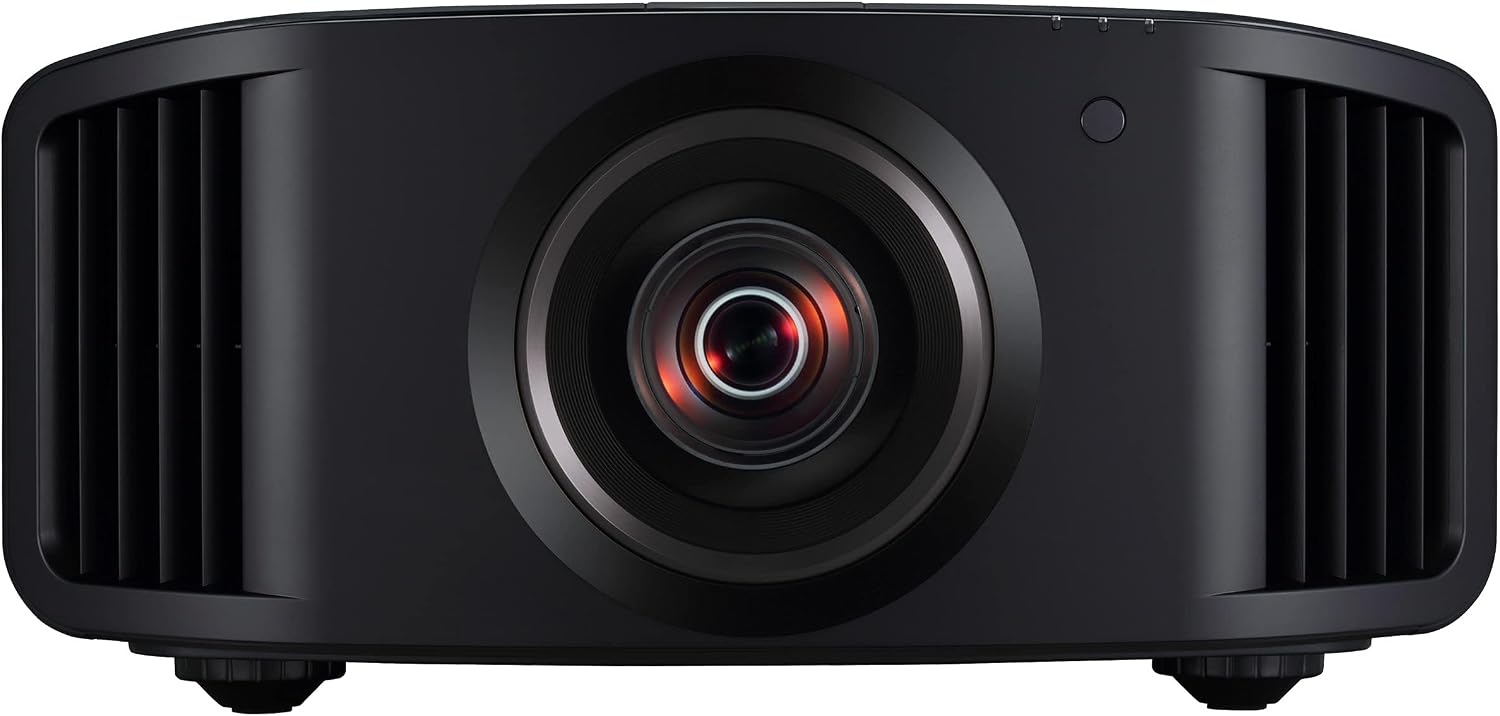
The JVC DLA-NZ7 stands as one of the most accomplished native 4K projectors available, leveraging JVC’s exclusive D-ILA (Digital Image Light Amplifier) reflective display technology. Unlike transmissive LCoS chips used in competing projectors, D-ILA’s reflective design delivers exceptional contrast ratios—the DLA-NZ7 achieves an astounding 200,000:1 contrast ratio, enabling rich, deep blacks that create genuinely cinematic images. This makes it particularly suited for dedicated home theater rooms where darkness and immersion are paramount.
The DLA-NZ7 pairs its true native 4K resolution with robust laser illumination, delivering 2000 ANSI lumens of brightness alongside extraordinary color accuracy. The projector supports Hybrid Log-Gamma, Dolby Vision, and HDR10+, ensuring compatibility with every major HDR format. JVC’s proprietary BrilliantColor technology and 8-segment color wheel calibration enable precise color reproduction that professional colorists trust. The motorized lens shift, focus, and zoom functions provide exceptional flexibility in room design, while the built-in frame interpolation enhances smooth motion handling.
For enthusiasts seeking the highest contrast performance and true 4K native resolution, the DLA-NZ7 is difficult to surpass. Its D-ILA technology excels particularly in dark room environments where its exceptional contrast can fully shine. This model represents a serious investment in premium home cinema, but the result is a projector capable of delivering genuinely theatrical image quality.
✓ Strengths
- Exceptional 200,000:1 contrast ratio
- True native 4K D-ILA technology
- Outstanding color accuracy and precision
- 2000 lumens excellent brightness
- Comprehensive HDR support
- Motorized lens controls
✗ Drawbacks
- Premium pricing tier
- Best in completely dark rooms
- Large footprint
- Requires dedicated screen
- Setup complexity
JVC DLA-NZ7
Premium native 4K D-ILA laser projector with exceptional 200,000:1 contrast ratio, true 4K native resolution, and professional-grade color accuracy.
View on Amazon2. Sony VPL-XW5000ES: 4K Native LCoS Precision
Sony VPL-XW5000ES Premium 4K Projector
Sony’s VPL-XW5000ES represents the company’s flagship 4K laser projection solution, combining native 4K LCoS (Liquid Crystal on Silicon) technology with a unique blue-laser-excited phosphor light source. This innovative illumination system delivers exceptional brightness consistency and remarkable color gamut coverage, enabling vibrant, saturated colors that still maintain proper contrast relationships. The LCoS chipset provides native 4K resolution without the need for pixel-shifting, delivering 3840 x 2160 resolution across the entire image.
The VPL-XW5000ES is engineered for balanced performance across both bright and dark image content. Its 2000 ANSI lumens output and superior color management mean it performs excellently in dedicated home theater environments while still delivering good results in moderately lit rooms. Sony’s proprietary technologies including Super Resolution technology enhance fine detail rendering, and comprehensive HDR support (HDR10, HLG, Dolby Vision) ensures future-proof compatibility with evolving content standards.
For those valuing Sony’s ecosystem, reliability track record, and balanced performance characteristics, the VPL-XW5000ES delivers an excellent 4K laser projection experience. The projector includes comprehensive lens shift, motorized zoom and focus, and detailed calibration controls for professional installation. Its feature set positions it as an excellent choice for both dedicated theater enthusiasts and those who want serious video projection technology from a trusted manufacturer.
✓ Strengths
- True native 4K LCoS technology
- Excellent brightness consistency
- Vibrant color saturation
- Balanced performance in various rooms
- Sony’s reliability heritage
- Professional-grade adjustments
✗ Drawbacks
- Premium pricing
- Not quite as much contrast as D-ILA
- Requires adequate throw distance
- Professional calibration recommended
- Large form factor
Sony VPL-XW5000ES
Premium native 4K LCoS laser projector with 2000 lumens, exceptional color accuracy, and balanced performance. Trusted Sony quality for demanding home theaters.
View on Amazon3. Epson LS11000: 4K Laser Power and Versatility
Epson LS11000 Pro Cinema Laser Projector

Epson’s LS11000 brings professional-grade 4K laser projection to audiences seeking maximum brightness combined with versatile room compatibility. Using Epson’s proprietary 3LCD laser technology with a robust 2500 ANSI lumens output, the LS11000 excels in rooms with ambient light, enabling excellent image quality even when complete darkness isn’t achievable. The 3LCD technology distributes the laser light across three separate LCD panels—one each for red, green, and blue—enabling exceptional color brightness and smooth gradations without the color separation artifacts that some single-chip designs can exhibit.
Rather than pursuing native 4K resolution, Epson focused the LS11000’s engineering on practical performance benefits: exceptional brightness, low maintenance, and room flexibility. The laser light source is rated for 20,000 hours of operation, and the sealed optical engine keeps dust and debris from entering the light path. Motorized lens shift, zoom, and focus provide professional installation flexibility. The projector includes comprehensive HDR support and excellent gaming credentials with input lag below 30ms, making it suitable for serious gaming experiences.
The LS11000 represents an excellent value proposition for those prioritizing brightness and versatility. While it doesn’t achieve the ultra-high contrast of pure 4K native competitors, its exceptional light output ensures outstanding performance across a wider range of room conditions. For serious gamers, those with living rooms that can’t be completely darkened, or anyone seeking Epson’s legendary reliability, the LS11000 delivers professional-grade performance at a more accessible price point than competitors. Compare with Epson LS12000 versus JVC comparisons to understand alternative options.
✓ Strengths
- Outstanding 2500 lumens brightness
- Excellent color brightness (3LCD)
- Versatile room compatibility
- Great gaming performance
- Motorized lens controls
- Reliable Epson construction
✗ Drawbacks
- Not native 4K (uses enhancement)
- Lower contrast than D-ILA/LCoS models
- Larger physical footprint
- Requires adequate ventilation
- Setup complexity
Epson LS11000
Professional 4K-enhanced laser projector with 2500 lumens brightness, 3LCD technology, and exceptional room versatility. Perfect for bright rooms and gaming.
View on Amazon4. Hisense Laser PX3-PRO: Affordable 4K Laser Technology
Hisense Laser PX3-PRO Projector

The Hisense Laser PX3-PRO brings premium 4K laser technology to a broader audience by combining tri-laser illumination (separate red, green, and blue laser modules) with native 4K resolution at a price point significantly lower than competing options. This makes it an excellent entry point into true 4K laser projection for those unwilling to spend premium dollars but still wanting exceptional quality. The tri-laser design delivers superior color accuracy compared to single-laser systems, as each color channel has its own dedicated light source, eliminating color balance compromises.
With 2000 ANSI lumens and outstanding color saturation from its tri-laser engine, the PX3-PRO delivers vibrant, accurate images that satisfy even demanding enthusiasts. The projector supports all major HDR formats and includes motorized focus and zoom for flexible installation. While not quite achieving the contrast ratios of ultra-premium D-ILA projectors, the combination of tri-laser color accuracy, native 4K resolution, and reasonable pricing creates compelling value. The laser light source operates for 25,000+ hours without requiring maintenance or replacement.
For those seeking a genuine 4K laser experience without the premium price premium, the Hisense PX3-PRO represents exceptional value. It’s particularly well-suited for mid-sized dedicated home theaters, gaming setups, and anyone prioritizing color accuracy and long-term reliability. The tri-laser design means you’re getting professional color technology that would cost substantially more from established premium brands. Learn more about best home theater projectors to compare alternatives.
✓ Strengths
- True native 4K resolution
- Excellent tri-laser color accuracy
- Outstanding value pricing
- 2000 lumens solid brightness
- 25,000+ hour laser lifespan
- Motorized lens controls
✗ Drawbacks
- Lower contrast than premium models
- Newer brand with smaller service network
- Not ideal for extremely bright rooms
- May require calibration
Hisense Laser PX3-PRO
Exceptional value 4K laser projector with tri-laser RGB technology, native 4K resolution, and 2000 lumens brightness. Premium quality at mid-range pricing.
View on Amazon5. AWOL VISION LTV-3500: Motorized 4K Laser System
AWOL VISION LTV-3500 Motorized Projector
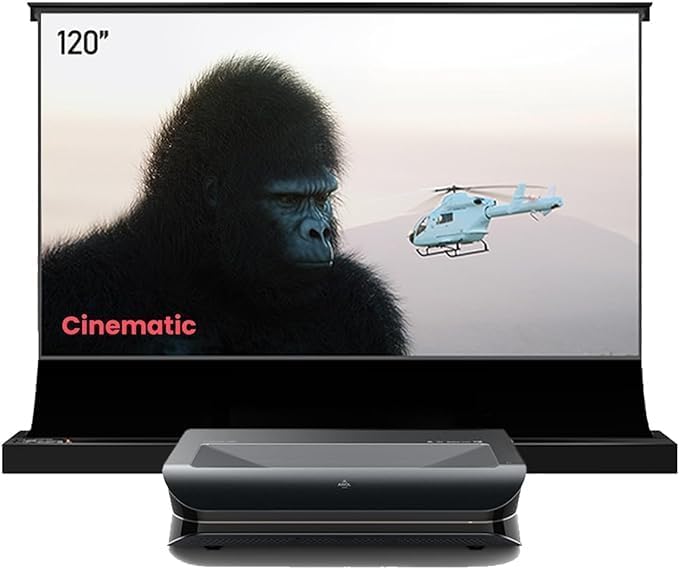
The AWOL VISION LTV-3500 takes a different approach by offering a complete integrated system combining the projector with a motorized ambient light rejecting (ALR) screen. This all-in-one solution is specifically engineered for those who want to maximize image quality without permanent installation complexity. The projector delivers an impressive 3000 ANSI lumens with native 4K resolution, and the included motorized ALR screen rises and lowers with a single remote command, storing away when not in use to maintain your room’s aesthetic appeal.
The LTV-3500’s exceptional brightness makes it ideal for living rooms that aren’t completely dark, and the ALR screen specifically rejects ambient light while reflecting projector light, ensuring images remain crisp and contrasty even in moderately lit spaces. The motorized screen adds remarkable convenience—transform your living room from a regular space to a cinema simply by pressing a button. The projector features comprehensive lens controls, excellent color accuracy, and support for all major HDR formats. This system is particularly appealing for ultra-short throw placement when combined with the right screen geometry.
The AWOL VISION LTV-3500 represents the pinnacle of “appliance-like” 4K laser projection—everything you need in one coordinated package. If you value convenience, integrate seamlessly motorized operation, and want the flexibility of hiding your projection system when not in use, this is an exceptional choice. The combination of 3000 lumens brightness and ALR screen technology ensures stunning images regardless of your room’s lighting conditions.
✓ Strengths
- Complete integrated system
- Outstanding 3000 lumens brightness
- Motorized ALR screen included
- Native 4K resolution
- No permanent installation required
- Excellent ambient light performance
✗ Drawbacks
- Very high price point
- Requires electrical outlet for motor
- Complex initial setup
- Limited screen size options
- Large system footprint
AWOL VISION LTV-3500
Complete motorized 4K laser system with 3000 lumens, native 4K resolution, and integrated motorized ALR screen. Premium integrated solution for modern homes.
View on Amazon6. XGIMI Horizon 20 Max: Portable 4K Laser Innovation
XGIMI Horizon 20 Max Projector

The XGIMI Horizon 20 Max represents a refreshing approach to 4K laser projection: delivering serious performance in a more portable package than traditional installation-focused models. This projector provides 2200 ANSI lumens of brightness combined with 4K laser technology, resulting in images that match or exceed much larger competitors in brightness and color quality. The portable form factor makes it feasible to move between rooms or take to different locations, something impossible with bulky traditional projectors, while still maintaining the performance characteristics that define premium 4K laser technology.
The Horizon 20 Max includes built-in Google TV, eliminating the need for external streaming devices and providing direct access to all major streaming platforms. The laser light source provides exceptional color accuracy and maintains consistent brightness, while the compact design doesn’t sacrifice on features—you get motorized focus, keystone correction, and comprehensive HDR support. The projector performs admirably in moderately lit rooms due to its strong brightness output, making it suitable for both dedicated theater rooms and living spaces that can’t be completely darkened. This is an excellent choice for those seeking portable yet powerful projection.
For the growing segment of users who value flexibility, portability, and the option to move their projector between spaces, the XGIMI Horizon 20 Max is genuinely revolutionary. It proves that premium 4K laser performance doesn’t require permanently installed equipment the size of a small refrigerator. The trade-off is a slightly lower contrast ratio than stationary models, but the convenience and versatility often make this worthwhile.
✓ Strengths
- Genuine 4K laser in portable form
- Excellent 2200 lumens brightness
- Google TV built-in (no device needed)
- Motorized lens adjustments
- Versatile placement options
- Modern smart home integration
✗ Drawbacks
- Slightly lower contrast than premium models
- Compact design limits some controls
- Not ideal for extreme purists
- Wireless connectivity can be unreliable
XGIMI Horizon 20 Max
Portable 4K laser projector with 2200 lumens, Google TV built-in, and motorized lens controls. Perfect for flexible, modern entertainment spaces.
View on Amazon7. Formovie Theater Premium: Triple-Laser 4K Excellence
Formovie Theater Premium Projector

The Formovie Theater Premium stands at the absolute pinnacle of 4K laser projection technology. Using an innovative triple-laser engine with separate red, green, and blue laser modules, this projector achieves color saturation and accuracy that approaches or exceeds what most consumers have ever experienced on any display technology. The laser light source delivers native 4K resolution with exceptional brightness (2500 ANSI lumens), ensuring that every color maintains full saturation even when scaled to massive image sizes.
What truly distinguishes the Formovie Theater Premium is its “LaserTV” designation—it’s engineered to completely replace your television, functioning as a premium primary display for all content, from everyday news broadcasts to specialized cinema. The triple-laser RGB system means each color channel has complete independence, enabling pure color reproduction that single-laser systems simply cannot match. The projector supports all major HDR formats and includes motorized focus, zoom, and keystone correction for professional installation flexibility. The sealed optical engine and laser technology mean virtually no maintenance—no lamp replacements, no fan cleaning, just exceptional images for 25,000+ hours of operation.
For those pursuing the absolute ultimate in 4K laser projection and willing to make the investment, the Formovie Theater Premium is difficult to recommend against. It represents the convergence of all premium projector technologies: true 4K native resolution, triple-laser color technology, exceptional brightness, and engineered to serve as your primary home display. Explore best high-end home cinema projectors to see comparable ultra-premium options.
✓ Strengths
- Outstanding triple-laser RGB system
- Native 4K resolution
- Exceptional 2500 lumens brightness
- Unmatched color saturation
- LaserTV dedicated performance
- Professional-grade features
✗ Drawbacks
- Premium investment required
- Large physical footprint
- Requires dedicated installation
- Complex calibration
- Dedicated power and cooling needs
Formovie Theater Premium
Ultra-premium triple-laser 4K projector with 2500 lumens, native 4K resolution, and LaserTV technology. The pinnacle of 4K laser cinema projection.
View on AmazonComplete 4K Laser Projector Specifications Comparison
Use this detailed comparison table to evaluate key specifications across all featured 4K laser projectors. Scroll horizontally on mobile devices to view all columns.
| Model | Technology | Brightness | Native 4K | Contrast | Price Tier |
|---|---|---|---|---|---|
| JVC DLA-NZ7 | D-ILA | 2000 ANSI | Yes | 200,000:1 | Premium++ |
| Sony VPL-XW5000ES | LCoS Native 4K | 2000 ANSI | Yes | 130,000:1 | Premium++ |
| Epson LS11000 | 3LCD Laser | 2500 ANSI | 4K Enhancement | High | Premium+ |
| Hisense PX3-PRO | Tri-Laser RGB | 2000 ANSI | Yes | 3000:1 | Mid-Range |
| AWOL LTV-3500 | 4K Laser | 3000 ANSI | Yes | High | Premium++ |
| XGIMI Horizon 20 Max | 4K Laser | 2200 ANSI | Yes | Excellent | Premium |
| Formovie Theater Premium | Triple Laser RGB | 2500 ANSI | Yes | Exceptional | Premium++ |
Why Laser Light Source Technology Dominates 4K Projection
Understanding laser technology’s advantages over traditional lamps is crucial for appreciating why 4K laser projectors have become the standard for premium home cinema. The differences go far beyond simple brightness specifications.
Brightness Consistency and Reliability
Traditional lamp-based projectors lose approximately 30% of their brightness within the first 1000 hours of use, and continue degrading throughout their operational life. By the time a lamp reaches half its rated lifespan, the projector has lost 50% of its original brightness. Laser light sources maintain virtually constant brightness throughout their entire operational life—typically 25,000+ hours—meaning your images will look as vibrant in your projector’s tenth year of use as they did on day one. This consistency eliminates the need for brightness compensation as lamps age, and means you’ll never experience the gradual darkening that plagues lamp-based systems.
Superior Color Accuracy
Laser light sources produce pure spectral colors (especially with RGB systems using separate red, green, and blue lasers) that are virtually impossible to achieve with filtered lamp light. This purity enables wider color gamut and more accurate color reproduction, meaning reds appear as pure reds, greens as pure greens, and blues as pure blues, without the color shift that occurs in lamp systems due to phosphor degradation. For those watching calibrated content or serious about color-accurate viewing, laser systems provide a measurable advantage.
Elimination of Lamp Replacement Costs and Hassle
Traditional projector lamps cost $200-$500 to replace and require replacement every 2000-5000 hours of use. That translates to lamp replacements every 2-5 years for regular users. Laser projectors operate for 25,000+ hours without lamp replacements, easily providing 10-20 years of use without bulb maintenance. This not only saves money but eliminates the complexity and downtime associated with lamp replacement. Learn more about comprehensive comparisons of laser versus lamp projectors.
Instant-On Capability
Many laser projectors enable instant-on operation—the projector starts displaying images immediately upon power-up without requiring warm-up time. Lamp-based projectors typically require 30-60 seconds of warm-up before displaying images. This seemingly small difference significantly improves the user experience, making your projector feel more like a television or display than a device that requires preparation time.
Quieter Operation
Laser projectors typically generate less cooling fan noise than lamp-based systems because laser technology generates less waste heat. For home theater users, this translates to less distraction from fan noise and a more immersive viewing experience. You’ll notice this difference especially during quiet scenes where lamp-based projectors’ cooling fans become noticeably audible.
Understanding 4K Resolution and Its Impact on Your Viewing Experience
4K resolution (3840 x 2160 pixels) provides four times the pixel density of 1080p, enabling dramatically increased detail visibility and sharper images, especially on larger screens. But understanding when 4K matters and how to maximize its benefits helps you make the best purchasing decision.
Native 4K vs. 4K Enhancement
“Native 4K” means the projector has actual 4K resolution chips that display all 3840 x 2160 pixels. “4K Enhancement” (or “4K-ready”) typically means the projector accepts 4K input via HDMI but uses a lower native resolution internally and upscales through processing. For true 4K detail visibility, native 4K projectors are significantly superior, particularly on larger screens and for close viewing positions. Some high-quality 4K enhancement systems upscale excellently, but native 4K projectors always deliver more actual detail.
Screen Size Impact on 4K Visibility
4K’s sharpness benefits become increasingly visible on larger screens. For screens under 80 inches viewed from typical seating distances, 1080p projectors often provide satisfactory sharpness. For 100-130 inch screens or smaller screens with close seating, 4K benefits become dramatically apparent. If you’re planning a 150+ inch screen, 4K is essentially mandatory for avoiding visible pixel structure. Generally, the distance from seating to screen divided by the screen width should be less than 1.5 for optimal sharpness perception with native 4K.
Future-Proofing Your Investment
4K content availability continues expanding—more streaming services offer 4K content, 4K Blu-ray libraries grow, and next-generation gaming consoles target 4K output. By investing in native 4K projection now, you’re ensuring your system can take full advantage of premium content as it becomes more common. Some estimate that within 5 years, 4K will be the dominant home theater standard, making native 4K a smart long-term investment.
HDR and 4K Synergy
4K often comes bundled with HDR (High Dynamic Range) capability in modern projectors. HDR provides expanded color gamut and brightness range, complementing 4K resolution’s detail improvements. The combination of native 4K and comprehensive HDR support creates dramatically more immersive images than either technology alone.
3840×2160 vs 1920×1080 = dramatically increased detail
4K sharpness most visible on 100″+ screens
4K Blu-rays and streaming maximize 4K benefits
4K content availability continues expanding
Triple Laser vs. Single Laser vs. Dual Laser: A Technical Deep Dive
One of the most consequential decisions when choosing a 4K laser projector is the type of laser engine it uses. The terms “single laser,” “dual laser,” and “triple laser” refer to fundamentally different approaches to generating the red, green, and blue light that creates the images you see on screen. Understanding these differences will help you make an informed choice that aligns with your priorities—whether that’s color accuracy, brightness, price, or long-term reliability.
How Single-Laser Systems Work
A single-laser projector uses one powerful blue laser as its primary light source. That blue laser beam strikes a spinning phosphor wheel, which converts a portion of the blue light into broad-spectrum yellow-green light. A series of dichroic filters and color wheels then separates this combined light into distinct red, green, and blue channels. The result is a workable RGB signal, but it comes with inherent compromises. Because the red and green colors are derived from phosphor conversion rather than generated natively, their spectral purity is lower than what dedicated lasers can produce. You get good color, but not the purest possible color.
Single-laser systems are the most affordable to manufacture, which is why they appear in entry-level and mid-range laser projectors. They also tend to be slightly less bright than multi-laser systems because the phosphor conversion process introduces efficiency losses. However, for viewers who primarily watch movies and television content in moderately controlled environments, a single-laser projector still delivers a dramatic improvement over traditional lamp-based models. The images are brighter, more consistent, and free from the color degradation that plagues aging lamps.
How Dual-Laser Systems Improve on Single-Laser
Dual-laser projectors use two laser sources—typically a blue laser and a separate red or yellow laser—alongside phosphor conversion to fill in the remaining color channels. This hybrid approach offers meaningful improvements over single-laser systems. By having a dedicated laser for at least one additional primary color (usually red, which is the hardest color for phosphor to generate accurately), dual-laser systems can achieve wider color gamut coverage and better red saturation.
Sony’s blue-laser-plus-phosphor approach in the VPL-XW5000ES is a refined example of dual-wavelength engineering. By carefully tuning the phosphor composition and using advanced color management algorithms, Sony extracts impressive color accuracy from its dual-wavelength light path. The advantage of this design is that it balances performance and cost—you get significantly better color than a basic single-laser system without the manufacturing expense of a full triple-laser engine.
Triple Laser: The Gold Standard
Triple-laser projectors use three completely independent laser modules—one red, one green, and one blue—to generate pure, spectrally narrow primary colors without any phosphor conversion. This is the approach used by the Hisense PX3-PRO and the Formovie Theater Premium, and it represents the current pinnacle of projector light source technology. Because each primary color is generated by a dedicated laser, the spectral purity is extraordinarily high. Red is a pure red, green is a pure green, and blue is a pure blue—no phosphor contamination, no spectral bleed, no color wheel artifacts.
The practical benefit of this purity is immediately visible. Colors appear more saturated, more lifelike, and more distinct from one another. Skin tones look natural rather than slightly orange or pink. Green foliage in nature documentaries looks genuinely alive rather than washed out. Red sports cars in action films pop with the kind of intensity that makes you feel the color rather than just see it. Triple-laser projectors can also cover a wider color gamut—often exceeding the DCI-P3 standard used in commercial cinemas and approaching the even wider Rec. 2020 color space.
The trade-offs for triple-laser technology are cost and, in some cases, a phenomenon called “laser speckle.” Speckle appears as a subtle shimmering or grain pattern on the projected image, caused by the coherent nature of laser light interfering with itself at the screen surface. Modern triple-laser projectors have largely solved this problem through techniques like vibrating screen elements, multi-mode lasers, and diffuser plates, but in some installations, particularly with very smooth screen surfaces, speckle can still be visible at close viewing distances.
Speckle: What It Is and Why It Matters
Laser speckle deserves its own discussion because it’s the one visual artifact that’s unique to laser projectors—it doesn’t exist with lamp-based systems. Speckle manifests as a fine, glittering pattern that overlays the projected image, particularly visible when you move your head or when the image contains large areas of uniform color. It’s caused by the coherent (single-wavelength, in-phase) nature of laser light creating constructive and destructive interference patterns as it reflects off the screen surface into your eyes.
Manufacturers address speckle through several techniques. The most common is using multi-longitudinal-mode lasers, which emit slightly varying wavelengths that naturally reduce coherence. Another approach is mechanical—vibrating the screen slightly to break up the interference pattern in real-time, which is why some ALR screens designed for laser projectors include a slight surface texture. Many modern triple-laser projectors also include electronic speckle reduction that subtly modulates the laser output to minimize visible patterns. For most viewers in typical viewing conditions, speckle is not a significant concern with modern projectors, but if you’re particularly sensitive to visual artifacts, it’s worth seeing a triple-laser projector in person before purchasing.
Which Laser Type Should You Choose?
For budget-conscious buyers who want meaningful improvements over lamp technology, single-laser projectors deliver excellent value. For those seeking wider color gamut and better red performance without a massive price premium, dual-laser systems offer a sensible middle ground. For enthusiasts who demand the widest possible color gamut, the most saturated primary colors, and the most lifelike image reproduction, triple-laser systems represent the current state of the art—and the direction the entire industry is heading.
Color Science, HDR Formats, and Calibration for 4K Laser Projectors
Resolution gets all the headlines, but color science and HDR performance are what separate a good projected image from a breathtaking one. Understanding how 4K laser projectors handle color—along with the various HDR formats they support—will help you evaluate models more critically and get the most from your investment after purchase.
Color Gamut Standards: sRGB, DCI-P3, and Rec. 2020
Color gamut refers to the range of colors a display can reproduce. Think of it as the total palette available to the projector. The sRGB color space, which was designed for computer monitors and web content, covers a relatively modest range of colors. DCI-P3, the standard used in digital cinema projection, is approximately 25% wider than sRGB, encompassing more saturated reds, greens, and blues. Rec. 2020 (also called BT.2020) is the widest commonly referenced color space, designed for ultra-high-definition content, and covers roughly 75% more area than sRGB.
Most 4K laser projectors in the premium tier cover 90-100% of DCI-P3, which means they can display virtually every color present in commercial cinema content. Triple-laser models like the Formovie Theater Premium and Hisense PX3-PRO often push toward 95-105% of DCI-P3 and can display a meaningful portion of the Rec. 2020 space. Single-laser and dual-laser models typically cover 80-95% of DCI-P3. For most viewers, the difference between 90% and 100% DCI-P3 coverage is subtle and only apparent in side-by-side comparisons. However, if you work in color-critical environments or simply want the widest possible palette, triple-laser models have a clear advantage.
HDR10: The Baseline Standard
HDR10 is the most widely supported HDR format and serves as the baseline for all HDR content. It uses static metadata, meaning the brightness and color information is set once for the entire movie or show and doesn’t change scene-by-scene. While this is less sophisticated than dynamic HDR formats, HDR10 still provides a meaningful improvement over standard dynamic range (SDR) content by expanding the range between the darkest and brightest elements of the image. All seven projectors in this guide support HDR10.
HDR10+ and Dolby Vision: Dynamic HDR
HDR10+ (developed by Samsung) and Dolby Vision (developed by Dolby) both use dynamic metadata that adjusts brightness and color information on a scene-by-scene or even frame-by-frame basis. This allows the projector to optimize its output for each individual scene rather than applying a single set of parameters to the entire content. The result is more nuanced shadow detail in dark scenes, more impactful highlights in bright scenes, and more accurate color throughout.
Dolby Vision is the more widely adopted of the two dynamic formats, with broad support from streaming platforms (Netflix, Disney+, Apple TV+) and a growing library of 4K Blu-ray discs. HDR10+ has less content availability but is championed by Samsung and supported by Amazon Prime Video. If you primarily watch content on Netflix and Disney+, Dolby Vision support is particularly valuable. If you’re a physical media collector, look for projectors that support both formats for maximum compatibility.
HLG (Hybrid Log-Gamma): Broadcast HDR
HLG was developed jointly by the BBC and NHK for live broadcast HDR content. Unlike HDR10 and Dolby Vision, which require HDR-encoded content, HLG is backward-compatible—HLG content displays correctly on both HDR and SDR displays. This makes it particularly important for live sports broadcasts and other real-time content. If you plan to watch live sports or broadcast television through your projector, HLG support ensures you’ll receive HDR-quality images when broadcasters transmit them. Most premium 4K laser projectors, including all seven featured in this guide, include HLG support.
HDR Tone Mapping: The Critical Hidden Feature
HDR content is typically mastered for displays capable of 1,000 to 4,000 nits of peak brightness. No projector can approach these brightness levels—projector HDR is typically measured in hundreds of nits at best. This mismatch creates a challenge: the projector must compress the HDR brightness range into its actual capabilities without losing detail in highlights or crushing blacks in shadows. This process is called HDR tone mapping, and the quality of a projector’s tone mapping algorithm has an enormous impact on HDR picture quality.
Poor tone mapping results in blown-out highlights (where bright details are lost, replaced by flat white areas) or murky shadows (where dark detail is lost, replaced by featureless black). Good tone mapping preserves detail across the entire brightness range while still conveying the expanded contrast that makes HDR compelling. JVC’s D-ILA projectors are widely regarded as having among the best HDR tone mapping in the industry, using a combination of automatic dynamic tone mapping and user-adjustable parameters. Sony’s XW5000ES also excels in this area with its proprietary HDR remaster technology.
When evaluating 4K laser projectors, pay close attention to HDR tone mapping quality. Read professional reviews that specifically evaluate HDR performance, and if possible, view HDR content on the projector before purchasing. The difference between good and bad tone mapping is more impactful than the difference between HDR10 and Dolby Vision for most viewers.
Professional Calibration: When and Why
Even the best 4K laser projector arrives from the factory with default settings that are optimized for retail showroom conditions—not your living room. Professional calibration adjusts the projector’s white balance, color temperature, gamma curve, and color gamut tracking to match industry reference standards, ensuring that the content you watch appears exactly as the director intended. A professional calibrator uses specialized equipment (colorimeters and spectrophotometers) to measure the projector’s actual output and create custom calibration profiles.
The benefit of calibration is most apparent in skin tones, shadow detail, and color accuracy across the entire brightness range. Uncalibrated projectors often display slightly blue or green whites, oversaturated colors that look impressive initially but fatigue the eyes over long viewing sessions, and imprecise shadow detail that makes dark scenes appear murky. Calibration corrects all of these issues, typically taking 2-4 hours and costing $500-$2,000 depending on the technician and your region.
For projectors under $5,000, many enthusiasts opt for DIY calibration using consumer-grade colorimeters and calibration software like CalMAN or HCFR. While not as precise as professional calibration with reference-grade instruments, DIY calibration can achieve 80-90% of professional results at a fraction of the cost. For premium projectors costing $10,000 or more, professional calibration is strongly recommended to extract maximum performance from your investment.
Ultra Short Throw vs. Standard Throw 4K Laser Projectors
The throw distance of a projector—the distance between the projector’s lens and the screen—is one of the most fundamental factors determining how it integrates into your living space. Understanding the differences between ultra-short throw (UST) and standard throw designs is essential for choosing a 4K laser projector that works with your room rather than against it.
What Is Ultra Short Throw?
Ultra-short throw projectors use specialized wide-angle optics to produce a large image from an extremely short distance—typically just 7-20 inches from the screen. This allows the projector to sit on a console or media cabinet directly below the screen, much like a soundbar. The optical engineering required to achieve this is complex and expensive, which is why UST projectors generally cost more than comparable standard-throw models. However, the spatial benefits are transformative: no ceiling mounting, no running cables across the room, no projector sitting in the middle of your living space.
Standard Throw: The Traditional Approach
Standard throw projectors—like the JVC DLA-NZ7, Sony VPL-XW5000ES, and Epson LS11000—require significant distance between the projector and screen to produce a large image. For a 120-inch diagonal image, a standard throw projector typically needs 10-15 feet of throw distance. This usually means ceiling mounting the projector behind the seating area. While this requires more installation planning, it offers advantages in image quality: standard throw optics are simpler and less expensive to manufacture, allowing more of the projector’s budget to go toward display technology, contrast performance, and color accuracy.
Image Quality Differences
This is where the comparison gets nuanced. UST projectors have historically shown slight compromises in uniformity and edge sharpness compared to standard throw models, because the extreme wide-angle optics must correct for significant geometric distortion across a very short projection path. However, modern UST designs have improved dramatically, and premium models like the Hisense PX3-PRO and AWOL LTV-3500 deliver image quality that rivals or matches many standard throw projectors in real-world viewing conditions. The gap has narrowed to the point where most viewers cannot identify which type of projector produced the image in a controlled comparison.
Standard throw projectors still maintain an edge in pure contrast performance, particularly with models like the JVC DLA-NZ7 that use dedicated D-ILA technology. The simpler optical path of standard throw designs allows for more precise light control, contributing to the deep blacks and high contrast ratios that define premium cinema projection.
Installation and Living Space Considerations
UST projectors are dramatically easier to install and live with. Place the projector on a flat surface, position it at the correct distance from the screen, adjust focus, and you’re done. There’s no ceiling mounting, no cable routing through walls, and no permanent alteration to your room. When you want to rearrange your furniture or move to a new home, the projector moves with you easily.
Standard throw projectors require more planning. Ceiling mounting involves brackets, electrical connections, HDMI cable runs (often through walls or ceiling cavities), and precise alignment. The result is a permanent, professional installation that looks clean but requires commitment. For renters, those who move frequently, or anyone who doesn’t want to modify their living space, UST is the clear winner. For homeowners building dedicated theater rooms, standard throw offers maximum flexibility in screen size, placement, and image quality tuning.
Which Should You Choose?
Choose ultra-short throw if: you want minimal installation complexity, you’re placing the projector in a living room or multi-use space, you don’t want ceiling mounting, or you value the ability to easily relocate the system. Choose standard throw if: you’re building a dedicated theater room, you prioritize maximum contrast and image quality, you’re comfortable with ceiling mounting, or you want the widest possible screen size options. Both approaches deliver excellent 4K laser projection—the right choice depends entirely on your space and lifestyle.
For a deeper comparison, see our guide on ultra short throw versus standard throw projectors.
4K Laser Projector Buying Guide and Expert Recommendations
Define Your Budget Constraints
4K laser projectors range from mid-range models around $3,000-5,000 (Hisense PX3-PRO) to ultra-premium systems exceeding $25,000 (JVC, Sony, Formovie). Understanding your budget ceiling helps eliminate options that won’t be practical for your situation. Premium-tier projectors ($15,000+) typically offer exceptional contrast and exclusive technologies, while mid-range 4K laser models deliver surprisingly excellent performance at lower price points. Budget-conscious buyers should focus on the Hisense PX3-PRO, which delivers genuine 4K laser technology at a fraction of premium competitors’ pricing.
Assess Your Room Characteristics
Room environment dramatically impacts which projector will perform optimally. Completely dark, dedicated home theater rooms benefit most from high-contrast D-ILA technology (JVC DLA-NZ7) or triple-laser systems. Living rooms that can’t be completely darkened benefit from higher-brightness models (Epson LS11000, AWOL LTV-3500) combined with ALR screens. Ceiling height determines throw distance requirements and mounting options. Wall color, ambient light sources, and viewing distance all influence the ideal projector selection. Consider your specific room before focusing on projector specifications.
Determine Your Viewing Content
Consider what you’ll primarily watch. For cinema content and serious movie enthusiasts, native 4K and high contrast matter significantly. For gaming, high frame rate support and low input lag become important. For all-purpose use (movies, gaming, streaming), balanced projectors with good brightness and solid color accuracy suit most needs. If you plan watching native 4K Blu-rays regularly, native 4K projectors are essential. For streaming-focused users, 4K enhancement projectors may suffice.
Installation and Mounting Considerations
Large projectors like the JVC, Sony, and traditional theater models require dedicated installation planning—ceiling mounts, throw distance verification, electrical planning. Portable options like the XGIMI Horizon 20 Max eliminate installation complexity. The AWOL LTV-3500 motorized system changes your setup approach entirely. Consider whether you want permanent installation or flexibility to move/adjust your system. Professional installation is recommended for premium projectors, adding cost but ensuring optimal performance. Check proper ceiling mounting techniques for projectors before installation.
Brightness Requirements Based on Room Lighting
Completely dark rooms (blackout curtains, minimal ambient light) work with 1500+ ANSI lumens. Moderately lit rooms require 2000+ lumens. Bright living rooms with standard lighting need 2500+ lumens or require ALR screens. Very bright rooms benefit from both high brightness (3000+ lumens) AND ALR screens. The Epson LS11000 (2500 lumens) and AWOL LTV-3500 (3000 lumens) excel in brighter environments. For dark theaters, even 2000 lumens provides excellent results.
Support and Warranty Considerations
Premium brands like JVC, Sony, and Epson offer established support networks and proven reliability. Newer brands like Hisense, AWOL, and Formovie have fewer service centers but often provide excellent direct support. Consider warranty length (typically 2-3 years for premium models), support availability in your region, and replacement part availability when making your selection. Building a relationship with an authorized dealer provides long-term support advantages.
Expert Recommendations by Use Case
Pure Film Enthusiasts: JVC DLA-NZ7 or Sony VPL-XW5000ES for maximum contrast and 4K fidelity in dark rooms.
Bright Room Lovers: Epson LS11000 or AWOL LTV-3500 for exceptional brightness and ALR screen compatibility.
Value Seekers: Hisense Laser PX3-PRO for genuine 4K laser technology at reasonable pricing.
All-Purpose Users: XGIMI Horizon 20 Max for balanced performance, smart features, and flexibility.
Premium Integrators: Formovie Theater Premium or AWOL LTV-3500 for complete system integration and maximum specifications.
Choosing the Right Screen for Your 4K Laser Projector
A 4K laser projector is only half of the display equation—the screen is the other half. Choosing the wrong screen can undermine the performance of even the best projector, while the right screen amplifies every strength your projector brings. Screen selection is the most overlooked aspect of projector system design, yet it has arguably the largest impact on perceived image quality after the projector itself.
Screen Gain: What It Means and Why It Matters
Screen gain measures how much light the screen reflects compared to a reference white surface (which has a gain of 1.0). A screen with a gain of 1.3 reflects 30% more light back toward the viewer than the reference, making the image appear brighter. A screen with a gain of 0.8 absorbs some light, making the image appear dimmer but often improving black levels and reducing hot-spotting (where the center of the screen appears brighter than the edges).
For 4K laser projectors in dedicated dark theaters, a gain of 0.8-1.0 is typically ideal. The lower gain improves perceived contrast by deepening blacks, while the projector’s laser brightness compensates for the slight light loss. For projectors in rooms with moderate ambient light, a gain of 1.0-1.3 helps maintain brightness. Screens with gains above 1.3 should generally be avoided—they can create visible hot-spotting, narrow the optimal viewing angle, and introduce color shifts at off-axis viewing positions.
Fixed Frame vs. Motorized vs. Portable Screens
Fixed frame screens are stretched tight across a rigid frame, creating a perfectly flat surface that ensures consistent focus and uniformity across the entire image. They provide the best image quality but are permanently mounted on a wall, consuming wall space even when not in use. For dedicated theater rooms where the screen is always visible, fixed frames are the gold standard.
Motorized screens roll up into a ceiling-mounted housing when not in use, preserving your room’s aesthetic for non-viewing activities. Modern motorized screens use tension mechanisms (tab-tensioning) that pull the screen material flat when deployed, approaching the flatness of fixed-frame designs. The AWOL LTV-3500’s included motorized ALR screen is an excellent example. Motorized screens cost more than fixed frames but offer lifestyle flexibility that many users find essential.
Portable screens are freestanding, tripod-based, or inflatable designs that can be set up and taken down as needed. They’re the least expensive option but sacrifice flatness, stability, and image quality. For casual outdoor movie nights or temporary setups, portable screens are adequate. For any permanent or semi-permanent installation, fixed frame or motorized screens are strongly preferred.
ALR (Ambient Light Rejecting) Screens
ALR screens use specialized optical layers to absorb ambient light from the sides and above while reflecting projector light from below (or, in UST configurations, from below and directly in front). This technology is transformative in rooms with ambient light—it can improve perceived contrast by 3-10x compared to a standard white screen in the same room. ALR screens typically cost 2-5x more than equivalent standard screens, but for projectors used in living rooms, the investment is almost always worthwhile. Read our detailed analysis of ALR screens for UST projectors to understand when they justify their cost.
Screen Size: Finding the Sweet Spot
Bigger isn’t always better. The ideal screen size depends on your viewing distance, projector brightness, and resolution. A common recommendation is that the viewing distance should be 1.0-1.5 times the screen diagonal for 4K content. For a 120-inch screen, this means seating 10-15 feet away. If you sit too close, you may perceive individual pixels; too far, and you lose the immersive benefit of the large image. For projector brightness, larger screens require more lumens to maintain the same perceived brightness—a 150-inch screen has roughly 56% more area than a 120-inch screen, meaning you need proportionally more brightness to maintain the same foot-lambert level at the screen surface.
4K Laser Projectors for Gaming: Performance, Latency, and Console Compatibility
Gaming on a 4K laser projector delivers an experience that no television can match—the sheer scale of a 120-150 inch image with 4K detail and laser-powered brightness creates an immersion level that transforms gaming from a screen activity into an environmental experience. However, not all 4K laser projectors are equally suited for gaming, and understanding the specific performance metrics that matter for gaming will help you choose the right model.
Input Lag: The Critical Gaming Metric
Input lag is the delay between pressing a button on your controller and seeing the corresponding action on screen. For casual gaming (adventure games, turn-based strategy, story-driven experiences), input lag below 50ms is generally acceptable. For competitive or fast-paced gaming (first-person shooters, fighting games, racing games), input lag below 30ms is essential—ideally below 20ms. Every millisecond of input lag affects your reaction time and can be the difference between a successful headshot and a frustrating miss.
Among the projectors featured in this guide, the Epson LS11000 stands out for gaming with input lag below 30ms in its gaming mode. The XGIMI Horizon 20 Max also performs well for gaming thanks to its dedicated game mode that reduces processing overhead. The JVC DLA-NZ7 and Sony VPL-XW5000ES offer game modes that reduce input lag, though their primary strength lies in cinema content. When evaluating any projector for gaming, always check the input lag measurement in game mode specifically—standard cinema modes can have input lag of 50-100ms or more, which is unacceptable for responsive gaming.
Refresh Rate and Frame Rate Support
Modern gaming consoles (PlayStation 5, Xbox Series X) support 4K output at 120Hz, and gaming PCs can push even higher frame rates. A projector’s ability to accept and display high refresh rate content directly impacts gaming smoothness. Most 4K laser projectors support 4K at 60Hz as their maximum, which is perfectly adequate for the majority of games. However, competitive gamers and those playing fast-paced titles may benefit from projectors that support 4K at 120Hz or 1080p at 120Hz. The Epson LS11000 supports 4K/120Hz input, making it one of the most gaming-capable models in this category.
HDMI 2.1: Essential for Next-Gen Gaming
HDMI 2.1 is the latest HDMI specification and is required for 4K at 120Hz, Variable Refresh Rate (VRR), and Auto Low Latency Mode (ALLM). VRR dynamically adjusts the display’s refresh rate to match the game’s frame rate, eliminating screen tearing without the performance penalty of traditional V-Sync. ALLM automatically switches the projector to its low-latency game mode when it detects a gaming console, eliminating the need to manually change settings. If you own or plan to own a PlayStation 5 or Xbox Series X, HDMI 2.1 support should be a priority in your projector selection.
Screen Size and Competitive Gaming
While a massive projected image is immersive, it can actually be a disadvantage for competitive gaming. In fast-paced multiplayer games, information at the edges of a 150-inch screen is outside your natural field of focused vision, requiring head movement to monitor the full game state. Many competitive gamers prefer slightly smaller projected images (80-100 inches) or sit further back to ensure the entire game world is visible without eye strain. For single-player cinematic games, larger is almost always better—scale enhances the narrative experience in ways that smaller screens cannot replicate.
HDR Gaming on 4K Laser Projectors
HDR gaming is transformative on a 4K laser projector. Games like Horizon Forbidden West, Cyberpunk 2077, and Ratchet & Clank: Rift Apart were designed with HDR in mind, using the expanded brightness range to create stunning lighting effects—sunsets that feel genuinely warm, neon cityscapes that glow with intensity, and dark caves where shadow detail reveals hidden threats. The projector’s HDR tone mapping quality becomes critical for gaming because game HDR is often less precisely mastered than cinema HDR, and the tone mapping must adapt in real-time to rapidly changing scenes.
Room Design and Ambient Light Management for 4K Laser Projectors
The single largest factor affecting your 4K laser projector’s image quality isn’t the projector itself—it’s the room it lives in. Even a $25,000 premium projector will look washed out and disappointing in an untreated bright room, while a mid-range model can deliver stunning images in a properly optimized space. Understanding room design principles will help you maximize the return on your projector investment.
Light Control: The Foundation of Great Projection
Ambient light is the enemy of projected images. Every photon of light that reaches the screen from sources other than the projector reduces contrast, washes out colors, and degrades the viewing experience. For the best results from any 4K laser projector, you need to control every light source in the room. This starts with windows—blackout curtains or shades are the single most impactful investment you can make in your viewing room. Even “light-reducing” curtains allow significant ambient light through; true blackout curtains eliminate virtually all window light.
Beyond windows, consider all artificial light sources. LED indicator lights on equipment, digital clock displays, under-cabinet lighting, and even exit signs create ambient light that reduces image quality. Covering or removing these light sources during viewing sessions yields noticeable improvements in perceived contrast and color saturation.
Wall and Ceiling Color
Light-colored walls and ceilings act as reflectors, bouncing projected light back onto the screen and reducing contrast. This effect is particularly problematic with large projected images—the light that misses the screen (overspray) hits the surrounding walls and reflects back, creating a subtle but measurable brightening effect on the screen surface. The solution is dark, non-reflective surfaces surrounding the screen and on the ceiling above the seating area. Dedicated theater rooms often use dark gray, charcoal, or even black paint on walls and ceilings adjacent to the screen. Even a dark accent wall behind the screen provides a meaningful improvement.
Flooring Considerations
Reflective flooring (hardwood, tile, polished concrete) bounces light from the screen upward, creating reflections that reduce perceived contrast. Dark carpet or large area rugs in the viewing area absorb reflected light and contribute to better image quality. This is one of the most commonly overlooked aspects of room design for projector installations.
Seating Distance and Angle
Optimal seating distance depends on screen size and resolution. For 4K projectors, the Society of Motion Picture and Television Engineers (SMPTE) recommends a viewing angle of 30-40 degrees for an immersive cinema experience. Practically, this translates to a seating distance of approximately 1.0-1.5 times the screen diagonal for 4K content. At this distance, individual pixels are invisible, and the image fills your field of view without requiring head movement to see the entire screen. Seating should be centered horizontally on the screen and positioned so that the viewer’s eye level is approximately 1/3 from the bottom of the screen—a position that mirrors the optimal seating in commercial cinemas.
Acoustic Treatment
While not directly related to image quality, room acoustics significantly affect the overall cinema experience. Hard, parallel surfaces create echo and reverb that muddy dialogue and distort sound effects. Acoustic panels on walls, heavy curtains, and carpeted floors all contribute to better sound quality. If you’re investing $5,000+ in a 4K laser projector, spending $500-1,500 on basic acoustic treatment dramatically improves the total experience.
Installation, Placement, and Throw Distance Planning
Proper installation is the bridge between purchasing a great 4K laser projector and actually experiencing great images. Even minor errors in placement, alignment, or mounting can degrade image quality significantly. This section covers the critical installation decisions you’ll need to make.
Throw Distance Calculation
Throw distance is the distance from the projector’s lens to the screen surface. Every projector has a “throw ratio”—a number that describes how wide the image will be at a given distance. A throw ratio of 1.5:1 means the projector produces an image 1 unit wide for every 1.5 units of distance. To calculate the required throw distance for your desired screen width, multiply the screen width by the throw ratio. For example, a 120-inch diagonal screen (approximately 105 inches wide) with a projector throw ratio of 1.5:1 requires approximately 157 inches (13.1 feet) of throw distance.
Most premium 4K laser projectors include motorized zoom lenses with a range of throw ratios—commonly 1.3:1 to 2.2:1. This range gives you flexibility in placement. Always consult the manufacturer’s throw distance calculator for your specific model and desired screen size before purchasing or installing. For detailed calculation tools, see our projector throw distance calculator.
Ceiling Mounting: Pros, Cons, and Best Practices
Ceiling mounting is the most common installation method for standard throw projectors in dedicated theater rooms. It keeps the projector out of the way, allows the image to project downward at a natural angle, and provides a clean, professional appearance. Ceiling mounting requires a sturdy mounting point (ceiling joist or reinforced bracket), a quality ceiling mount (expect to spend $100-400), and cable routing for HDMI, power, and optionally trigger or control cables.
When ceiling mounting, ensure the mount allows for precise adjustment in pitch, yaw, and roll—the three axes of projector orientation. Even a 1-degree misalignment can create visible keystoning or uneven focus across the image. Many premium projectors include lens shift (vertical and horizontal) that allows you to adjust the image position without physically moving the projector. Lens shift is more optically pure than keystone correction, which digitally distorts the image and can reduce resolution in affected areas.
Shelf and Cabinet Placement
For those who cannot or prefer not to ceiling mount, placing the projector on a rear shelf or dedicated equipment stand behind the seating area is a viable alternative. This requires a shelf at the appropriate height and depth, adequate ventilation space around the projector (laser projectors generate less heat than lamp models but still need airflow), and cable management to prevent tripping hazards. Shelf placement works well for projectors with comprehensive lens shift that can compensate for non-ideal placement heights.
UST Console Placement
Ultra-short throw projectors sit on a low console directly below the screen. The console must be at a specific height and distance from the screen—typically determined by the projector’s throw ratio and the desired image size. Many UST projector manufacturers specify exact placement dimensions in their installation guides. The console should be stable, level, and positioned so that the projector’s optical path is unobstructed. Common mistakes include placing the console too far from the screen (resulting in an oversized image) or at the wrong height (causing geometric distortion).
Cable Management and Connectivity
For 4K HDR content, use certified Ultra High Speed HDMI cables that support HDMI 2.1 bandwidth (48 Gbps). Older HDMI cables may not reliably carry 4K HDR signals, leading to intermittent signal dropouts, color banding, or resolution limitations. For runs longer than 15 feet, consider fiber-optic HDMI cables, which maintain signal integrity over much longer distances than copper cables. If ceiling mounting, run cables through the ceiling cavity or through decorative conduit along the wall.
Ventilation and Thermal Management
Laser projectors generate significantly less heat than lamp-based models, but they still require adequate ventilation. Ensure at least 6-8 inches of clearance around the projector’s intake and exhaust vents. Never place a projector in a sealed cabinet without ventilation. In ceiling installations, verify that the mounting location has adequate airflow and isn’t enclosed in a dead air space. Excessive heat shortens the lifespan of electronic components and can cause thermal throttling that reduces brightness.
Audio Integration for 4K Laser Projector Home Theaters
Picture quality is only half of the cinema experience—audio is the other half, and it’s the half that most projector buyers underinvest in. A 4K laser projector paired with tinny built-in speakers or a basic soundbar creates a visual mismatch: your eyes see a 120-inch cinematic image while your ears hear a flat, lifeless soundscape. Proper audio integration transforms a projector setup from a “big screen” into a genuine home theater.
Why Projector Audio Is Limited
Most projectors have small built-in speakers that are designed for convenience, not quality. They produce adequate sound for presentations and casual viewing but lack the bass response, dynamic range, and spatial imaging needed for cinema content. Even premium projectors like the JVC DLA-NZ7 and Sony VPL-XW5000ES have minimal built-in audio because their manufacturers assume that buyers at this level will use external audio systems. Plan your audio system alongside your projector purchase—don’t treat it as an afterthought.
Soundbar Solutions
A quality soundbar is the simplest audio upgrade for a projector setup. Modern soundbars from manufacturers like Sonos, Samsung, and JBL include HDMI ARC or eARC connectivity, allowing them to receive audio directly from your source device or through the projector’s audio return channel. Soundbars with dedicated subwoofers provide the bass impact needed for movie explosions and music. For projector setups, position the soundbar directly below the screen for the most natural sound imaging. Budget $300-1,000 for a soundbar system that complements a 4K laser projector.
AV Receiver and Surround Sound
For the full cinema experience, an AV receiver powering a surround sound speaker system is the gold standard. A 5.1 system (three front speakers, two surround speakers, and a subwoofer) creates spatial audio that places you inside the action. A 7.1 or Dolby Atmos system (adding height channels) adds vertical dimensionality that makes rain fall from above, helicopters fly overhead, and explosions rumble from every direction. The AV receiver serves as the hub of your system, accepting HDMI inputs from your source devices and passing video through to the projector while processing audio to the speakers.
For the cleanest integration, run HDMI from your source devices (streaming stick, Blu-ray player, gaming console) to the AV receiver, then run a single HDMI cable from the receiver’s output to the projector. This ensures the receiver handles all audio processing while the projector receives a clean video signal. Budget $500-3,000 for a quality AV receiver and speaker package, depending on the number of channels and speaker quality.
Wireless Audio Options
Wireless speaker systems from Sonos, Bluesound, and other manufacturers offer the convenience of no speaker wire runs, which is particularly valuable in rooms where running cables through walls isn’t practical. Modern wireless systems have latency low enough to avoid noticeable audio-video sync issues, though some calibration may be needed. Wireless surround speakers and subwoofers can be placed flexibly, making them ideal for multi-purpose rooms where permanent wiring isn’t desired.
Audio Calibration
Modern AV receivers include automatic room calibration systems (Audyssey, YPAO, Dirac Live) that use a measurement microphone to analyze your room’s acoustics and automatically adjust speaker levels, distances, equalization, and crossover frequencies. Running this calibration after setting up your speakers takes 15-30 minutes and yields dramatic improvements in sound quality. It compensates for room reflections, standing waves, and speaker placement compromises that would otherwise degrade audio quality.
Smart Features, Streaming Platforms, and Connectivity
The built-in smart platform of a 4K laser projector determines how conveniently you can access streaming content without external devices. While serious home theater enthusiasts often prefer dedicated streaming devices (Apple TV 4K, NVIDIA Shield, Roku Ultra), the quality and completeness of built-in smart platforms has improved dramatically and matters for users who want a simpler, more streamlined setup.
Google TV, Android TV, and Google-Certified Platforms
Google TV (the successor to Android TV) is the most common smart platform in modern projectors. The XGIMI Horizon 20 Max includes a full Google TV implementation, providing access to virtually every major streaming app—Netflix, YouTube, Amazon Prime Video, Disney+, Apple TV+, and more. Google TV also integrates Google Assistant for voice control and Google Chromecast for easy screen mirroring from phones and tablets. The platform is regularly updated with new features and app compatibility.
Proprietary Smart Platforms
Some manufacturers develop their own smart platforms. Hisense’s VIDAA platform powers their laser TV products, offering a curated selection of streaming apps with a simple, responsive interface. Samsung’s Tizen platform, found in their projector products, is similarly polished. Proprietary platforms can be more optimized for the specific hardware but may have fewer app options than Google TV or Android TV. If you rely on niche streaming services, verify app availability before choosing a projector with a proprietary platform.
External Streaming Devices
For the best streaming experience, many enthusiasts pair their projector with a dedicated external streaming device. The Apple TV 4K offers the best user interface and broadest app support, while the NVIDIA Shield TV Pro is favored by enthusiasts for its superior upscaling capabilities and Plex media server functionality. The Amazon Fire TV Stick 4K Max offers excellent value and supports most streaming formats. External devices connect to the projector via HDMI and bypass any limitations of the projector’s built-in platform.
Wireless Connectivity: Wi-Fi and Bluetooth
All modern 4K laser projectors include Wi-Fi connectivity for streaming and firmware updates. Dual-band Wi-Fi (2.4GHz and 5GHz) is standard, with some models supporting Wi-Fi 6 for faster, more reliable wireless performance. Bluetooth connectivity allows wireless audio output to headphones, soundbars, or speakers—useful for late-night viewing without disturbing others or for supplementing the projector’s built-in audio. Bluetooth audio may introduce slight latency (100-300ms), which can create lip-sync issues. Many projectors include audio delay adjustment to compensate.
HDMI eARC and Audio Return Channel
HDMI ARC (Audio Return Channel) and its enhanced version eARC allow audio to travel from the projector back to a soundbar or AV receiver through the same HDMI cable that carries video from the source to the projector. This simplifies cabling—one HDMI cable handles both directions. eARC supports higher-bandwidth audio formats (Dolby Atmos, DTS:X) that standard ARC cannot carry. If you’re connecting to a Dolby Atmos soundbar or AV receiver, ensure both the projector and audio device support eARC for full audio quality.
Smart Home Integration
Modern projectors increasingly integrate with smart home ecosystems. Voice control through Google Assistant, Amazon Alexa, or Apple HomeKit allows you to turn the projector on/off, switch inputs, adjust volume, and launch apps using voice commands. IFTTT compatibility enables automation—for example, automatically dimming smart lights when the projector turns on. While not essential features, smart home integration adds convenience that becomes habitual once experienced.
Common Mistakes When Buying 4K Laser Projectors
Buying a 4K laser projector is a significant investment, and certain mistakes can leave you with a system that doesn’t meet your expectations. Understanding these common pitfalls before you buy will save money, frustration, and disappointment.
Mistake 1: Ignoring Room Environment
The most common mistake is choosing a projector based solely on specifications without considering your room. A projector with a 200,000:1 contrast ratio will look washed out in a bright living room with white walls and unblinded windows. Conversely, a 3000-lumen projector with modest contrast will look spectacular in a bright room paired with an ALR screen. Before choosing a projector, honestly assess your room’s lighting conditions, wall colors, and your willingness to control ambient light. If you can’t darken the room, prioritize brightness over contrast.
Mistake 2: Undervaluing the Screen
Many buyers spend $5,000+ on a projector and then pair it with a $200 screen. This dramatically undermines the projector’s performance. The screen is half of the display system, and a premium screen paired with a mid-range projector will outperform a cheap screen paired with a premium projector in most real-world conditions. Budget 20-40% of your total system cost for screen selection, and don’t compromise on screen flatness, gain, or surface quality.
Mistake 3: Over-Relying on Keystone Correction
Keystone correction digitally compensates for projector misalignment by distorting the image to appear rectangular. While convenient, keystone correction reduces effective resolution (you’re using fewer pixels to display the image) and can introduce artifacts. Always use lens shift for image positioning rather than keystone correction. If your projector doesn’t have lens shift, physically reposition the projector to minimize the need for keystone correction.
Mistake 4: Neglecting HDMI Cable Quality
4K HDR signals require high-bandwidth HDMI cables. Using an old HDMI 1.4 cable with a 4K HDR projector will result in signal dropouts, resolution limitations, or complete signal loss. Invest in certified Ultra High Speed HDMI cables (HDMI 2.1 rated) for all connections. For cable runs longer than 15 feet, use fiber-optic HDMI cables to maintain signal integrity.
Mistake 5: Buying for Specifications Instead of Experience
It’s tempting to choose the projector with the highest contrast ratio, the most lumens, or the widest color gamut. But specifications don’t always translate directly to viewing experience. A projector with slightly lower specifications but superior HDR tone mapping may look better in practice than a spec-leading model with mediocre processing. Read real-world reviews, view projectors in person when possible, and prioritize the total viewing experience over any single specification.
Mistake 6: Forgetting About Audio
Many projector buyers focus exclusively on picture quality and neglect audio, only to realize after installation that their projector’s built-in speakers are inadequate for the cinematic experience they envisioned. Plan your audio system during the projector selection phase, not as an afterthought. Even a basic soundbar represents a massive improvement over projector-integrated speakers.
Mistake 7: Skipping Professional Installation for Premium Models
For projectors costing $10,000+, professional installation and calibration are not luxuries—they’re essential for extracting the performance you paid for. A $15,000 projector poorly installed and uncalibrated can look worse than a $5,000 projector properly installed and calibrated. Budget $1,000-3,000 for professional installation and calibration when purchasing a premium projector.
4K Laser Projector vs. Large-Screen Television: The Real Comparison
The question “should I buy a projector or a large TV?” is one of the most common in home entertainment. With 85-inch and even 98-inch televisions now available at increasingly accessible prices, the decision isn’t as straightforward as it once was. Understanding the genuine strengths and weaknesses of each technology will help you make the right choice for your specific situation.
Size: Where Projectors Still Dominate
The most obvious advantage of a projector is screen size. A 4K laser projector can easily produce a 120-inch, 150-inch, or even 200-inch diagonal image—sizes that no consumer television can approach. At these scales, the viewing experience transcends “watching a screen” and becomes genuinely immersive. For dedicated home theaters where the goal is to replicate the cinema experience, nothing matches a projector and large screen combination. Even a 98-inch television, which is the practical upper limit for consumer flat panels, is less than half the screen area of a 150-inch projected image.
Brightness and Ambient Light Performance
This is where televisions hold a decisive advantage. A modern QLED or OLED television produces 500-2,000 nits of brightness across its entire screen area. A 4K laser projector, even the brightest models, delivers a fraction of this brightness at the screen surface (typically 50-150 foot-lamberts, depending on screen size, gain, and projector output). In bright rooms with significant ambient light, televisions maintain vivid, contrasty images while projectors struggle. However, in controlled lighting environments, the perceived brightness difference narrows significantly, and the projector’s larger image size creates a more impactful experience even at lower brightness levels.
Contrast and Black Levels
OLED televisions deliver perfect black levels—each pixel can turn off completely, creating infinite contrast. No projector technology can match this, including the best D-ILA projectors. However, high-end projectors like the JVC DLA-NZ7 come remarkably close in dark room environments, where their high contrast ratios produce blacks that appear genuinely deep to the human eye. In rooms with any ambient light, the perceived contrast advantage of OLED diminishes rapidly because ambient light washes out both the projector’s and the TV’s black levels.
Convenience and Daily Use
Televisions are the clear winners for daily convenience. Turn it on and it’s instantly ready—no warm-up, no screen deployment, no lighting adjustments. Projectors, even with modern laser instant-on technology, require the screen (if motorized), the room lighting, and often an audio system to be coordinated. For everyday viewing—news, casual TV shows, background entertainment—a television is more practical. For dedicated movie nights, sports events, and gaming sessions, the projector’s immersive scale justifies the additional setup.
Cost Per Inch
When measured by cost per diagonal inch of screen size, projectors are dramatically more cost-effective. A 4K laser projector system (projector + quality screen) delivering a 120-inch image costs approximately $4,000-10,000. A 98-inch television costs $8,000-20,000+. The projector delivers 22% more diagonal inches at a fraction of the cost. For screen sizes above 100 inches, projectors remain the only economically viable option for most consumers.
Lifespan and Maintenance
Modern televisions are designed for 50,000-100,000 hours of operation. 4K laser projectors are rated for 20,000-30,000 hours before brightness degrades to 50%. At typical usage patterns, this still translates to 10-20 years of projector life—more than enough for most users. The key difference is that projector brightness degrades gradually over its lifespan, while televisions maintain consistent brightness throughout. For users who watch 8+ hours daily, a television may be more appropriate; for those who watch 2-4 hours of dedicated entertainment, a projector’s lifespan is more than adequate.
Long-Term Value, Total Cost of Ownership, and Resale Considerations
A 4K laser projector is a multi-year investment, and understanding the total cost of ownership helps you budget accurately and evaluate value over time. The purchase price is only the beginning—the full picture includes accessories, installation, maintenance, energy costs, and eventual replacement timing.
Initial System Cost Breakdown
A complete 4K laser projector system includes several components beyond the projector itself. Budget for: the projector ($3,000-$25,000+), a quality screen ($500-$5,000), ceiling mount and hardware ($100-$400), HDMI cables and wiring ($50-$300), professional installation ($500-$2,000), professional calibration ($500-$2,000), and an audio system ($300-$5,000). Total system costs typically range from $5,000 for a budget-conscious setup to $40,000+ for a reference-grade installation. Understanding this full picture before purchasing prevents budget surprises.
Ongoing Costs
One of the greatest advantages of laser projectors over lamp-based models is minimal ongoing cost. There are no lamp replacements ($200-$500 each, every 2-5 years). Filter cleaning is minimal with sealed optical engines. Electricity costs are modest—most laser projectors consume 200-400 watts during operation, translating to roughly $30-$80 per year for regular viewing. Over a 10-year period, the ongoing cost savings compared to lamp-based projectors (factoring in lamp replacements, energy efficiency, and maintenance) can amount to $1,000-$3,000.
Depreciation and Upgrade Timing
Like all electronics, projectors depreciate over time. Premium projectors from established brands (JVC, Sony, Epson) hold their value better than lesser-known brands, typically retaining 40-60% of their value after 3-5 years on the used market. Technology obsolescence is a factor—while a 4K laser projector purchased today will deliver excellent images for 10+ years, new technologies (8K resolution, improved HDR, new laser engine designs) may tempt upgrades before the projector’s physical lifespan ends. Budget-conscious buyers can take advantage of this depreciation by purchasing 1-2 year old used or refurbished premium projectors at significant savings.
Warranty and Service Considerations
Most premium 4K laser projectors include 2-3 year manufacturer warranties covering parts and labor. Extended warranties are available from most manufacturers and authorized dealers, typically adding 1-3 years of coverage for 10-15% of the projector’s purchase price. For projectors costing $10,000+, an extended warranty is generally worthwhile given the cost of out-of-warranty repair. Establish a relationship with an authorized service center in your region before purchasing, and verify that replacement parts (laser modules, optical components, circuit boards) are available for your specific model.
4K Laser Projector Maintenance and Care Guide
While 4K laser projectors require dramatically less maintenance than lamp-based models, they’re not entirely maintenance-free. Proper care ensures optimal performance, maximizes lifespan, and prevents preventable issues from developing. The good news is that laser projector maintenance is straightforward and infrequent.
Lens Cleaning
The projector lens is the most maintenance-sensitive component. Dust, fingerprints, and airborne particles accumulate on the lens surface over time, reducing image sharpness and introducing haze or softness. Clean the lens every 3-6 months (or whenever you notice image degradation) using a soft microfiber cloth and lens cleaning solution designed for optical glass. Never use paper towels, tissues, or household cleaners—these can scratch the lens coating or leave residue. Always blow loose dust off the lens with a rocket blower before wiping to prevent scratching particles across the glass surface. For detailed instructions, see our guide on how to clean a projector lens properly.
Air Filter Maintenance
Some 4K laser projectors include user-accessible air filters that prevent dust from entering the optical engine. If your projector has a filter, check it every 3-6 months and clean or replace it according to the manufacturer’s instructions. Clogged filters restrict airflow, causing the projector to run hotter, which triggers louder fan operation and can reduce component lifespan. Projectors with sealed optical engines (like many modern laser models) minimize or eliminate filter maintenance by preventing dust from entering the critical optical path.
Firmware Updates
Manufacturers periodically release firmware updates that improve projector performance, fix bugs, add features, and enhance compatibility with new devices and content formats. Check for firmware updates every 3-6 months through the projector’s settings menu or the manufacturer’s website. Most modern projectors support over-the-air (OTA) updates via Wi-Fi, making the process simple. Some updates improve HDR tone mapping, color accuracy, or input lag performance—meaning your projector can actually get better over time through firmware.
Environmental Considerations
Keep the projector in a clean, dry, temperature-controlled environment. Avoid placing it near sources of excessive humidity (bathroom-adjacent rooms, uncovered outdoor areas), extreme temperature fluctuations, or heavy airborne dust (construction areas, workshops). If the projector is ceiling-mounted, verify periodically that the mount remains secure and the projector hasn’t shifted from its original alignment.
Power Management
Use a quality surge protector or uninterruptible power supply (UPS) to protect the projector from power surges and outages. Sudden power loss during operation can stress electronic components. Many projectors include a “cool-down” cycle when powered off—allow this cycle to complete fully rather than cutting power abruptly. If you live in an area with frequent power fluctuations, a UPS provides both protection and enough runtime to perform a proper shutdown during outages.
Long-Term Laser Health
Laser modules gradually dim over their operational life, but this degradation is extremely slow—most users won’t notice a meaningful brightness decrease for 10-15 years of regular use. To maximize laser lifespan, avoid running the projector at maximum brightness unnecessarily. If your room is adequately dark, using a lower brightness setting reduces stress on the laser modules and extends their lifespan. This also reduces fan noise and power consumption.
The Future of 4K Laser Projection Technology
4K laser projection is not a static technology—it’s evolving rapidly, with several exciting developments on the horizon that will further improve performance, reduce costs, and expand the range of applications for laser-based projection.
8K Laser Projection
While 4K is the current standard, 8K projection (7680 x 4320 pixels) is already appearing in ultra-premium commercial models. As 8K content becomes more available and manufacturing costs decrease, 8K laser projectors will gradually enter the consumer market. The jump from 4K to 8K is less dramatic than the jump from 1080p to 4K for most viewers, but on very large screens (150+ inches) viewed at close distances, 8K provides visible improvements in fine detail. Expect 8K laser projectors to become accessible to enthusiasts within the next 3-5 years.
RGB Laser Cost Reduction
Triple-laser RGB systems are currently the most expensive laser engine design, but manufacturing costs are declining rapidly as production scales up. Green laser diodes, historically the most expensive component, are becoming more affordable thanks to advances in semiconductor manufacturing and increased production volume. Within 2-3 years, triple-laser technology is expected to reach price points currently occupied by single-laser models, making the widest color gamut and most accurate colors accessible to mid-range buyers.
Improved Laser Speckle Reduction
Laser speckle, the subtle shimmering artifact unique to laser projection, continues to be addressed through engineering advances. New multi-mode laser diodes, advanced diffuser designs, and electronic speckle reduction algorithms are making speckle progressively less visible. Within the next generation of projectors, speckle is expected to be virtually undetectable in normal viewing conditions.
Integration with Smart Home Ecosystems
Future 4K laser projectors will integrate more deeply with smart home ecosystems. Imagine walking into your theater room and having the projector automatically power on, the screen deploy, the lights dim, and the audio system configure itself—all triggered by your presence or a single voice command. This level of integration is already partially available through platforms like Google Home, Apple HomeKit, and Amazon Alexa, but future projectors will include native Matter protocol support and deeper automation capabilities.
MicroLED and the Competitive Landscape
MicroLED display technology, which uses microscopic LEDs to create self-emissive displays without a backlight, represents a potential long-term competitive threat to projection. MicroLED displays can theoretically achieve the contrast of OLED with the brightness of LED, at screen sizes approaching projection territory. However, MicroLED technology remains extremely expensive and is likely 5-10 years from reaching consumer price points for large screen sizes. In the near and medium term, 4K laser projection remains the most cost-effective path to truly large, immersive home cinema images.
AI-Enhanced Image Processing
Artificial intelligence and machine learning are increasingly being applied to projector image processing. AI-powered upscaling can enhance the appearance of sub-4K content on native 4K displays, while AI-driven HDR tone mapping can optimize brightness and contrast on a scene-by-scene basis. Future projectors will include more powerful dedicated AI processors that perform real-time image optimization, potentially closing the gap between mid-range and premium projectors through software improvements.
Frequently Asked Questions About 4K Laser Projectors
❓ What’s the actual difference between D-ILA, LCoS, and 3LCD projection technologies?
D-ILA (Digital Image Light Amplifier) is a reflective technology that uses liquid crystals on a silicon substrate. LCoS (Liquid Crystal on Silicon) is similar but uses a transmissive design. Both excel at contrast and resolution. 3LCD technology uses three separate LCD panels (one for each primary color), excelling at color brightness but typically showing slightly lower contrast. D-ILA tends toward the highest contrast ratios, LCoS balances contrast and brightness, and 3LCD prioritizes brightness and color vibrancy. For home cinema, D-ILA typically provides the most “cinematic” image, while 3LCD excels in mixed-use environments.
❓ Is native 4K truly necessary, or can 4K enhancement projectors be acceptable?
For screens under 100 inches viewed from typical seating distances, high-quality 4K enhancement projectors can deliver satisfactory results. For larger screens (100-130 inches), the difference between native 4K and enhancement becomes increasingly apparent, with native 4K showing noticeably sharper detail. For screens above 130 inches or very close seating distances, native 4K is essentially mandatory to avoid visible pixelation. If you’re investing significantly in a premium projector and plan long-term use, native 4K future-proofs your investment better than enhancement technologies.
❓ How much does screen selection impact 4K laser projector image quality?
Screen choice is genuinely critical—the projector and screen form a system where each element affects the other. A premium projector paired with a cheap screen underperforms significantly. For 4K laser projectors, dedicated cinema screens designed to support high contrast (gain ratios of 0.8-1.3) are ideal. The screen should be carefully sized and positioned to avoid keystoning. For bright rooms, ALR screens for projectors preserve contrast by rejecting ambient light. Budget 20-40% of your total system cost for screen selection.
❓ How long do laser light sources actually last, and what happens when brightness degrades?
Modern laser projectors are rated for 20,000-30,000 operating hours before brightness decays to 50% of original output. At 5 hours daily use, this translates to 11-16 years. At 2 hours daily use, 27-40 years. Unlike lamps, lasers don’t require replacement—they just gradually dim over decades. Unlike lamp projectors where dimming becomes noticeable within a few years, laser projectors maintain acceptable brightness throughout most of their life. When brightness finally decreases significantly (after 15+ years), you simply calibrate the projector’s brightness setting upward or accept slightly dimmer images.
❓ Do 4K laser projectors work well for gaming?
Yes, premium 4K laser projectors work excellently for gaming, especially when paired with next-generation gaming consoles capable of 4K output. Input lag (response time) matters more for gaming than for movies—look for projectors with sub-30ms input lag if competitive gaming is important. The Epson LS11000 is particularly gaming-friendly with excellent input lag performance. For cinematic single-player gaming, any 4K laser projector provides an immersive experience surpassing traditional gaming displays. Verify HDR and high frame rate support for your specific gaming content and console.
❓ What’s the difference between single-laser, dual-laser, and triple-laser systems?
Single-laser systems use one laser combined with color wheels or filters to produce RGB light—simpler but color reproduction depends on the color wheel efficiency. Dual-laser systems use two lasers (typically blue + yellow) with phosphor conversion, offering better color than single-laser but not matching true RGB. Triple-laser systems use separate red, green, and blue lasers for maximum color purity and saturation—Formovie Theater Premium and Hisense PX3-PRO use this approach. For pure color enthusiasts, triple-laser systems deliver the most accurate and saturated colors, but single-laser systems still produce excellent results at lower cost.
❓ How important are HDR capabilities for 4K laser projectors?
HDR (High Dynamic Range) is genuinely significant, especially paired with 4K. HDR provides expanded color gamut and brightness range, complementing 4K resolution’s detail improvements. Premium streaming content (Netflix, Prime, Disney+) increasingly offers HDR, and modern content looks noticeably better with proper HDR support. All featured 4K laser projectors include HDR support, but the implementation varies—some handle HDR tone mapping more naturally than others. For serious movie enthusiasts, comprehensive HDR support (Dolby Vision, HDR10+, HLG) is important.
❓ Should I invest in a calibrated installation or DIY setup?
For projectors under $10,000, quality DIY installation with careful manual adjustments yields excellent results if you’re patient and detail-oriented. For premium projectors ($10,000+), professional calibration with specialized equipment (spectrophotometers, colorimeters, probe systems) extracts maximum performance from your investment. Professional calibration costs $500-$2,000 but optimizes brightness, contrast, color accuracy, and keystone correction to manufacturer specifications. For dedicated theater rooms, professional installation is recommended. For multi-purpose rooms with budget constraints, careful DIY calibration using reference images can yield 80% of professional results.
❓ What’s the total cost of ownership for a 4K laser projector?
Initial projector cost ranges $3,000-$25,000+. Add screen costs ($1,000-$5,000), ceiling mounting ($500-$2,000), professional installation/calibration ($500-$2,000), electrical work ($500-$1,500), and AV receiver/sound system ($1,000+). Total system cost typically ranges $6,000-$35,000. After the initial investment, laser projectors have minimal ongoing costs—no lamp replacements, minimal maintenance (occasional filter cleaning), and low electricity consumption. Over 10-15 years, total cost of ownership becomes reasonable when amortized annually. Lamp-based projectors have lower initial cost but higher maintenance expenses over time.
❓ How do I choose between portable models like XGIMI and stationary theater projectors?
Portable models like XGIMI Horizon 20 Max prioritize flexibility and smart features. You can move them between rooms, adjust placement easily, and integrate modern smart home ecosystems. They sacrifice some contrast ratio and are less ideal for ultra-dark dedicated theater rooms. Stationary theater projectors like JVC, Sony, and Epson prioritize maximum image quality and operate best in controlled, dedicated environments. Choose portable if you value flexibility and want to avoid permanent installation. Choose stationary if you’re building a dedicated theater and prioritize ultimate image quality. The AWOL LTV-3500 motorized system bridges both approaches by providing flexibility through motorization rather than portability.
❓ What ambient light conditions are acceptable for 4K laser projectors?
Completely dark rooms work with any 4K laser projector. Rooms with moderate ambient light (typical living room with lights on) work best with projectors delivering 2000+ lumens paired with quality screens. Bright rooms with windows require 2500+ lumens brightness and ALR screens to maintain image quality. The AWOL LTV-3500 with its 3000 lumens and motorized ALR screen excels in bright environments. Very bright spaces are challenging for any projector—blackout curtains significantly improve performance in bright rooms. For optimal results, dimmer rooms always yield better contrast and image quality than bright environments.
❓ Can I use a 4K laser projector outdoors?
Yes, but with caveats. Outdoor projection requires waiting until after sunset for acceptable image quality, as even the brightest laser projectors cannot compete with sunlight. Choose a projector with at least 2500 ANSI lumens for outdoor use, and pair it with a portable screen designed for outdoor conditions. Protect the projector from moisture, insects, and temperature extremes—most projectors are designed for indoor climate-controlled environments. A portable projector like the XGIMI Horizon 20 Max is well-suited for occasional outdoor movie nights due to its compact form and built-in speakers.
❓ How do 4K laser projectors handle fast motion and sports?
Motion handling varies between projector technologies. DLP-based laser projectors generally have the best native motion handling due to their fast pixel response times. LCoS and D-ILA projectors may show slight motion blur with very fast content, but most include frame interpolation features that smooth motion. For sports viewing, look for projectors with dedicated sports modes that enhance motion clarity and boost brightness for the vivid colors typical of sports broadcasts. The Epson LS11000 and XGIMI Horizon 20 Max both handle sports content well.
❓ Do I need a dedicated electrical circuit for my 4K laser projector?
Most 4K laser projectors consume 200-400 watts during operation—similar to a large television and well within the capacity of a standard household circuit. A dedicated circuit is not typically required for the projector alone. However, if you’re powering a complete system (projector, AV receiver, powered subwoofer, amplifiers, and other equipment), the total power draw may justify a dedicated circuit to prevent tripping breakers shared with other high-draw appliances. At minimum, use a quality surge protector to protect your investment from power fluctuations.
Final Recommendations: Choosing Your Perfect 4K Laser Projector
The 4K laser projectors featured in this guide represent the absolute pinnacle of home entertainment projection technology. Each brings unique strengths to different use cases and budgets, and selecting the right model depends on understanding your specific needs, room environment, and viewing priorities.
For Maximum Contrast and Pure Cinema: The JVC DLA-NZ7 stands unmatched in delivering the exceptional contrast ratio and color precision that dedicated theater enthusiasts crave. If building a completely dark home theater is your goal and budget allows, the DLA-NZ7’s 200,000:1 contrast ratio delivers genuinely theatrical images impossible to achieve with any other technology.
For Balanced Premium Performance: The Sony VPL-XW5000ES and XGIMI Horizon 20 Max offer excellent 4K native laser performance with different approaches—Sony targeting stationary installation, XGIMI prioritizing flexibility. Both deliver outstanding image quality without requiring the premium pricing of ultra-luxury models.
For Brightness and Room Versatility: The Epson LS11000 and AWOL LTV-3500 dominate when rooms can’t be completely darkened or if you want maximum flexibility. The Epson offers outstanding value and exceptional brightness, while the AWOL provides complete motorized integration that transforms your viewing space.
For Value-Conscious Buyers: The Hisense Laser PX3-PRO delivers genuine native 4K laser technology with tri-laser color accuracy at roughly half the price of premium competitors. It proves you don’t need to spend $20,000+ to own legitimate 4K laser projection.
For Ultimate Performance: The Formovie Theater Premium represents the convergence of all premium technologies—triple-laser RGB system, native 4K resolution, exceptional brightness, and engineered to serve as your primary display. It’s the choice for those pursuing the absolute ultimate in home cinema.
Your decision should balance your room environment, budget, viewing priorities, and installation preferences. All featured projectors will deliver life-changing improvements over traditional displays, but matching the right model to your specific situation ensures maximum satisfaction and longevity from your investment.
4K laser projection isn’t merely a spec upgrade—it’s a fundamental shift in how you experience cinema at home. The combination of ultra-high resolution and laser light source technology creates images that rival dedicated cinema installations. Whether you choose an entry-level 4K laser model or invest in premium territory, you’re embracing the future of home entertainment.